I bought a PowerBook 100 and it didn't even power on the first time I tested it. I've done the following:
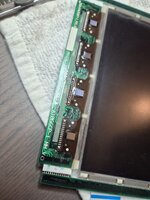
- Recapped caps in LCD panel, replaced with tantalums
- Recapped all SMD capacitors, replaced with tantalums and polymers
- Opened up the Conner drive and unstuck the head.
Generally there were very little capacitor leakage across the machine. I've rechecked my re-cap work multiple times.
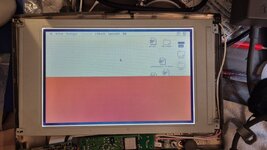
System now chimes and boots up into MacOS as normal. Keyboard + mouse works fine. Brightness + contrast control works.
But, only half the screen is showing. The rest has a solid red color. I suspect a signal issue to row drivers 3 and 4. The only other topic I've found that closely resembles is this one: https://68kmla.org/bb/index.php?threads/powerbook-100-half-screen-dead.46200/
If I unplug the brightness+contrast control cable, then the screen is dark across the whole panel, no more red color.
What more should I check. I've done continuitity check on the flex cable + wiring harness, those were fine.
Could it be related to the remaining through-hole capacitors (which normally holds up a bit better than the SMD ones) and/or inductors?
- Recapped caps in LCD panel, replaced with tantalums
- Recapped all SMD capacitors, replaced with tantalums and polymers
- Opened up the Conner drive and unstuck the head.
Generally there were very little capacitor leakage across the machine. I've rechecked my re-cap work multiple times.
System now chimes and boots up into MacOS as normal. Keyboard + mouse works fine. Brightness + contrast control works.
But, only half the screen is showing. The rest has a solid red color. I suspect a signal issue to row drivers 3 and 4. The only other topic I've found that closely resembles is this one: https://68kmla.org/bb/index.php?threads/powerbook-100-half-screen-dead.46200/
If I unplug the brightness+contrast control cable, then the screen is dark across the whole panel, no more red color.
What more should I check. I've done continuitity check on the flex cable + wiring harness, those were fine.
Could it be related to the remaining through-hole capacitors (which normally holds up a bit better than the SMD ones) and/or inductors?