• Hello MLAers! We've re-enabled auto-approval for accounts. If you are still waiting on account approval, please check this thread for more information.

Not a "Classic" Checkerboard Issue

So I was recently given a Macintosh Classic (not a Classic II), and as one might expect, it will only give a checkerboard screen when powered.  All and all, it's a pretty common issue.  However, what's strange, is that the image isn't stable.  Upon powering, the screen flickers, and the checkerboard is contracted horizontally with a thin squiggle that runs al the way down the screen.  The image does eventually stabilize but remains contracted, also there is a strange pulsing that bulges the checker-pattern out at the sides, and slowly runs down the screen.  If the checkerboard was stable, I'd assume that this was a simple motherboard issue, but the distortion, pulsing and flickering would seem to indicate something else.  

I've tried cleaning the motherboard with rubbing alcohol and a cotton swab, but it didn't help.  The board looks pretty clean, but there is one chip with corroded pins (labeled O, or Q-1) near the power.  From the looks of it, the chip seems to have been corroded by leakage from one of the four nearby capacitors (likely C-8).

I'm considering running it through a dishwasher, but I'm not convinced that that will solve any of my problems.

I already know that I have to recap the board (there's no getting around it), but I'm wondering if anyone has any recommendations as to what replacement parts to use.  I really don't want to use electrolytic capacitors again, since that's what failed in the first place, but I can't tell if the solid-state tantalum alternatives I've seen online will fit.  

So does anyone have any recommendations?  Will the dishwasher help?  What would be the best capacitors to use so I don't have to do this again?  And what's causing my screen to pulse and flicker?

 
Last edited by a moderator:
I'm considering running it through a dishwasher, but I'm not convinced that that will solve any of my problems.
Under any circumstances, DO NOT PUT THE BOARD THROUGH A CONSUMER GRADE DISH WASHER. You will provoke damage. DO NOT!

Ok, I will stop screaming now and go back and read this. Trust me, what I read what you are considering, I stopped reading and immediately came to give this first piece of advice.

There are two issues and I will come back with my advice.

 
it will only give a checkerboard screen when powered.
First of all, there is no rush so I want you to take things slowly. I am glad you took a good first step — a visual inspection of the issue. If at all possible please take a short video of the issue, just upload to youtube and paste the link here, it could be pretty useful for any of us who volunteer to help you. For now, please post a few pics.

Just very briefly though and I apologise up front that I haven't yet bought your message in full. There may be an issue with a component on the analog board (not the CRT) hence the wobble and distorted raster. Then the checkerboard, this is likely caused by a series of small chips that are responsible for video but it is not restricted to this. I will provide more detail in a further response. 

From what you described though, a checkerboard pattern, I had a similar issue and resolved it so I should be able to provide some guidance here.

(Please keep the consumer grade dishwasher completely out of the picture) :)  I understand the urge but tap water is corrosive in the long term and leaves residue, it really doesn't help any. ok I will now full read your 
 
I've tried cleaning the motherboard with rubbing alcohol and a cotton swab, but it didn't help.  The board looks pretty clean, but there is one chip with corroded pins (labeled O, or Q-1) near the power.  From the looks of it, the chip seems to have been corroded by leakage from one of the four nearby capacitors (likely C-8).
So, I might be answering in stages.

Great job in identifying what you see. Yes it is likely that the corrosion (typically the high gloss or shine of the solder now looks faded and rough, dull looking) may be a result of the original capacitors.

Let's look at this one issue, the caps.

So, there are a number of videos on youtube that declare the repair person take a pair of pliers and twist off the caps. NO! Do not ever do this because the twist action can pull off, loosen or tear the pads that are there to create a continuous flow for electricity between the capacitor and the traces on the board that lead to and from the capacitor.

The best way to remove these capacitors is too add a liberal amount of flux to the positive and negative leads of the capacitor and add enough heat to the positive and negative side of the cap legs to eventually melt the solder and then the cap can begin to come loose. I have a simply TS1000 soldering iron which reaches 400°C and it came with a rather pointy tip so I have to angle the tip and I simply go back and forth, back and forth, from the positive to the negative and after 30 seconds or perhaps a bit more enough heat begins to engulf the region, this is when I get pliers and hold the cap, I continue to apply heat while the pliers are there, left and right. I then gently pull up on the cap with the pliers and usually one side will begin to come loose. Only apply a small amount of pull, don't yank. It will come loose. I don't have the perfect tool for this but the heat eventually saturates the area and I get the cap off. If necessary, add more flux, it truly helps with focusing the heat, add some solder as well as it can help hold heat, keeping temperatures up. I know this is way more work then just twisting off caps but trust me, you don't want to be facing the hard work on getting a new pad in place to replace the ones the came off along with the twist action.

So the first thing I do is remove all the old caps, all of them. These are old machines and the caps are no longer in good shape. When the caps are off I begin the process of cleaning up all that old flux, use a solder braid and the iron to pull up some of the initial mess. Then douse a q-tip in isopropyl alcohol and clean up the rest. Be gentle because the strands on cotton based q-tips can at times pull on anything loose so be gentle, especially over the pads especially if caps leaked because the corrosiveness of the leakage that has sat on the board may have weekend the bond holding down the pads. Repeat the cleaning with isopropyl alcohol until all the flux and other remaining particles are removed.

It goes without saying that you should be ground and so should the board. So by a matte to place the board, ground the matte and get a wrist strap and connect it to the pad. The matte is grounded to a grounded power strip. Please don't skip this grounding part because there are sensitive parts on the logic board that can get damaged from static that may be unnoticeable at first but even when the machine is fixed and running you might see unexpected crashes, system errors or even an outright failure to a chip. Ground you, the board and the work area.

 
So for now, remove the caps as noted being careful and staying grounded.

After this you should make a further visual inspection. I tend to use a magnifying glass (my old eyes you see) and I just follow traces, examine the little legs on chips and that good stuff and take note of any things like corrosion, something you pointed out earlier. Using a multimeter check for continuity from the pads (negative and positive) to their eventual destinations to ensure that the connections that are there show good continuity.

On corrosion.

I tend to do the following. I add a little flux to the area that is corroded and then using flux and the iron I heat it up to let's say evaporate it or reflow the solder. So if there were corrosion on a chips leg that makes contact with the logic board I add flux to that area and touch the hot iron tip to the chip's foot at the end of its leg as it were. The flux is excellent at breaking up or disintegrating the corrosion. The with a cotton q-tip I will clean off the flux and other debris. I then visual inspect and if necessary repeat the process. Sometimes you can consider using a solder braid to pull some of the old solder off as well. After several of these interventions on that area and things look clean you can reflow a little bit of fresh solder. The result should be a nice shiny looking connection of reflow solder.

By the way, PACE has some extraordinary videos on repair and soldering, they are exceptionally well put together. Just in case here is a link.


For the wobbly/unstable video image, I recommend you visit http://www.maccaps.com/MacCaps/Repair_books.html and download "The Dead Mac Scrolls" which should reference that specific issue and what the cause might be but this is likely due to some issue with the analog board. The books hosted on MacCaps can also be found on archive.org but in higher quality. All the books on MacCaps should stay on your hard drive, the ones from archive.org are OCR'd which will allow the OS, like MacOS spotlight or your PDF reader to search the contents to locate material you need for the repair. I can't tell you how excellent Larry Pina's books are, they are one of the best and he has a few.

On the tantalum question you had. You might want to consider organic polymer or MLCC (not sure if the shortage continues though, https://ec.kemet.com/mlcc_alternatives). I only had a tantalum fail once on me, on a Quadra 950 and when I introduced this it turned out I was not the only one. I am not a capacitor expert so perhaps someone else can chime in on an alternative to tantalums.

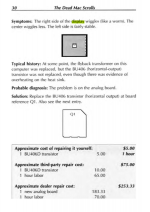
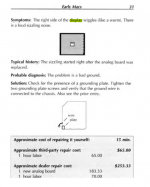
With respect to the display issues. On pages 30 and up of the "Dead Mac Scrolls" there is mention of the contraction and wiggling but contracting can be vertical or horizontal, I am not sure which is affected but here are some excerpts pages.

I recommend you download the book and explore some of the issue/repair pages to better decide what the case might be for your machine. Start with the logic board and get that going then move on to the analog board, this is how I would proceed but of course you might decide otherwise.

I hope these notes help you and that others react to your query and provide some more in the way of help. I wish you luck but I will be interested in how it goes. If you have further questions I will do my best to help you out.
 

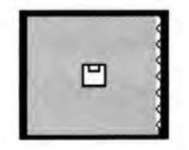
Right squiggle.png

Exceprt one (analog board repair).png

Exceprt two (analog board repair).png

 
Last edited by a moderator:
So, there are a number of videos on youtube that declare the repair person take a pair of pliers and twist off the caps. NO! Do not ever do this because the twist action can pull off, loosen or tear the pads that are there to create a continuous flow for electricity between the capacitor and the traces on the board that lead to and from the capacitor.

The best way to remove these capacitors is too add a liberal amount of flux to the positive and negative leads of the capacitor and add enough heat to the positive and negative side of the cap legs to eventually melt the solder and then the cap can begin to come loose. I have a simply TS1000 soldering iron which reaches 400°C and it came with a rather pointy tip so I have to angle the tip and I simply go back and forth, back and forth, from the positive to the negative and after 30 seconds or perhaps a bit more enough heat begins to engulf the region, this is when I get pliers and hold the cap, I continue to apply heat while the pliers are there, left and right. I then gently pull up on the cap with the pliers and usually one side will begin to come loose. Only apply a small amount of pull, don't yank. It will come loose. I don't have the perfect tool for this but the heat eventually saturates the area and I get the cap off. If necessary, add more flux, it truly helps with focusing the heat, add some solder as well as it can help hold heat, keeping temperatures up. I know this is way more work then just twisting off caps but trust me, you don't want to be facing the hard work on getting a new pad in place to replace the ones the came off along with the twist action.
I used to subscribe to this same cap removal philosophy and still would lift the occasional pad.  I even bought soldering tweezers to let me apply heat to both sides of the cap I was removing at the same time.

I have been using the twist method for the last 5 or so boards I have done and not only has it saved time, I haven't lifted a single pad.  

I would suggest:

1) If the caps are in good shape and haven't leaked, I think Alex's method is the best (or two soldering irons / tweezers even better).  This is because the cap leads likely aren't corroded and brittle and the solder is probably somewhat clean.

2) If the caps have leaked (virtually all boards I am dealing with), I use needlenose plyers and while pushing down on the cap, gently move it back and forth to break the leads.  I think this method is better when the cap has leaked as the leads are brittle and break easily.  You are not putting any upwards pressure on the pads which is where they are most vulnerable.  As a bonus, I can decap a board in probably 1/10th the time it would take me using soldering tools and I don't need to worry about bodge wires after.

 
Last edited by a moderator:
I now have soldering tweezers and prefer to use them as removal with them is as quick or quicker than the twist method, but for what it's worth, my experimentation suggests that if you must use the twist method (proceed at your own risk), the best way is to twist gently and with small movements in one circular direction, and concentrate on moving the silver can, not the black plastic pad. If there is no corrosion the black plastic pad will come away freely when the legs break. A portion of the legs will probably remain on the pad and can be cleaned away during the usual cleanup phase.

If there is corrosion, or the pads were originally glued to the board (see some earlier threads on mystery glue spots under the caps), the silver can will break free but the base will remain, and you can then remove it with the gentle application of heat from an iron. It's easier to get the plastic base off with a single iron when you can apply heat more directly to every part of the connection.

I didn't lift any pads when I practiced doing it this way on a couple of boards I didn't care about. But again, proceed at your own risk.

As far as washing boards goes, many people here have reported dishwashing their boards with absolutely no ill effect. But again, proceed at your own risk. An alcohol bath with an electrostatic-safe brush is safer, although it may not clean quite as thoroughly in every crevice.

 
Under any circumstances, DO NOT PUT THE BOARD THROUGH A CONSUMER GRADE DISH WASHER. You will provoke damage. DO NOT!

Ok, I will stop screaming now and go back and read this. Trust me, what I read what you are considering, I stopped reading and immediately came to give this first piece of advice.

There are two issues and I will come back with my advice.


wtf? Done it tons of times and never had issues? 

 
Last edited by a moderator:
If you decide that you need to replace the BU406 transistor, I have a few of them left over from repairing an SE/30 with that 'right side of the screen wiggles' issue.

 
The checkerboard is from caps on the logic board, but the unstable image is almost certainly the analog board. It will also need a full recap. I've come across all sorts of unstable screen issues from bad caps in the Classic analog boards. For whatever reason they are often in much worse shape than the SE(/30) and earlier models.

 
wtf? Done it tons of times and never had issues? 


In general, there are three general grades of water: tap water, distilled water and deionized (DI) water. In terms of precision cleaning, neither tap water nor distilled water are sufficiently pure to handle the job as both are contaminated, to greater or lesser degrees, with minerals and organics. So you must jump to DI-water.

http://www.circuitnet.com/experts/59891.html


It is common to clean high reliability electronics after assembly; however, some parts may be sensitive to one cleaning agent or the other (solvent, aqueous based, etc), so care should be taken to assess compatibility. Unfortunately, tap water does carry contaminants and more.

I consider the following points below in my process.

  • If the board has to be cleaned after rework/soldering then I would recommend ethanol or isopropanol cleaning + DI water rinsing. This should be good enough. All-in-one cleaning spray available by Farnell and alike may also work fine.
  • Most of us don't owner have access to an industrial dishwasher with proper cleaning agent so I tend to stay away from the dishwasher, it won’t provide any advantage if you consider the first bullet point.
  • Tap water is not indicated, if I must use water I use DI water for any required rinsing. (no need to say that a thorough drying stage is required to ensure no humidity is kept on the board when you power it up)
  • To remove only dust, blown air is usually good enough, but pay attention to related ESD events as blown air is known to generate charges at the surface of boards so it may be interesting to use an ionizing system to neutralize the air blown on the boards but I haven't employed this myself.
 
the unstable image is almost certainly the analog board.
I agree a 100%, if your Analog Board is not outputting the correct voltages, you will get unstable video AND probably checkerboard issues, even with a good logic board.


wtf? Done it tons of times and never had issues? 
I wanted to reference another good source on the matter:

http://cds.cern.ch/journal/CERNBulletin/2014/49/News Articles/1971984?ln=en

Tap water can be used to wash the circuits but not to rinse them. “Indeed, ionised water can generate major problems for the electronics decreasing the reliability of the integrated circuits. It leaves residue on the surface of the boards, which may be detrimental to the reliability of the assembly. The main associated risk is electromigration – the transport of material caused by the gradual movement of the ions in a conductor,” explains Kaufmann. “Therefore, we use de-ionised water in the rinsing process.”

 
I am just going to do what I do. been doing it for years and no problems yet. 

deionized/distilled water is better if your ultrasonic cleaning so no streaking. 

 
I am just going to do what I do. been doing it for years and no problems yet. 

deionized/distilled water is better if your ultrasonic cleaning so no streaking. 
Understood. I think it is just fair to point out that what may work for you may not for others because tap water varies from region to region but I am certainly not going to challenge your process, if it works why change it but I hope the extra knowledge is useful to others. Glad to hear it works for you, that's what's important.

Thanks for your input, it's always appreciated!

 
Last edited by a moderator:
Back
Top