• Hello MLAers! We've re-enabled auto-approval for accounts. If you are still waiting on account approval, please check this thread for more information.

Non-Mac 68k computer

quinterro

68020
I bought a TI-86 graphing calculator a few weeks ago off of eBay. The screen had some occasional glitches so I searched for a replacement screen. While I didn't find a screen I found a TI-92 graphing calculator for a little over $20.

The TI-92 has a 68000 processor running at 10 Mhz and 256 KB memory. As you can tell from the picture it's big - it's about the size of an 8" tablet.
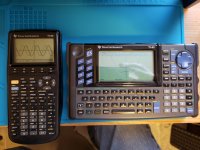
20201206_105555.jpg

Due to the keyboard the TI-92 is classified as a computer and can't be used on ACT or College Board standardized tests. Going through the manual to familiarize myself with both calculators I've dealt with more equations than I have in many years.  :)  

The TI-92 is much easier to use when working with equations and graphing. I haven't yet tried programming on either of the calculators.

 
I remember those calculators quite fondly!  My first software "success" (i.e. other people used it and liked it) was an "IDE" (glorified text editor) for Windows for writing BASIC for the TI-83 :-) .

 
Last edited by a moderator:
I still use my 86 for things. As an aside I have another 68k machine: my Street Fighter II arcade machine. 68k based.

 
you have no choice now @quinterro, you have to make this vHack a reality ;)


If it were eithera TI-92 II or a TI-92 Plus it might be possible. The TI-92 doesn't have enough storage space to handle emulating a Mac.

Doing some research i found there is a Mac emulator for the TI-Nspire.

 
Last edited by a moderator:
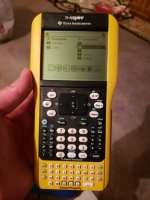
Found and ordered an inexpensive TI-Nspire Touchpad. With this one I can run vMac on it (32MB storage vs. 256KB on the TI-92).

 
I have a Ti-89!  And - surprise - I used it for calculus 1/2/3 (those three classes were among the hardest I'd ever taken!)

Programming it is a big chore, too.

The fact that it has a 68000 is pretty neat, though.  I had forgotten about that!

c

 
I have a Ti-89!  And - surprise - I used it for calculus 1/2/3 (those three classes were among the hardest I'd ever taken!)

Programming it is a big chore, too.

The fact that it has a 68000 is pretty neat, though.  I had forgotten about that!

c


I thought the keyboard on the TI-92 would help with programming on it.

My TI-GraphLink cable arrived yesterday and I transferred a few TI-Basic programs to the TI-92 and opened one if them for editing.  Programming on it would be tolerable but I'm spoiled by using 2 or 3 monitors on my PC.  :)  

Page Up and Page Down functionality would make it easier to work on larger programs.

 
The TI-Nspire arrived today. I bought it "parts or not working" and so far has lived up to that label. It appeared to have minor battery corrosion in the past based on residue remaining on the calculator.

I took it apart, removed the battery terminals and let them soak in vinegar. I also cleaned the motherboard where the terminals made contact with vinegar.

I haven't yet reassembled the calculator but hope it works - I found the TI-84 keypad for it in a separate auction. 

 
The Nspire didn't work after reassembly. I found another one on Ebay and it arrived today. It's a School Edition TouchPad model.

Turning the second Nspire on I found It was in Press-to-Test mode. A little research later and I found how to remove it using a computer.

 
Back
Top