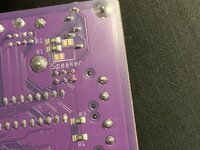
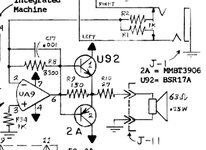
I just received a serviced reloaded board. At first it didn't boot — I got the stock VRAM Simasima — but I found some of the chips weren't properly seated and tried stock ROM shifted in the socket slightly for better contact.
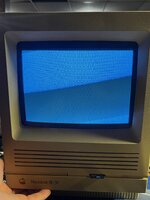
It boots! But no sound.
I am going to work with what I know / am capable of doing, as methodical as I can be: Plug in headphone to see if I get sound at all. Continue to play with the chip seating. So far, it's only sound. SCSI works, ROM/RAM swapped a few times, but none of the latter matters here I don't think because if it was the issue I wouldn't get to the desktop.
I don't think it's a major issue with chips as the components were working prior to the transfer, but since I didn't do the transfer myself and don't have ton of diagnostic tools it's difficult for me to say.
Any other advice — for what to try, or what diagnostic tools might be useful in this situation outside of a multimeter would be helpful. Hopefully it doesn't mean I need an oscillator or something else really expensive. I'll also check out CayMac's videos
OR maybe: What, besides a SE/30 extension cable would be beneficial in running the board outside of the chassis? I think part my issue here is that I'm running a video card from the PDS slot; I'll switch to a Mac without that so make that easier.
I'm thinking jumper wires from the speaker -> board might be all I need once I can get the board out of the chassis?
It boots! But no sound.
I am going to work with what I know / am capable of doing, as methodical as I can be: Plug in headphone to see if I get sound at all. Continue to play with the chip seating. So far, it's only sound. SCSI works, ROM/RAM swapped a few times, but none of the latter matters here I don't think because if it was the issue I wouldn't get to the desktop.
I don't think it's a major issue with chips as the components were working prior to the transfer, but since I didn't do the transfer myself and don't have ton of diagnostic tools it's difficult for me to say.
Any other advice — for what to try, or what diagnostic tools might be useful in this situation outside of a multimeter would be helpful. Hopefully it doesn't mean I need an oscillator or something else really expensive. I'll also check out CayMac's videos
OR maybe: What, besides a SE/30 extension cable would be beneficial in running the board outside of the chassis? I think part my issue here is that I'm running a video card from the PDS slot; I'll switch to a Mac without that so make that easier.
I'm thinking jumper wires from the speaker -> board might be all I need once I can get the board out of the chassis?
Attachments
Last edited: