• Hello MLAers! We've re-enabled auto-approval for accounts. If you are still waiting on account approval, please check this thread for more information.

Newly Acquired Apple II Plus

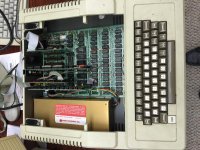
Just acquired this Apple II Plus and have no idea where to start diagnosing it.  When plugged in and turned on I hear a repeating squeeky/whiney noise from the power supply.. Where can I find info on re-capping the power supply and anything else I  might need??

IMG_0814.JPG

 
I agree.

When you get that PSU working, remove all of the cards from the motherboard and plug into a composite monitor to turn it on. If the motherboard is OK, it should go straight to BASIC.

Then test the cards one at a time with the Disk Drive Card first (the one in Slot #6).

 
Last edited by a moderator:
I agree.

When you get that PSU working, remove all of the cards from the motherboard and plug into a composite monitor to turn it on. If the motherboard is OK, it should go straight to BASIC.

Then test the cards one at a time with the Disk Drive Card first (the one in Slot #6).

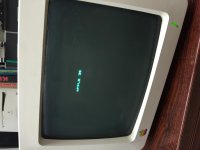
Ok so I popped open the PSU and it looks great, so I plugged it back in, and it seems as if one of the cards was shorting it out... I got it to boot with this monochrome monitor... is this monitor compatible with the II plus??  I cant seem to get the screen stable.  Also there is no prompt or anything, it just says Apple II...?

IMG_0815.JPG

 
Last edited by a moderator:
Try hitting Reset - or Control-Reset (depends on the version of machine/keyboard and an associated hardware switch) and see if you drop to a prompt. That may be Apple-Reset; I don't have a machine handy and I can't remember which it is :)

That monitor should work OK - don't know if the size adjustments are off on the monitor, or the video out of the Apple ][ is out of whack.

 
The monitor should be fine, like ScutBoy says. Just go to the back control knobs and adjust it so the "Apple ][" it on the top of the screen.

Was the disk drive card out when you turned it on? It is was on, it would search for a bootable disk that is not there and you have to hit Control-Reset to go to BASIC.

Depending on the age of the monitor it might need to be recapped. It is similar to the classic B/W 9in Macs in design. I can almost bet it's a cracked solder joint on the board.

Which card was shorting out?

 
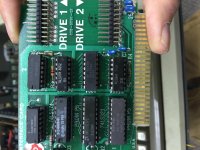
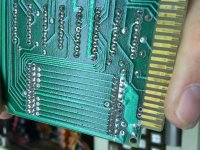
the disk card has bubbling on the PCB near the DISK 2 Connection.  When the disk 2 is connected the computer will not start.   When I have just disk 1 connected the computer starts up and says apple ][ but doesnt have a cursor blinking.  I think the DISK card is completely done. So I dont think I can test any further at the moment, but at least the PSU and motherboard are working.. :D   I have no experience setting up/installing anything on an Apple ][ so this is a new journey for me... :D

 
Can you put a pic up of the card? Sounds like something in the Drive is shorting out the card.

This is a not too common problem but it does happen. As long as the proms on the Disk Card are OK, swap out the 74XXX series and a couple other chips should fix it.

 
IMG_0831.JPG

IMG_0832.JPG

When I have two disk drives attached to the card, the computer will not turn on... When I have just disk 1 installed it will turn on.. something is wrong with the disk 2 connection on the card.

Also one of the chips on the actual disk drive was blown up.    I will try to use all the chips for one drive and see if I can get it to boot.  When it tries to read right now the "IN USE" light continually is lit and the disks spins continually but never reads anything or stops trying to read and spin.

 
Blown chips are a common sign that usually the drive was connected "backwards", which happens relatively frequently with the 20 pin header. I've blown mine once and I almost thought I had killed the whole machine, but actually these chips are very common and you can replace them all for less than 10$!

You should actually replace them all for safety - even if they don't show signs of damage, they're likely toasted as well.

 
Last edited by a moderator:
I only have disks from my apple iigs but I am not sure if they read on the apple ii plus?? maybe i just dont have any compatible software.  plus I dont have any basic commands or know what to do at command prompt haha

 
No, they arnt compatible. 

The PCB looks perfectly fine on that card. the "bubbling" you are referring to, was quite common practice back in these days. the boards were solder tinned before the mask went on. Why? I dunno. 

Hitting the correct key-combo will drop you to the BASIC ] prompt

 
Last edited by a moderator:
If I attach any drive to the second drive port on the card the computer doesnt recognize that there is a drive connected, so I do think I have a problem with the card..... but I dont have any Apple II master disks or dos disks to try.  I guess I could make one with one of the other macs?? Like I said, im still learning how to use this apple 2...

 
Out of the thousand of Disk ][ cards I have seen, that bubbling on the second drive connector is always there, even on a brand new card. Perhaps it's a manufacturing issue or something but it is always there.

What worries me is the chips on the card, their date codes are too broad (from '79 to '81, with a majority on '80). This to me says that the card was repaired at least once before. Even the date codes on the PROMs do not match when they usually do, so one of them had to have been replaced before.

What chip was blown on the disk drive board? This usually happens when the disk header is plugged in backwards or off by a pin or two. But it also blows out a couple chips on the board. I need to find my notes I compiled with Dr Levinson about disk drive and card repair. The problem is usually the 74XXX series on the card. But the thing is, do you have a Killer Card?

A killer card is when one of the 74XXX is shorted and plugging a drive to it kills the drive by blowing a chip or two on the board (usually the stepper motor controller chip - I forget its component number).

But if another 74XXX chip blows, you get a Disk (Not Drive) Killer Card. Plugging the drive to the board, it looks like its booting but it never does. The head goes into a Magnetic High - Write Mode (regardless what Write Protect Switch says) and erases first track the disk you put in. If you put in the disk before turning it on, as the head goes bak and forth to seek track 0, it erases those tracks. It is like rubbing a magnet on your disk. After replacing the chips at fault, you also need to use a head demagnetizer to the drive's head as well.

Thing is, I do not remember which 74XXX does what damage when blown. Best to replace them all since there are 4 of them. also replace the 556 Timer chip on the card too.


 
Lets do this one at a time. Work with 1 drive at a time with the first drive output and see if it boots.

Like TechKnight says - Control Reset should get you to a BASIC Prompt.

Put in a DOS Disk (make sure its a back up and not your original!) in to the drive and type

PR#6 [RETURN]

That will reactivate the card like a cold reboot, and see if the disk boots.

Turn off and swap the drive and repeat.

Note: I just noticed that one of the chips has a date from from 1993! So this had to have been fixed more than one time. Probably from a previous owner plugging in the drive the wrong way more than once!

 
Last edited by a moderator:
Wowzers, I have a lot of work to do!

I picked up a Woz Rom 1 IIgs with a TON of games in the boxes and other software today.  It has an upgraded Power Supply with an Applied Engineering "Vulcan" card in it.  I havent been sucessful getting it to read any discs through either the 3.25/5.5 inch drives.  If I have time later today (Saturday) ill see if I can get it working.  I have some more questions about that as well....

 
I'll be here....

Like I said, it is best to remove all the cards and see what the beast does in its stock version. Then test each add-on one at a time.

 
My goodness... I dont have enough time in the day.... The Apple ][ has been put on the backburner for the time being.  I picked up that Woz IIgs and I had no idea that the AE Vulcan card in it and the upgraded power supply contained a 20mb IDE HDD.  I had to remove the HDD and lightly tap it to free up the heads but it now tries to boot into GS/OS when turned on.  It fully completes the boot screen but at the very end it says error $00067 which I read is an I/O Error or System File Error, so I need to reinstall GS/OS but the 3.25" Floppies I have with GS/OS 6.0.1 are not working properly and I forgot how I made them...   I am pretty sure I used my PM7200 with Bernie ][ the Rescue to create the discs.  I think some of the resource forks are damaged....  Anyhow also got a bunch of infocom/sierra/etc video games w/ boxes and goodies.... when I get the time I'll share the finds.

 
Back
Top