Good morning everybody,
Short intro , previous Powerbook G4 collector since 2016 and Atari ST fanatic.
Living in Belgium.
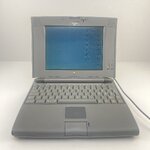
After having found a Powerbook 145B last year and in the spirit of MARCHintosh I stumbled on a very good looking 520C on eBAY
and decided to take the plunge.
I wanted a bit more processor oomph , more RAM expandability and a 256 color screen.
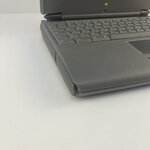
The machine is in exceptional state for its age, plastics and the hinge are perfect.
Just a broken corner but not so bad.
Screen is also in a very good state so very happy with it .
Opened it to install my BlueSCSI (from the PB145B) with System 7.1 and it has an 4 MB RAM expansion so currently a total of 8MB RAM.
I found an 8MB RAM expansion card on eBAY that should arrive this week.
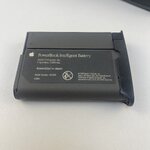
Reviving the battery with the Apple Intelligent software , EMMPathy and Lind BU 500 has so far been non succesfull.
Put the battery in the freezer last night , let's see if that awakens it.
From what I can tell visually on the outside of the battery and the insides of the 520C there is no leakage.
Altough the machine came from France , there were a lot of personal documents of a French company on the internal harddisk the actual keyboard
is QWERTZU (German).
Anybody willing to part/sell me a QWERTY keyboard and ship it to Europe (Belgium) ?
Apart from the RAM upgrade and BlueSCSI any other expansions that are available and make the machine even more capable of
exploring the 2026 world ? Not looking into upgrading it to a PowerPC.
custom-build battery ?
hooking it up to wired Ethernet via the AAUI although is 10Mbit worth it vs the DaynaPort BlueSCSI Wifi ?
PCMCIA is probably rare to find ?
getting it hooked up to a CENTRONICS EPSON dot-matrix printer ?
Short intro , previous Powerbook G4 collector since 2016 and Atari ST fanatic.
Living in Belgium.
After having found a Powerbook 145B last year and in the spirit of MARCHintosh I stumbled on a very good looking 520C on eBAY
and decided to take the plunge.
I wanted a bit more processor oomph , more RAM expandability and a 256 color screen.
The machine is in exceptional state for its age, plastics and the hinge are perfect.
Just a broken corner but not so bad.
Screen is also in a very good state so very happy with it .
Opened it to install my BlueSCSI (from the PB145B) with System 7.1 and it has an 4 MB RAM expansion so currently a total of 8MB RAM.
I found an 8MB RAM expansion card on eBAY that should arrive this week.
Reviving the battery with the Apple Intelligent software , EMMPathy and Lind BU 500 has so far been non succesfull.
Put the battery in the freezer last night , let's see if that awakens it.
From what I can tell visually on the outside of the battery and the insides of the 520C there is no leakage.
Altough the machine came from France , there were a lot of personal documents of a French company on the internal harddisk the actual keyboard
is QWERTZU (German).
Anybody willing to part/sell me a QWERTY keyboard and ship it to Europe (Belgium) ?
Apart from the RAM upgrade and BlueSCSI any other expansions that are available and make the machine even more capable of
exploring the 2026 world ? Not looking into upgrading it to a PowerPC.
custom-build battery ?
hooking it up to wired Ethernet via the AAUI although is 10Mbit worth it vs the DaynaPort BlueSCSI Wifi ?
PCMCIA is probably rare to find ?
getting it hooked up to a CENTRONICS EPSON dot-matrix printer ?