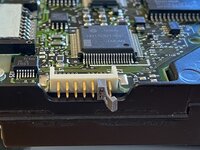
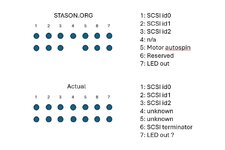
Hey posting to mention that this thread helped me sort out setting the correct SCSI ID for this drive. The pin out is indeed wrong from the one website I could find one for this drive. I still can't get the LED activity thing to work. I think the board on this drive literally doesn't have the components connected for it because there's a few unpopulated things near the pins the LED should connect to. No activity from the LED from the supposed pin 7 location so I guess my drive just doesn't have that available.
However I was able to sort out the SCSI ID issue I was having. This was originally an internal drive to my Macintosh LCIII. I had upgraded the drive to a 500MB drive some time ago and moved this one to an external enclosure. I had not bothered to try getting the drive running since then since I didn't need it for anything yet. Well I finally got a switch for my bedroom so now the Ethernet is finally connected and I can finally connect the LCIII to the internet. (had to uninstall OpenTransport, MacTCP kept making itself invisible and settings were sticking as a result)
The ID pins you pointed out are indeed the correct ones. It's also possible to set IDs beyond ID 2 just as the original pin out suggested. (it just seems everything is flipped relative to where they should be as you pointed out). Unlike your situation however mine was self terminated even without the pin 6 jumper in position (I put it back anyways after I figured out the SCSI ID pin orientation so now use the enclosure's SCSI ID block to select my intended ID so I can now keep the original jumper where I found it). So yeah this drive will have to be the last in any SCSI chain I put it in. But that's fine. My setup already has it setup for to be that anyways.
My enclosure has a single ground pin and 3 selector pins wired out from what I can tell which works fine for this drive since all the SCSI ID pins share a common ground. This photo shows it setup. I forgot to take a photo while I had the enclosure open.

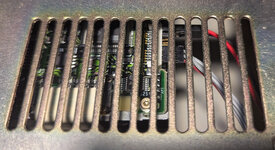
You can see the pin 6 jumper and my activity LED connector relative to the SCSI ID selector connection block. Since the SCSI ID pins share a common ground on this drive I could use a ID selector from an enclosure setup to just use one ground and have it select the various combinations of positive pins as shown in the photo. The positive pins appear to be the bottom row. (or the row of pins that is away from the PCB from the orientation of this photo).
The end result is the drive shows up exactly as the ID the enclosure's ID selector thing has selected at the moment:
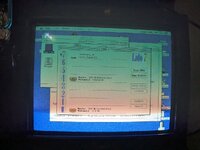
Which in this case is ID 4. I think 5 or 6 is occupied by the ZIP drive I have in this chain (though currently don't have it's AC adapter plugged in) I forget what ID I have the CD drive on but since I can't have them connected at the same time due to lack of cables, so it currently doesn't matter what ID that one is on at the moment. All I know is it doesn't conflict with the ZIP drive which is the only other thing that's always present in this chain so not something I need to worry about right now.
Anyways my drive no longer hangs the bus and causes the question mark floppy icon to show on boot. At first thought was a termination issue but was simply an ID conflict so this was what I needed to do to sort that out. Since jumper 6 position is termination that meant my drive was trying to use ID 0 which my internal drive is already using which was why things were hanging on me. Having none of the SCSI ID pins populated for this drive causes it to use ID 0.


 Hello Guest! We're hosting a challenge to welcome vintage Intel macs to the MLA during the month of July! See this thread for more information.

 . I'll take a look at my Color Classic and check. Any luck with your LC III