• Hello MLAers! We've re-enabled auto-approval for accounts. If you are still waiting on account approval, please check this thread for more information.

Networking issues w/ IIsi/7.5.3

dv-

6502
Trying to get the Ethernet card in this old IIsi working. Got a 7.5.3 install and added Open Transport 1.1.2.

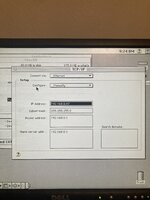
Link lights come on, green light occasionally blinks. Won’t pull an IP from my router and doesn’t work w/ manual configuration either (can’t ping it.)

My home network is all IPv4, fairly old fashioned, running on an Omada router and mesh setup. It works fine with with my OS9-running G4.

Before I dig out wireshark and start looking at dhcp request packets to see who’s doing something nonstandard, is there some piece of software or config to enable networking that I’m missing because I haven’t done this in 20-some years?
 

Attachments

  • IMG_2681.jpeg
    IMG_2681.jpeg
    2.2 MB · Views: 31
  • IMG_2680.jpeg
    IMG_2680.jpeg
    2.7 MB · Views: 27
  • IMG_2679.jpeg
    IMG_2679.jpeg
    3.8 MB · Views: 27
yeah exactly. on old ethernet cards I usually use AUI adapters because of this issue.
 
Well, I borrowed a managed switch, manually set the port to 10Mb - 1/2 duplex. Still no dice.

I found an AUI adapter for a couple bucks. Hopefully that will solve it - I should be able to set the "autodetect" jumper to AUI-only mode on the card, then.
 
Asante's part numbers are sure all over the place.

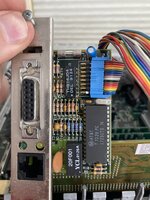
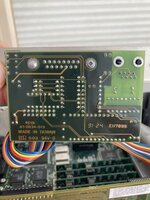
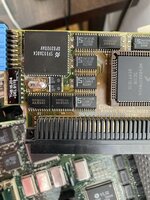
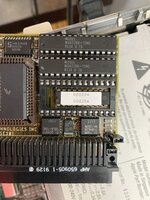
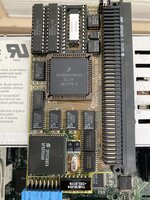
Can we get a picture of this card, the MacNIC II/E? Only two results are returned by google for this card.

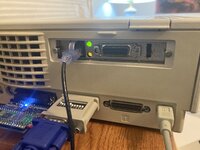
You appear have the collision light on. This means that the card is experiencing an issue itself or something else is transmitting at the same time (relatively) as your NIC. This is usually rare and usually the card has an issue.

If this is like the Asante MacCon 30ie cards for the SE/30 and IIsi, it probably needs a new 20MHz oscillator on the board. The Macintosh II series of cards like the MC3NB will flash an LED because the Auto-MDI-X feature of the router chokes up the card. This can be fixed by swapping a resistor.
 
IIRC, there are a couple of potential snags on the software side, even if the hardware and physical Ethernet link are OK.

1. I don’t believe the settings in the TCP/IP control panel are saved and applied until you close the control panel. I’d recommend manual configuration to avoid any DHCP issues.
2. I don’t think the TCP/IP stack is actually loaded and activated until an application tries to use it, so pings from another machine might fail until something on the Mac actually tries to use the IP stack.
 
Asante's part numbers are sure all over the place.

Can we get a picture of this card, the MacNIC II/E? Only two results are returned by google for this card.

You appear have the collision light on. This means that the card is experiencing an issue itself or something else is transmitting at the same time (relatively) as your NIC. This is usually rare and usually the card has an issue.

If this is like the Asante MacCon 30ie cards for the SE/30 and IIsi, it probably needs a new 20MHz oscillator on the board. The Macintosh II series of cards like the MC3NB will flash an LED because the Auto-MDI-X feature of the router chokes up the card. This can be fixed by swapping a resistor.
photos attached

Yeah, the link light blinks a fair bit. The collision light isn’t on - that’s just sunlight making it look that way.

I had hoped manually setting the switch to 10Mb would prevent the auto detect from being an issue, but I guess Incan swap a resistor. Even after reading the tinkerdifferent threads that discuss this, though I’m unsure of which one to do; they’re talking nubus cards mostly.
 

Attachments

  • IMG_2688.jpeg
    IMG_2688.jpeg
    1.5 MB · Views: 19
  • IMG_2687.jpeg
    IMG_2687.jpeg
    1.4 MB · Views: 18
  • IMG_2686.jpeg
    IMG_2686.jpeg
    2.2 MB · Views: 17
  • IMG_2685.jpeg
    IMG_2685.jpeg
    2 MB · Views: 19
  • IMG_2684.jpeg
    IMG_2684.jpeg
    1.9 MB · Views: 20
ya the Nubus ones are different.

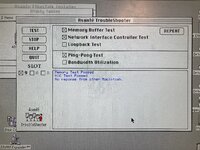
It's basically a MacCon 30ie just a bit different. Try this. Boot up the TroubleShooter with the Asante 5.6.1 driver disk and see what it says. I got 5 bacon cheeseburger frosties that says that 20MHz crystal is on its way out. I love the soldering hack.

MacCon cards for the SE/30 and IIsi don't have the same issue with 10BASE-T and Auto-MDI-X that the Nubus ones do. Bet you it's that crystal.
 
ya the Nubus ones are different.

It's basically a MacCon 30ie just a bit different. Try this. Boot up the TroubleShooter with the Asante 5.6.1 driver disk and see what it says. I got 5 bacon cheeseburger frosties that says that 20MHz crystal is on its way out. I love the soldering hack.

MacCon cards for the SE/30 and IIsi don't have the same issue with 10BASE-T and Auto-MDI-X that the Nubus ones do. Bet you it's that crystal.
No bet; I’ll try it tonight and let you know!
 
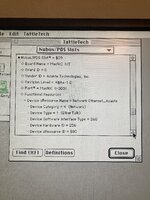
Well the tester ran but it thinks the NIC is ok. ID’d it as device 9 and said it passed the NIC tests.

Is there a particular test(s) I should run to verify that oscillator is working right?
 

Attachments

  • IMG_2695.jpeg
    IMG_2695.jpeg
    5.8 MB · Views: 14
You can't really test an oscillator without a power supply and an oscilloscope, with a good reference of what is in spec and what is not. Oscillators also sometimes require certain capacitors to go along with them, if I'm not seriously mistaken. If the card is having "issues", it's been a safe bet for a few people who've reported that its replacement (including me) solved their issues. See here.

Considering that a new one is 0.38$ US, why bother? Mouser has them in stock, part number 520-ECS200-18-4X-CKM. Make sure you take good notes of where the connections go to.
 
Can you describe how/what you’re testing on the software side to determine if you have connectivity? For example, accessing an AFP server using AppleTalk or TCP/IP, accessing an FTP server, etc?
 
Can you describe how/what you’re testing on the software side to determine if you have connectivity? For example, accessing an AFP server using AppleTalk or TCP/IP, accessing an FTP server, etc?

Fixed!

I had been, for instance, looking at the packet transmit count on the switch port, which went to a few and stopped. I had been waiting either for DHCP to pull an IP, or trying to ping the manually assigned address.

However, you actually gave me the brain-kernel to figure it. Thinking it was a weird TCP/IP thing, I finally decided to try Appletalk instead. And... it worked. I could see my printer. (It's an older Samsung which supports AppleTalk for some reason.)

So I remembered your post with the idea that the TCP/IP stack doesn't get loaded until the computer tries to use it. I thought of it, and tried to use MacSSH 68k to connect to my laptop. It didn't work, but the error was a handshake error which meant they actually did have basic IP connectivity! And a check of the TCP/IP control panel at that point showed that the IIsi had finally pulled an IP address from the DHCP server.

So I think maybe all this was because I was just stupid. Thank you for talking me through things!
 
@dv- Glad you got it working! It’s definitely non-intuitive that the IP stack only loads the first time it’s needed. I think there’s an option buried in the TCP/IP control panel to always enable it, but I can’t recall for sure.
 
Back
Top