Follow along with the video below to see how to install our site as a web app on your home screen.
Note: This feature may not be available in some browsers.
Hello MLAers! We've re-enabled auto-approval for accounts. If you are still waiting on account approval, please check this thread for more information.
I'm working with an old Netatalk version. Netatalk 2.0.2
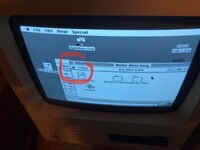
Normal install. Everything looks fine I mount my Home Directory as always, try to write to it but get the message "The disk is locked"
I'm not getting it....how to "unlock" this disk?
atalkd.conf? Why can a atalkd.conf be of any importance? Why could it be locking my disk. I was in disbelieve .... ( yes I admit it...)
So .... I tried. My former setup was with a LocalTalk PC card. The zone is strange but an advice of the kernel module LTPC.
SOLVED! Ok. It is the system change, not the atalkd.conf.
Now running on a Macintosh SE System 7.5.3.
The disk is not locked anymore and I can upload to it! Happy with the result!
Not sure why I get this problem in the combination Debian Sarge (Debian 3.1) and System 6.0.8.
In Debian Woody (3.0) and System 6.0.8 I do not have this locked disk syndrome.
This site uses cookies to help personalise content, tailor your experience and to keep you logged in if you register.
By continuing to use this site, you are consenting to our use of cookies.