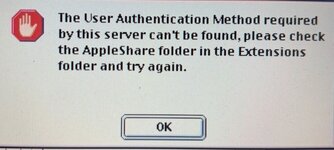
I am still snuggling with replacing my A2SERVER with Netatalk 4 on my RPi 4. I went with Netatalk 4.2.3 because it was easily installable via apt so I didn't have to compile it, remember I am a novice (but getting better) at this. I can setup a share but am failing badly at permissions, authentication etc on classic Mac OS (yes I have RTFM). Can someone share an afp.conf file with me that has the correct permissions for a Mac OS guest and user? I haven't ever starting looking into atalkd.service yet as it clearly isn't running. I will be happy with getting AFP via TCP running on System 7 and Mac OS 8/9 clients first, baby steps.

-
 Hello Guest! We're hosting a challenge to welcome vintage Intel macs to the MLA during the month of July! See this thread for more information.
 -
We've made some quality of life improvements to the Trading Post. More info here.
Netatalk 4.0 - Future-proofing Apple File Sharing
- Thread starter slipperygrey
- Start date