• Hello MLAers! We've re-enabled auto-approval for accounts. If you are still waiting on account approval, please check this thread for more information.

Netatalk 4.0 - Future-proofing Apple File Sharing

So my proposal is: Introduce a "name" option to volume sections where you can define a case sensitive volume name. This changes the default behavior a bit, but I promise to make that clear in the upcoming release notes. :)

Agreed, this is a sensible option. I'm really not a fan of INI section titles being used for anything other than structuring the configuration, so I've never liked the way netatalk 3 did this.
 
PR merged to main! I also updated the afp.conf man page with descriptions and examples of the new behavior.

This won't break anyone's existing configuration. Just that volume names will default to all lowercase, as observed by pl212.

Here's a sample afp.conf that I added to the man page.

INI:
[Global]
appletalk = yes
uam list = uams_dhx.so uams_dhx2.so uams_randnum.so uams_clrtxt.so
legacy icon = daemon

[mac]
name = Mac Volume
path = /srv/mac
legacy volume size = yes

[apple2]
name = Apple II Volume
path = /srv/apple2
prodos = yes
 
The hostname option, which is confusingly described in the docs as advertising the resolved IP address from the specified hostname, seems to be the only way to specify the server's name for AppleTalk (i.e. the name that shows up in the Chooser.) There is already an afp listen option for specifying which IP address and port to use for AFP over TCP. Should there be a separate name parameter in the global section that explicitly specifies the server name for AppleTalk?

(And if section names need to be lowercase now, shouldn't the first section be [global]?)
 
The hostname option, which is confusingly described in the docs as advertising the resolved IP address from the specified hostname, seems to be the only way to specify the server's name for AppleTalk (i.e. the name that shows up in the Chooser.) There is already an afp listen option for specifying which IP address and port to use for AFP over TCP. Should there be a separate name parameter in the global section that explicitly specifies the server name for AppleTalk?
This is an astute observation. Unless I'm overlooking something obvious reading the code, the documentation is plain wrong. The hostname option is used as server name and nothing else. The naming might come from the fact that if you don't explicitly set hostname, the server name is determined by a call to hostname() stripping away anything after the first period.

I suggest we update the docs and leave the logic as-is.

At a related note, there's also the zeroconf name option which does the same but for Zeroconf clients (macOS / OSX).

(And if section names need to be lowercase now, shouldn't the first section be [global]?)
Section names are case-insensitive now, so it doesn't matter at all. You can call it [GLOBAL] or [gLoBaL] if you want. :)
 
Strike that. The hostname option is actually used in dsi_tcp_init() for an addrinfo() call. I can see the argument for introducing a new option that allows you to set the server name independent of the hostname.
 
@thecloud With this PR, I introduce a new Global option "server name" which should have the effect that you desire.


Please test it in your AppleTalk environment. I don't have any vintage Macs handy right now because of my current living arrangements, but it seems to work with DSI (TCP) connections on an emulated Mac OS 9 system, as well as with Zeroconf on macOS Sequoia.

I'm also discarding the "zeroconf name" option here, and folding its functionality into the new "server name" option. It doesn't seem worth the added code complexity to have separate options for the AFP server info name and the Zeroconf service name. You'd usually want to identify the server by the same name everywhere. The code handles the scenario of a UTF-8 server name to Mac charset conversion, with graceful fallback when UTF-8 to Mac charset conversion fails (i.e. if the UFT-8 server name contains Korean glyphs but Mac charset not set to MAC_KOREAN.)

Edit: I'm merging the PR right away because I want to keep iterating on surrounding code. Please either test the feature branch or main branch code!
 
It looks like you got rid of name and replaced it with volume name, which seems like a good choice to eliminate ambiguity. I assume that if I don't specify server name but do specify hostname then previous behavior is unchanged, but if both are specified then server name should override hostname. Will build and test soon.
 
Yes, well spotted. After some testing I found that name was too ambiguous in certain contexts.

Correct, hostname is now treated as a fallback when server name hasn't been defined.

Now a friend has reported to me that there is missing code for registering server name for ASP connections (AppleTalk). I'm working on a fix now.
 
Last edited:
This is cool. Finally had some time to bring Netatalk 4 up in a container on one of my servers. Dead simple and works. I've got my 68K Macs talking to it over ethernet. I'll configure CUPS later on. Really appreciate your work on this @slipperygrey :)
 
I have Netatalk running well, using the docker compose file listed on the GitHub. Works great, no complaints, etc.
Now I am trying to get setup to connect to the GlobalTalk network, using jrouter (https://gitea.drjosh.dev/josh/jrouter). I had some success last night browsing around from my 7300 (if very very slowly).

Is it possible to tell Netatalk to specifically use the zone created by jrouter (or any other appletalk router on the network) instead of creating its own? It seemed like specifying it in atalkd.conf would do the job but I couldn't get it working early this morning. I'm probably missing something simple!
 
yes, you can have another router be the seed router. i remember having issues with that in 2.x though... there was some sorta gotcha
 
I have Netatalk running well, using the docker compose file listed on the GitHub. Works great, no complaints, etc.
Now I am trying to get setup to connect to the GlobalTalk network, using jrouter (https://gitea.drjosh.dev/josh/jrouter). I had some success last night browsing around from my 7300 (if very very slowly).

Is it possible to tell Netatalk to specifically use the zone created by jrouter (or any other appletalk router on the network) instead of creating its own? It seemed like specifying it in atalkd.conf would do the job but I couldn't get it working early this morning. I'm probably missing something simple!
Okay I think I figured out my problem: I was adding my ethernet interface to both the ATALKD_INTERFACE *and* the ATALKD_OPTIONS line. Now that I only have the interface listed in the former, and my phase/net/addr/zone in the latter, my netatalk server seems to be joining the existing zone created by jrouter, and the atalkd.conf inside the container lists the right zone and address. Step one complete.

The next step is to get my server to appear in the Chooser. I can mount the netatalk file share using the IP, but it doesn't show up inside the AppleShare section of the Chooser when my local zone is selected. However, I can use the Chooser to connect to other AppleTalk zones through jrouter and connect to the AppleShare servers contained within, so I'm pretty sure the problem is on my end, within my netatalk configuration. Do I have to make further changes to the afp.conf to get it to announce its presence to the local EtherTalk network?
 
Last edited:
If you have a seed router on the network (in this case, jrouter), just enter a network interface in ATALKD_INTERFACE and leave ATALKD_OPTIONS blank. This will force atalkd to issue a ZIPGetNetInfo packet to request network information and automatically configure the interface for use.

By default, afpd doesn't have AppleTalk support turned on. You need to add appletalk = yes under the global section of netatalk.conf.
 
Is any part of the link going over Wifi?
No, all ethernet.
If you have a seed router on the network (in this case, jrouter), just enter a network interface in ATALKD_INTERFACE and leave ATALKD_OPTIONS blank. This will force atalkd to issue a ZIPGetNetInfo packet to request network information and automatically configure the interface for use.

By default, afpd doesn't have AppleTalk support turned on. You need to add appletalk = yes under the global section of netatalk.conf.
When I initially had just ATALKD_INTERFACE filled out and ATALKD_OPTIONS empty, atalkd chose its own zone and address instead of asking jrouter (hosted on the same machine, both in docker containers) for an address. I could've had things misconfigured though, I'll try again tonight.
I will add the correct line to netatalk.conf tonight and see if that changes things; I noticed appletalk = yes in afp.conf, does it need to be in both places?
 
@thecloud The fix for ASP connections has been merged. The new server name option should be ready to ship. :)
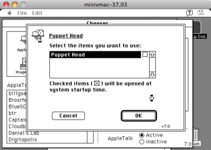
Unfortunately I have been unable to get the main branch (4.2.0dev) to work successfully for me yet. My System 7 clients lock up at the point where the volume mount is attempted (see screenshot). At first I thought it might be something to do with the AppleDouble/ea changes you made on this 4.2.0dev branch, but I went through a process of checking out and building prior builds until I got to 4.1.0, which works again. Something between 4.1.0 and 4.1.2 seems to cause the AppleShare client to hang at this point. I'll keep digging.

My afp.conf includes these lines; are they a problem going forward? My filesystem doesn't currently support EA as mentioned earlier.
Code:
[Global]
appletalk = yes
appledouble = v2
ea = ad
 

Attachments

  • Hang on mounting afp volume.png
    Hang on mounting afp volume.png
    23.6 KB · Views: 8
Sorry, meant afp.conf, not netatalk.conf. Note that atalkd will not "make up" a zone name. If no router is found, it will pick an address in the startup range (network in the 65000 area). Running jrouter on the same machine in another container is likely an issue. The two containers likely can't see each other (a common problem with multiple VMs on the same machine). You can try connecting them directly with a tap interface (this worked for me with TashRouter). Another option if you have a fancy router is to enable "hairpin" routing of packets.
 
I forgot to specify, both containers are using "host" networking. That should let them see each other, I think? I could be wrong though.
 
If I check out the netatalk-4-1-0 tag, do meson compile -C build and meson install -C build, then start up the atalkd and netatalk services, everything works fine and clients can mount the server volumes with no problem. (This is on NetBSD.)

If I check out the netatalk-4-1-1 tag, or anything after that (including main), the same meson build appears to complete OK and the result of afpd -V and netatalk -V is the expected version matching that tag. The services start up fine and the netatalk server can be selected in the Chooser. But clients will hang at the point where an AFP volume is selected and the OK button is pressed.

Looking at the files which changed (git diff --name-only netatalk-4-1-0 netatalk 4-1-1), there were a couple of .c files which looked promising. I rolled each back, one by one, and rebuilt/restarted the services, but the post-4.1.0 servers still always cause my Mini vMac clients to hang.

Could it be the bdb lib path? Not sure. Will try rolling back the meson build file changes next.
 
Back
Top