Follow along with the video below to see how to install our site as a web app on your home screen.
Note: This feature may not be available in some browsers.
Hello MLAers! We've re-enabled auto-approval for accounts. If you are still waiting on account approval, please check this thread for more information.
I need to get in my macintosh plus to fix the floppy drive, can someone send me instructions on how to get it out, ive been haveing a hard time finding them.
Can you also send me instructions on how to diacharge the crt
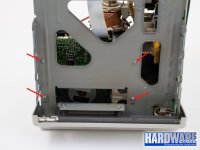
If you just need to fix the floppy drive? Then, no. You just need to remove the logic board (here's a video, it starts where he's removing the logic board) then just unscrew the screws on the bottom of the floppy drive cage (see picture) then you just remove it. I really recommend checking out this page because it tells you how to clean the floppy drive for the Mac Plus. Also, be careful with the screws that hold the cage and the drive together. they can be very hard to unscrew
This site uses cookies to help personalise content, tailor your experience and to keep you logged in if you register.
By continuing to use this site, you are consenting to our use of cookies.