• Hello MLAers! We've re-enabled auto-approval for accounts. If you are still waiting on account approval, please check this thread for more information.

Need help - Mac 512Ke floppy drive

Hello all...  After 28 years, I managed to get my original Mac 512Ke back from a friend (who kep it in my home country after I moved).

For a quick laugh, see here:

https://www.youtube.com/watch?v=BWd_HQbeeoE&feature=youtu.be

Two problems!

1) Anyhow, the problem I had after shooting this video was that first the External floppy drive started making a strange sound... constantly.  I can insert a disk no problem, but it doesn't seem like it is reading it or anything.  I opened it up and the sound seems to be coming from a black part with the word OMRON like the one in the bottom right in this picture:

https://wiki.68kmla.org/File:Floppy1.jpg.  The sound is like a mechanical grind of sorts.   I have to use a paperclip to eject.

2) 2 minutes later, the INTERNAL floppy does a strange sound as well.  Now the issue with the internal is that it feels strange mechanically... when I insert a disk it doesn't feel like it is mechanically engaging correctly.  It feels a little 'loose' in there. The mac doesn't react to disc insertion in any way, and I have to user a peperclip to eject.  I dont think lubrication is the issue here.  Can't boot anymore!

What are the odds!  But oh well, 28 years is a long time.  Aside from the Disk drive issues, everything else operated normally.

Any ideas what these drive issues are about?  I'm wanting to get the internal one fixed with higher priority, because I dont think I can boot from the external floppy drive (if I recall correctly). 

Thanks for any help!

 
Last edited by a moderator:
These drives gum up with age, making it harder to eject. Then what happens is it literally destroys the gears in the eject motor, causing it to lock up or spin forever. 

These days, running unserviced floppy drives is a dangerous endevour. if you dont do maintenance to the drive, you can literally kill it for life! you will likely need replacement eject motors now. Which you might as well find new drives. 

 
Last edited by a moderator:
Thanks techknight.   Im not sure the problem here has anything to do with ejection...?     I can't even get the disks to read, and one of the drives makes an odd grinding sound.  the other makes no sound.  Thanks.

 
I got a long torx screwdriver on eBay to open her up.   Assuming I stay WELL AWAY from the CRT/Flyback, it looks like removing the internal drive is achievable without discharging the CRT.  Risks aside, is this correct?

 
Risk is minimal if you stay away from the CRT HV Cable. Remove the floppy cable first and then you can shimmy logic board off the rails and unclip the board from the analog board connector. Its a tight squeeze, but doable. Then the Logic board falls off.

Under the frame is 4 phillips screws that holds the floppy drive mounting case to the frame. If not, then there 1 screw at the back of the mounting frame under the CRT. Its rare but there could be 5 screws holding the frame in place- the 4 at the bottom and the 1 at the back. Either way when the screws are off, the back of the mounting frame tilts up and then you can pull out to the back the whole thing as one unit. The drive is in the mounting frame by 4 screws, 2 on each side. remove them and the drive should slide out of the front of the drive.

 
Elfen,

Thanks for your detailed explanation.  I opened the Mac today (finally got the extra long 9" torx tool), and followed your instructions - partially.   Everything makes sense, and I only see 4 screws holding the frame in place, so it should be simple to remove once I get the logic board out of the way.  

  At any rate, I got a little cowardly at disconnecting the Analog board connector from the Logic board connector.  I think this is absolutely necessary for the logic board to slide out of the rails...

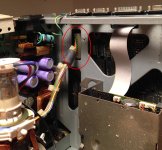
AIs there any risk of high voltage when touching that connector?  I am picturing it in this post just for clarity...   I can stick my hand in there without getting too close to the CRT or the larger capacitors I see on the board.  Just want to be sure...

FullSizeRender6.jpg

 
So I have serviced the drive cleaning out all dry Grease and lubricating all over again. I am still noticing what I think is abnormal behavior.

Please refer to attached video. The drive doesn't seem to inject the floppy be in one go. If I push it really fast it will all go in, but most of the time it just behaves the way I am showing in the video.

 
Its because you need more lubrication. There are grease joints under the sled carriage, and the actual base itself that always gets missed. They need hit. Unless you have a lightweight machine oil that will penetrate the two pieces of metal, you will need to remove the entire carriage assembly and then remove the 4 retaining washers, that will expose the joints. 

 
I don't believe that is normal....but basically it is just lowering slightly until you push it in further and then it goes the whole way, doesn't appear that it would be an issue in its functionality. 

or lube the heck out of it as stated above lol

 
Last edited by a moderator:
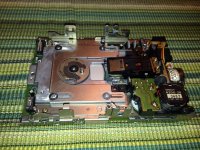
I have it apart. Can you tell me from this picture what needs to be removed and lubed?

Its because you need more lubrication. There are grease joints under the sled carriage, and the actual base itself that always gets missed. They need hit. Unless you have a lightweight machine oil that will penetrate the two pieces of metal, you will need to remove the entire carriage assembly and then remove the 4 retaining washers, that will expose the joints.
image.jpg

 
Last edited by a moderator:
Indeed! That "Floppy Drive Orchestra" is quite novel!!

It's amazing what things one can do with this stuff.

c

 
Last edited by a moderator:
That carriage assembly, you will need to remove the 4 plastic retaining washers, and remove that slide carriage. There points directly underneath that contain gooed lithium grease that needs cleaned and relubed. 

You will need to remove the eject motor beforehand. Also the eject motor contains a reed switch that tends to fowl up, and when it does, the eject motor will only turn half-way and stop. This will cause the drive to hang, not accepting nor ejecting a disk. it will appear to get stuck "half-way" and not accept a full insertion, after an eject is attempted. 

This may sound odd, but it seems like I have been fixing nothing but floppy drives in my collection. My portable, then my mac classic, and then the Q700 also fowled up. And the mac plus. I had to do a track re-alignment on my Q700 drive. 

 
Last edited by a moderator:
Back
Top