• Hello MLAers! We've re-enabled auto-approval for accounts. If you are still waiting on account approval, please check this thread for more information.

My Performa 400 (LCII) just died :-( !

But yeah I agree with zigzagjoe, you can’t really put off the recap any longer. Cleaning around the caps using alcohol and a cotton bud might temporarily return function but it won’t last.

The Alcohol & cotton bud cleaning is intended just for the SIMM contacts on the RAM. The caps will be removed, but I'll need to wait until I'm at my Dad's before I can pick up the LCII and that'll be this Sunday.
 
The problem with all that cap goo is that it ends up destroying the Egret, and then you have a non-working machine. So getting it done ASAP and not powering it on in that state is the way to go.

The last LC II that I fixed, I had to hot air everything in the sound/startup circuit area of the board, cleaned everything up properly including solder wick on every pad, tinning the pads with fresh solder and then solder wick again to completely clean all the old gunk off. Only then does everything go back on.

The Egret chip would be my main concern - they are fragile!
 
The problem with all that cap goo is that it ends up destroying the Egret, and then you have a non-working machine. So getting it done ASAP and not powering it on in that state is the way to go.

The last LC II that I fixed, I had to hot air everything in the sound/startup circuit area of the board, cleaned everything up properly including solder wick on every pad, tinning the pads with fresh solder and then solder wick again to completely clean all the old gunk off. Only then does everything go back on.

The Egret chip would be my main concern - they are fragile!
Thanks :cry: !
 
@joshc , @cheesestraws , @Durosity. OK, so my Performa 400 is now back at my house and so I can start fixing it.

I can order things from Farnell and RS Components. I've also dabbled with Mouser a bit. I'd like to order everything I need in one go.

I have a standard 15W soldering iron. What kind of fine tip do I need to buy to desolder the caps? Can I get isopropyl alcohol (I have meths!) from Farnell or RS? Oh and what would you use to clean the pins on affected chips? I have some braid (not very good at using it). I need flux, right what would you use? Do I need a heat gun (they sound expensive)? Also, ... I'm thinking of ordering a suitable cable connector to connect my SE to its analog board to replace the one I've misplaced. Do they sell anything suitable, even if I need to clip it to the right length? I can check out the caps myself.

I've not done this kind of root-canal work on a Mac before, though I've fixed a Korg Poly 61 synth where 3 chips, 2x Transistors, 2 tracks & a few other discretes were eaten by its long-dead battery (common fault). So, I probably need a hefty supply of tranqs to calm my nerves! (Only kidding, I'll just take it steadily and I do have a steady hand).

All help appreciated!

-cheers from Julz
 
Personally I don't go for desoldering old caps, you're much more likely to lift a pad due to the heat required to fully melt the contaminated solder and it's a horrifically annoying (and stinky) experience. Also don't do the twist-off method, if you try that on a cap that isn't thoroughly rotted you're absolutely going to tear a pad off.

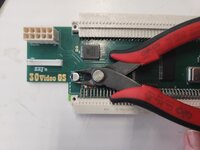
This is going to seem a bit barbaric: I use a pair of micro snips to cut the cap in half, lined up inline with the leads, like below. Seat the cap as deeply as possible before cutting it in two. After cutting it, the remainder of the cap body usually lifts off. Use the snips to cut the lead stubs flush with the plastic base of the cap, then remove the plastic base.

Finally, use a large soldering iron tip with a blob of solder on it to wipe off the remains of the leads. Clean the pads with a piece of saturated solder wick and lots of flux.

This reduces the odds of lifting a pad by reducing the heat used to the minimum required as well as less mechanical stress on the leads. IME it's straightforward, reliable, and has the best odds of not lifting a pad. Sometimes a pad will be too far gone due to electrolyte damage unbonding it from the substrate, nothing can be done there.

1733148830157.jpeg
(no grayscale cards were harmed in the making of this post)
 
I think I have a definitive answer for whether the 4MB RAM (which could be faulty) or the logic board has problems, and I think it's the logic board.

I've just been trying RAM from my SE and also my Mac Plus. The SE RAM (2x 1MB SIMMs, 100ns) generated the same, sad tune as did the Mac Plus (2x 1MB SIMMs also 100ns). So, testing the Mac Plus involved removing its logic board. However, what I didn't expect was:

  1. The Mac Plus had two really tall SIMMs that could barely squeeze into the logic board.
  2. I had to lift the logic board all the way out, unlike the SE which only needs to be lifted out a couple of cm until the logic board tabs line up with the gaps between the logic board chassis slots. With the SE, you can then just angle the logic board out.
As a result it was a really nasty job getting the logic board out. I scraped a couple of the 104 caps, but horror - one of the 104 caps had been broken off much earlier! Just now I've noticed that the memory select resistors just had the 256kB resistor snipped and not removed properly. It's just dangling by one leg.

1748266046120.png

In other respects, aside from the dust, the logic board seems to be in good condition. Caps look OK, can't see any corrosion on any pins. Logic board says 1985, but most of the chips seem to be made in 1986, so this is a fairly early Mac Plus.

Anyway, I now need to find some 104 decoupling caps!

-cheers from Julz
 
Just now I've noticed that the memory select resistors just had the 256kB resistor snipped and not removed properly. It's just dangling by one leg.
That’s actually how Apple’s service documentation recommended doing it, so that the dangling leg could be moved over and resoldered if the memory configuration ever needed to be changed back.
 
I'm late to this party, searching for clues on my own LC II restoration.. but I agree with @zigzagjoe on cap removal: I have a pair of micro-snippers set aside just for this method. Gently depress the cap to prevent any lifting while using the dedicated snippers to cut the cap's can in half. I usually do two or three snips from differing angles to limit the torque and all on the pads below. Once I get the top 2/3rds of the cap off (de-capitating it.. groan 😆) the rest is just as he does.
 
I'm late to this party, searching for clues on my own LC II restoration.. but I agree with @zigzagjoe on cap removal: I have a pair of micro-snippers set aside just for this method. Gently depress the cap to prevent any lifting while using the dedicated snippers to cut the cap's can in half. I usually do two or three snips from differing angles to limit the torque and all on the pads below. Once I get the top 2/3rds of the cap off (de-capitating it.. groan 😆) the rest is just as he does.
Intriguing, what do you micro-snippers look like?
 
Just standard small wire nippers, the kind used to trim leads flush with the board, or cut the leads from chips I never intend to reuse, to ease their removal.
 
Back
Top