• Hello MLAers! We've re-enabled auto-approval for accounts. If you are still waiting on account approval, please check this thread for more information.

My Dumb Scrolling Bug

Snial

68000
Hi folks,

I'm writing a little application in THINK C, targeting the standard Mac Toolbox API. I have a window with a scroll bar. Usually it scrolls up and down correctly and always correctly if it's a page up/down or slide to any position. However, sometimes if I hit the same arrow button (either up or down) multiple times quickly, it can generate a gap. For example:

1742078250843.png

Here, I managed to click down twice quickly enough for there to be 2 scroll events before there was a single update event. My code doesn't repaint everything, I'm trying to be clever, so I only repaint the the bits that need updating, see later...

The bug is either in the scroll code or the update code. Here's the scroll code.

C:
void MyPaint(WindowPtr aWindow, Rect *aIntersect)
{
    Rect rct;
    char numStr[3]; // enought for 2 chars.
    int16_t from,too,oY,line;
    int16_t winWidth=aWindow->portRect.right-kMyScrollBarWidth;
    oY=(*gMyInfo->iScroll)->contrlValue;
    from=aIntersect->top/kMyFontHeight; // round down.
    // too rounds up.
    too=(aIntersect->bottom+kMyFontHeight-1)/kMyFontHeight;
    if(from>kMyLinesPerPage) {
        from=kMyLinesPerPage-1;
    }
    if(too>kMyLinesPerPage) {
        too=kMyLinesPerPage;
    }
    SetRect(&rct,0,from*9,winWidth, too*9);
    EraseRect(&rct);
    for(line=from; line<too; line++) {
        MoveTo(4,(line+1)*9);
        NumToString((int32_t)(line+oY), numStr);
        DrawString(numStr);
        MoveTo(31,(line+1)*9);
        if(line+oY!=gMyInfo->iEditLine) {
            DrawString(gMyInfo->iLib[line+oY].iEntry.iData.iName);
        }
        else {
            SetRect(&rct,kMyNameOx,0, winWidth-4,9);
            TEUpdate(&rct, gMyInfo->iText);
        }
    }
}

/**
 * @Precondition: GrafPort is already set.
 */
void MyClickControl(WindowPtr aWindow, ControlHandle aControl,
        Point *aWhere, int16_t aPart)
{
    Rect scrlRect;
    Point updateOffset;
    RgnHandle tmpRgn;
    int16_t newVal,oldVal=(*gMyInfo->iScroll)->contrlValue;
    if(TrackControl(aControl, *aWhere, NULL)) { // only buttons.
        // The only control is the scroll bar.
        newVal=oldVal;
        switch(aPart) {
        case inUpButton:
            --newVal;
            break;
        case inDownButton:
            ++newVal;
            break;
        }
        if(newVal<0) {
            newVal=0;
        }
        else if(newVal>(*gMyInfo->iScroll)->contrlMax) {
            newVal=(*gMyInfo->iScroll)->contrlMax;
        }
        SetCtlValue(gMyInfo->iScroll, newVal);
        newVal-=oldVal;
        if(newVal) {
            BlockMove(&aWindow->portRect, &scrlRect, sizeof(Rect));
            scrlRect.right-=16; // ignore the scroll bar itself.
            scrlRect.bottom=126;
            {
                tmpRgn=NewRgn();
                ScrollRect(&scrlRect,0,newVal*=-9,tmpRgn);
                MyOffsetEdit(newVal, aWindow);
                updateOffset.h=updateOffset.v=0;
                LocalToGlobal(&updateOffset);
                OffsetRgn(tmpRgn, updateOffset.h, updateOffset.v);
                UnionRgn(tmpRgn, ((WindowRecord*)aWindow)->updateRgn,
                        ((WindowRecord*)aWindow)->updateRgn);
                DisposeRgn(tmpRgn);
                ++gScrolls;
            }

        }
    }
}

/**
 * Precondition, the grafport is already set.
 */
tBool MainClick(WindowPtr aWindow, Point *aWhere,
        uint16_t aModifiers)
{
    ControlHandle control;
    Rect nameRect, destRect;
    char *str=NULL;
    int16_t len, edLine, topLine;
    int16_t part=FindControl(*aWhere, aWindow, &control);
    if(part) {
        MyClickControl(aWindow, control, aWhere, part);
    }
    return kTrue;
}

I had had an earlier bug where I'd had: ScrollRect(&scrlRect,0,newVal*=-9, ((WindowRecord*)aWindow)->updateRgn); but the update region seems to be in local coordinates; which would cause the right and bottom parts of the window to be erased. To explain a bit further: when the window is scrolled up, the newly exposed part of the window is deemed 'uncovered', so it sets the update region for that area. Then the code would get an Update Event and see that pretty much everything needs to be updated (because at some point the region in local coordinate space was treated as being in global coordinate space, converted to local coordinates; and my Repaint code simply takes its bounding box (which is now way off to the top and left); erases that rect and redraws the remaining lines.

So, I decided to convert the region from local to global coordinates (see the LocalToGlobal call above) and then add that to the update region. It's not good enough to convert the update region itself from local to global, because if you click twice between a repaint then the first region that gets updated, gets converted to global coordinates; then on the second scroll that region gets converted again. So, what you want to do is get the update region for each scroll, convert that and then add that to the existing update region.

And here's the essential bit of the update code:

C:
void MyClick(WindowPtr aWindow, Point *aWhere, uint16_t aModifiers)
{
    int16_t h,v;
    Rect keyPadRect;
    GrafPtr oldPort;
    if(aWindow!=FrontWindow()) {
        SelectWindow(aWindow);
    }
    GetPort(&oldPort);
    SetPort(aWindow);
    GlobalToLocal(aWhere);
    MainWinClick(aWindow, &gTheEvent.where, gTheEvent.modifiers);
    SetPort(oldPort);
}

void DoMouseDown(void)
{
    WindowPtr whichWindow;
    int16_t thePart;
    int32_t windSize, menuChoice;
    GrafPtr oldPort;
    thePart=FindWindow(gTheEvent.where, &whichWindow);
    switch(thePart) { //<snip> other parts.
    case inContent:
        MyClick(whichWindow, &gTheEvent.where, gTheEvent.modifiers);
        break;
    } // <snip> other parts.
}

void RepaintAll(WindowPtr aWindow)
{
    uint16_t row, col;
    Rect dataRect, intersect;
    char *pad=(char*)gPageAahKeyPad;
    GrafPtr oldPort;
    GetPort(&oldPort);
    SetPort(aWindow);
    SetRect(&dataRect,kOriginX, kOriginY, kOriginX+100, kOriginY+12);
    // Check rgnBBox instead and do SectRect.
    BlockMove(&((*aWindow->visRgn)->rgnBBox), &intersect, sizeof(Rect));
    MyPaint(aWindow, &intersect);
    DrawControls(aWindow);
    SetPort(oldPort);
}

void DoUpdate(WindowPtr aWindow)
{
    Rect myRect, drawingClipRect;
    GrafPtr oldPort;
    BeginUpdate(aWindow);
    RepaintAll(aWindow);
    EndUpdate(aWindow);
}

tBool DoEvent(void)
{
    tBool gotOne=kFalse;
    gotOne=WaitNextEvent(everyEvent, &gTheEvent, kSleep, NULL);
    if(gotOne || gotOne==0 && gTheEvent.what==nullEvent) {
        switch(gTheEvent.what) { // Snip other events.
        case updateEvt:
            DoUpdate((WindowPtr)gTheEvent.message);
            break;
        }
    }
}

main()
{
    ToolboxInit();
    if(Init()) {
        while(!gDone) {
            DoEvent();
        }
        SoundEndIf();
    }
}

It must be a really basic mistake, but I can't currently see it. So, any hints (e.g. @David Cook or @joevt or @cheesestraws ) would be welcome! And yes, I
 
I'm not following too clearly, but it looks like MyPaint() only checks the latest value of (*gMyInfo->iScroll)->contrlValue. What's to stop MyClickControl() from being called twice before the repaint occurs?
 
Thinking a little more, you might want topDirty and btmDirty variables which could increase or decrease (but not below 0) in case the user somehow managed ↓↑↑↓. Or if you retain the destination rect of the last scroll, could you draw whatever isn't contained in that?
 
I'm not following too clearly, but it looks like MyPaint() only checks the latest value of (*gMyInfo->iScroll)->contrlValue. What's to stop MyClickControl() from being called twice before the repaint occurs?
Good theory. I think I only need to know oY at the time of the repaint, but it should probably be renamed topY. I only use it to determine which of the lines might be being edited (in which case I'd show the Text Edit field). In these cases, none of the lines are being edited so oY doesn't matter.
Thinking a little more, you might want topDirty and btmDirty variables which could increase or decrease (but not below 0) in case the user somehow managed ↓↑↑↓. Or if you retain the destination rect of the last scroll, could you draw whatever isn't contained in that?
Thanks, it might be a good method. I have a theory on why it might fail. When you do a ScrollRect, it'll copy the update region to tmpRgn (because tmpRgn started out being empty). Then it'll convert it to Global coordinates (correct), and then add it to the existing update region.

But if you single scroll twice, then the existing update region is the same as the new region you're adding, so nothing gets added. Hence it scrolls twice, but the update region is only for the bottom line. So, if I was to fix it using regions, I'd have to copy (or Union) the existing region into tmpRgn; offset it by local coordinates; then do the scroll (which would add the newly exposed scroll region, in global coordinates); then reconvert the tmpRgn to global coordinates.

But then maybe it'd just be simpler to offset the update region to local coords; scroll; then convert back to globals.
 
SetRect(&rct,0,from*9,winWidth, too*9);
EraseRect(&rct);
for(line=from; line<too; line++)

Is the for loop supposed to be "line<=too". The EraseRect is going <=too.
 
You use kMyFontHeight in some places and 9 in others. Are they not the same value?

You're using the font size as the line height? Shouldn't there be some extra spacing using font metrics?

Is BlockMove necessary for copying structs? Doesn't scrlRect = aWindow->portRect; work?

Shouldn't InvalRgn be used instead of UnionRgn?

Why wait for an update event to update the scroll? Why not redraw the dirty rectangle immediately? The scrolling may appear smoother this way. Update events will continue to happen when part of a window is unobscured but they don't need to happen for scrolling.

Your code does not allow holding the mouse button on the up or down scroll control to scroll multiple lines continuously?

One thing that was really cool about Jasik's The Debugger is that you could select a region in a struct and press a key to invert that region in the UI to see what area it covers.
 
Hi folks,

Thanks for the replies.

SetRect(&rct,0,from*9,winWidth, too*9);
EraseRect(&rct);
for(line=from; line<too; line++)

Is the for loop supposed to be "line<=too". The EraseRect is going <=too.
I'll check, but I think it's correct, the number of lines redrawn is normally one in either direction if the arrows are clicked. If it should have been <=, then I figure it'd redraw 0 lines in the normal case (if from==too).

You use kMyFontHeight in some places and 9 in others. Are they not the same value?
Yike, magic numbers I should have replaced.
You're using the font size as the line height? Shouldn't there be some extra spacing using font metrics?
Yes, and you can see the problem in the window screen-grab but it's a more minor issue than the scrolling bug.
Is BlockMove necessary for copying structs? Doesn't scrlRect = aWindow->portRect; work?
I think I wasn't sure if THINK C copied structs.
Shouldn't InvalRgn be used instead of UnionRgn?
That sounds better, but I think it'd have the same problem.
Why wait for an update event to update the scroll? Why not redraw the dirty rectangle immediately?
I thought I was supposed to wait for an update event, but if it's normal practice not to in these situations, then sure, I'm happy to change it.
The scrolling may appear smoother this way. Update events will continue to happen when part of a window is unobscured but they don't need to happen for scrolling.
It's a good point.
Your code does not allow holding the mouse button on the up or down scroll control to scroll multiple lines continuously?
I didn't think of that. If I did do it (likely as it's a good idea), I'd also want to limit the scrolling rate in case it was run on a faster Mac to maybe 5 lines per second (or whatever feels reasonable).
One thing that was really cool about Jasik's The Debugger is that you could select a region in a struct and press a key to invert that region in the UI to see what area it covers.
Clever! I've heard of "Jasik", but not their application: "The Debugger".
 
I think I wasn't sure if THINK C copied structs.
It's part of the C spec that structs can be copied with an assignment. Arrays is a different matter. If it didn't work in THINK C, then I think you would get a compiler error.

That sounds better, but I think it'd have the same problem.
Yes, I didn't really look at any of the math to find what was actually the problem. Stepping through the code with the debugger should be sufficient for finding the problem. You could add a text window and log stuff to that if necessary.

I thought I was supposed to wait for an update event, but if it's normal practice not to in these situations, then sure, I'm happy to change it.
For events that you control, you don't need to wait. However, you may want to check for events if you're in a loop that's doing a lot of work such as scrolling.

I didn't think of that. If I did do it (likely as it's a good idea), I'd also want to limit the scrolling rate in case it was run on a faster Mac to maybe 5 lines per second (or whatever feels reasonable).
The scrolling can be done in the TrackControl callback. Maybe measure how often the call-back gets called without doing any drawing to see if it needs to be slowed.
 
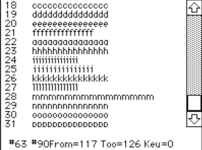
Hi folks,

I've solved the problem. Here's a screenshot:

1742120330869.png
At the bottom I added a bit of debug. The first number is the number of Updates, the second is the number of scroll events. It starts with 1 update event (the initial window paint) and 0 scroll events. Here you can see there's a lot more scroll events than update events, but I no longer saw any missing lines.

The scrolling code fragment is now:
C:
tmpRgn=NewRgn();
ScrollRect(&scrlRect,0,-(newVal*=9),tmpRgn);
PatchLibOffsetEdit(newVal, aWindow);
OffsetRgn(((WindowRecord*)aWindow)->updateRgn, 0,
        -newVal);
OffsetRgn(tmpRgn, updateOffset.h, updateOffset.v);
InvalRgn(tmpRgn);
DisposeRgn(tmpRgn);

So, I think that validates my earlier conclusion that the update region kept getting Union'd with an identical update region if there was a double-scroll. I think it could still be wrong if the ((WindowRecord*)aWindow)->updateRgn wasn't previously empty due to a non-scroll event, then I had a scroll (or 2) and then responded to an update. But I don't care about that right now, because next I'll have a go at doing a direct update as per @joevt 's suggestion, so I can also continually scroll if the up or down buttons are held.
It's part of the C spec that structs can be copied with an assignment. Arrays are a different matter. If it didn't work in THINK C, then I think you would get a compiler error.
I think some early compilers didn't structure copy. MegaMax C (1985) makes a big deal out of its ability to.
Yes, I didn't really look at any of the math to find what was actually the problem. Stepping through the code with the debugger should be sufficient for finding the problem.
You would think just stepping through the debugger would find the problem, but I was doing that and it still took me a long time.
You could add a text window and log stuff to that if necessary.
It stuck some debug at the bottom to help, but it didn't occur to me I could log to another window I'd created. I'll do that in the future.
For events that you control, you don't need to wait.
OK, I'm not super knowledgeable about early Mac OS programming.
However, you may want to check for events if you're in a loop that's doing a lot of work such as scrolling.
I was aware of that, it's the classic cooperative task model problem. I guess I'd call SystemTask, rather than GetNextEvent as I don't think I want events to pile up in the queue, but maybe they pile up anyway. You could get mouse-moved events; keyboard events, but perhaps not other update events as such.
The scrolling can be done in the TrackControl callback.
Oh, of course! I'll refactor and try that.
Maybe measure how often the call-back gets called without doing any drawing to see if it needs to be slowed.
Yes, I was going to use TickCount(): and limit the number of scrolls while the mouse is held to about one every 12 ticks (200ms).

Thank you again for the replies, they've really helped and my future ToolBox based apps will be better!
 
I don't think an app should ever mess with the updateRgn directly. Maybe you can update the window before it's scrolled? Use EmptyRgn to check if the UpdateRgn is empty, and if it isn't then do BeginUpdate/EndUpdate on the window. BeginUpdate ensures that you can only draw to the intersection of the visible region and update region and it will clear the update region.

Why does tmpRgn from ScrollRect need to be offset? Isn't tmpRgn exactly the region that is uncovered by ScrollRect? The offsetting of tmpRgn comes from the original code where it was converting the region to global coordinates to union with the update region.
 
Hi @jeovt,

Thanks for feedback.

I don't think an app should ever mess with the updateRgn directly. Maybe you can update the window before it's scrolled?
Really? I didn't know that. I think I plan to use TrackControl to improve it in the future - for now I just wanted to have a better grasp of why my code was failing.
Use EmptyRgn to check if the UpdateRgn is empty, and if it isn't then do BeginUpdate/EndUpdate on the window. BeginUpdate ensures that you can only draw to the intersection of the visible region and update region and it will clear the update region.

Why does tmpRgn from ScrollRect need to be offset?
Because in my earlier code when I didn't do that, the update region really was set in global coordinates. In the earlier version of my code I had:

ScrollRect(&scrlRect,0,-(newVal*=9),((WindowRecord*)aWindow)->updateRgn);

So, here the update region parameter is the Window's updateRgn (which I didn't know you weren't supposed to use). Anyway, using that generated an update event and in my update handler from the main loop I do BeginUpdate ... EndUpdate. I find the bounding box (BBox?) of the update region; clear rect that bounding box and then update the individual lines. In reality I kept finding that the bounding box was offset by the Local coordinates of the window. I would end up with the text clipped to the top left and the rest of it not updated at all.
Isn't tmpRgn exactly the region that is uncovered by ScrollRect? The offsetting of tmpRgn comes from the original code where it was converting the region to global coordinates to union with the update region.
Again, without the OffsetRgn(tmpRgn, updateOffset.h, updateOffset.v); the intended part of the window (e.g. the bottom line or two lines) doesn't get updated at all, because by the time it got to the update code, the bounding box appeared to be off-window as though the local coordinates had been interpreted as global coordinates. But I'll recheck, maybe it was OK all along and my recent changes would have fixed these issues anyway. I'll post a screenshot tomorrow.
 
Back
Top