• Hello Guest! We're hosting a challenge to welcome vintage Intel macs to the MLA during the month of July! See this thread for more information.

Modern MacOS driver for Griffin PowerMate

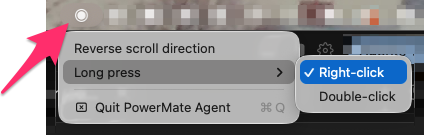
I found a Griffin PowerMate in my junk USB drawer, and thought "can this even work now?" While the System Profiler showed the device, it did not register as an HID device, so it was dead as a hockey puck. So, I wrote a driver.

The driver works on ARM Macs and enables scrolling and button presses. It also makes the blue light change intensity as you scroll. While mostly useless, maybe you might want to reminisce about how we "used to do it" with PowerMate.

See the GitHub project or download the latest release.
Screenshot_5_10_26__9_27 AM.png
 
I found a Griffin PowerMate in my junk USB drawer, and thought "can this even work now?" While the System Profiler showed the device, it did not register as an HID device, so it was dead as a hockey puck. So, I wrote a driver.

The driver works on ARM Macs and enables scrolling and button presses. It also makes the blue light change intensity as you scroll. While mostly useless, maybe you might want to reminisce about how we "used to do it" with PowerMate.

See the GitHub project or download the latest release.

View attachment 98681
Nice work :)

Good to keep these things useful.

You might consider uploading it to Macintosh Garden if you're comfortable sharing it. It will make it findable for people looking.
 
There was apparently a bluetooth Power Mate released around 2013, I wonder if that version requires a driver or not? Only one on ebay currently is too expensive to get just out of curiosity!
 
Great to see the PowerMate getting so much love this year — James, nice work, especially the LED feedback.

I went down the same rabbit hole with the one from my drawer and ended up building a different take, focused on audio control rather than scrolling: powermate-macos. It reads the knob in userspace (IOHIDManager, no kext) and drives CoreAudio directly — turn = volume on whatever your current default output is, press = mute. A plain-text config can map the full gesture set (double-click, long-press, press-and-turn) to things like play/pause, track skip, or cycling output devices. Single Swift file, MIT, works on Intel and Apple Silicon (macOS 11+).

Install is one line if you use Homebrew: brew install curtiside/tap/powermate — it builds locally so there's no Gatekeeper fuss. Fair warning: USB PowerMate only (the Bluetooth one is a whole different BLE animal), and I don't drive the LED yet — James has me beat there.

Between the three projects floating around now (this one, mine, and the Hammerspoon-based powermate-osx) there's no reason for any of these knobs to stay in drawers.
 
This is great, nice work. Userland USB has really been a lifesaver for legacy devices.

I always hated how (by default) the smooth, very precise stepped knob incremented volume in coarse chunks. I used to have it fire custom AppleScripts instead to adjust the volume by single % instead, though it ate a CPU whenever you adjusted it. So your driver beats the original since it offers that customization out of the box :).

For a modern Bluetooth HID device (no drivers), I used to recommend the (expensive, but cheap for them) Teenage Engineering Ortho Remote as an alternative. Seems like it's sold out now (which probably means sold out for forever). Though they're not advertised as such, they'll pair with any modern system and the white or black look at home with a modern Apple desktop. So another alternative if you can find one.
 
Back
Top