Missing pad; did I ruin my LC475 or can I fix it?

oneman

6502
Hi all,

I've been trying to recap my LC475. I recapped the TDK-PSU, worked out fine. Than I did the motherboard, aaaand... while removing the second to last cap (C129) a pad came loose. Bad luck I guess. I searched the web, found many solutions but none of those seem to work in this case:
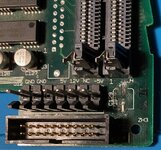
  • Fix 1: use a through board hole the pad was connected to by soldering some enamelled wire to it: there's no hole, just a very small pin through the board. I scraped the pin slightly free, but it's to small and no solder will stick to it
  • Fix 2: Solder to a trace in the board's surface: i freed some copper coloured trace, but no solder will stick to it & not sure this is even a real trace or even the right one.
So, I'm stuck. Here are some images of the damage: the missing pad and what is suspect are the tiny pins through the board that the pads are connected to.
20260125_missing_pad.jpeg20260125_missing_pad_backside.jpeg

Can any of you give or point me to a possible solution? Can I run a wire to another part of the board? Anything else?

Also, can anyone tell me what this cap is needed for? I haven't tried booting it yet but if it could work with say, the loss of a functional floppy drive or something else one could do without, I could live with the damage (for now).

Thanks,

oneman
 
Hi all,

I've been trying to recap my LC475. I recapped the TDK-PSU, worked out fine. Than I did the motherboard, aaaand... while removing the second to last cap (C129) a pad came loose. Bad luck I guess. I searched the web, found many solutions but none of those seem to work in this case:
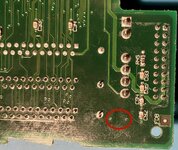
  • Fix 1: use a through board hole the pad was connected to by soldering some enamelled wire to it: there's no hole, just a very small pin through the board. I scraped the pin slightly free, but it's to small and no solder will stick to it
  • Fix 2: Solder to a trace in the board's surface: i freed some copper coloured trace, but no solder will stick to it & not sure this is even a real trace or even the right one.
So, I'm stuck. Here are some images of the damage: the missing pad and what is suspect are the tiny pins through the board that the pads are connected to.
View attachment 95124View attachment 95125

Can any of you give or point me to a possible solution? Can I run a wire to another part of the board? Anything else?

Also, can anyone tell me what this cap is needed for? I haven't tried booting it yet but if it could work with say, the loss of a functional floppy drive or something else one could do without, I could live with the damage (for now).

Thanks,

oneman
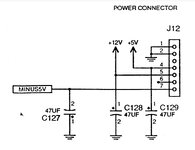
I shouldn't worry to much. It will most likely work without to be honest, but if you want to replace it, wire the leads of a physically small through hole 47uF capacitor between pin 4 (+ve side) and pin 1 or 2 (negative side) on the back of the power connector. Note pin 1 is on the left in your top side photo, even though there is a 1 written near the connector at the other end! You might want to put a dab of glue on the capacitor to keep it in place, and make sure it fits in the case with it there. The capacitor is on the 5v rail next to the power connector as shown here :

1000033662.jpg

The Mac has lots of other capacitors on the 5v rail though and so in simple terms, it will probably cope without.
 
Last edited:
Also, for future work, pads coming off usually means you put too much heat into the board.

As much as some people hate it, I recommend either twisting the capacitors off using needle nosed pliers, or using side cutters to snip the old capacitors off. It is easier than you imaging, and because there is no heat getting into the PCB, it is stronger and handles it. It is vastly less likely to cause damage than a hot air gun or soldering iron.

People argue about this, but after recapping many, many boards using various methods, for me, it causes the least damage.

Now just wait for someone who saw a YouTube video once to tell me that it is a skill issue.
 
shouldn't worry to much. It will most likely work without to be honest
Ah, that's good to know. I'll try to boot it and if that works, move forward to the screen that needs fixing also. The fix you described seems doable too. Next time I order parts, I'll get a though hole cap. Thanks.
Also, for future work, pads coming off usually means you put too much heat into the board.
Yeah. New to recapping... lots of heat makes for easy cap removal I thought... another lesson learned. :)
 
As much as some people hate it, I recommend either twisting the capacitors off using needle nosed pliers, or using side cutters to snip the old capacitors off. It is easier than you imaging, and because there is no heat getting into the PCB, it is stronger and handles it. It is vastly less likely to cause damage than a hot air gun or soldering iron.

I agree. 100%. If the capacitor has corroded the solder at all, it is difficult to get the solder to flow again. So, you end up overheating the area (and the glue the bonds the pad to the PCB).
 
+1 for "twist them off", and good luck with your LC475! They are great 68k machines and there's a surprising number of upgrades you can do 😄
 
Also, for future work, pads coming off usually means you put too much heat into the board.
This is also why we try to reduce "dwell time" when using a soldering iron. You don't want hot spots on the board, especially for a long time, as that tends to lead to the adhesives involved breaking down.

As much as some people hate it, I recommend either twisting the capacitors off using needle nosed pliers, or using side cutters to snip the old capacitors off. It is easier than you imaging, and because there is no heat getting into the PCB, it is stronger and handles it. It is vastly less likely to cause damage than a hot air gun or soldering iron.

People argue about this, but after recapping many, many boards using various methods, for me, it causes the least damage.
My own experience is that pre-heating the entire board a bit helps immensely. Because the board as a whole is warmer, you don't have to add nearly as much additional heat to melt solder, which in turn means that you're less likely to add more heat than the board can take without damage. This can be important when you are looking to salvage components, especially when they're attached to a massive heat-sink such as a ground plane, RF shield, or whatever.

If the board is already fragile, applying torsion to the pads can tear them up directly, at which point you're looking at the very same kind of repair needed. And then you still need to apply heat anyway in order to remove the old component legs and clean up the pads. If it works well for you, though, great!

Now just wait for someone who saw a YouTube video once to tell me that it is a skill issue.
Skill and equipment issue. But part of developing overall skill is learning which approaches work for you and which don't, and how to recover when you've screwed things up. I like using an iron or hot air. I've also done the pliers thing. And I've done the "this board is too tightly packed, I need to re-secure the lifted pads and replace the torn ones in order to be able to even install the replacement capacitors" thing (conductive epoxy is not cheap, but when it comes in handy it really comes in handy).
 
Back
Top