• Hello MLAers! We've re-enabled auto-approval for accounts. If you are still waiting on account approval, please check this thread for more information.

Might have killed my TAM. Sad face.

ried

6502
During one of Action Retro's recent videos about the TAM, Sean installed a Sonnet Serial ATA PCI adapter and drive. He cracked open his TAM to split the optical drive's MOLEX power connector, so he could run one end to the optical drive and the other end to the back of the TAM, which powers a SATA hard drive. I did the same thing.

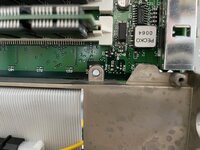
However, in the process of splitting the front section (screen, optical drive, speakers) from the rear section (logic board, chassis) I forgot about the single screw near the middle of the TAM, behind the A/V card. I attempted to pull the sections apart, only to realize that there was still something - that screw - holding the two sections together.

I think applying that much pressure to the logic board may have killed it. It may be a broken solder joint somewhere... but I just don't know. Now the TAM refuses to power up. If I plug it in, then press the CUDA switch on the logic board for 5 seconds:
  1. The power supply in the subwoofer makes a small noise as if it's energizing, and its green LED flicks on for a split second.
  2. The TAM's built-in fan spins for a split second and then stops.
Then nothing happens. No startup chime, nothing. Subsequently pressing the power buttons (on the keyboard or on the back of the TAM) doesn't do anything at all. I have to unplug, replug and press the CUDA switch again to get 1& 2 to happen. That's the only way I can get a sign of life out of the machine.

So, wise friends. Did I kill my TAM's logic board by applying too much force on it? I wouldn't think so, but with these old and brittle machines, it's quite possible...

Can anyone repair the TAM's logic board, if that is indeed the problem?
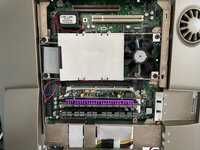
IMG_5754.jpeg
IMG_5752.jpeg
 
Well, I've disassembled and reassembled it again. Still won't boot, but I can get 1 and 2 (above) to happen without unplugging it. If it's plugged in and I press the power button - either on keyboard or on the back of the TAM - the base unit / power supply makes a sound and flashes the green LED for a moment, and the fan inside the TAM spins for a second. Then it's dead again. Still no boot chime or boot sequence.

Hmmm...
 
Is there a chance your splice from ODD power is shorting when the case is pressed shut?
A chance your hard drive IDE cable is offset by one pin at the hard drive?
A chance one of the motherboard's edge connector pins is bent and making no contact/extra contact?

What happens when you attempt power on with no Battery, no RAM, no cache/G3, hard drive and motherboard fan unplugged?
 
It works. Took it all apart, including all of the cables and reseated the RAM, then the cache/G3. All better now, and I have the extra MOLEX power cable running to the back. Thank you!
 
It works. Took it all apart, including all of the cables and reseated the RAM, then the cache/G3. All better now, and I have the extra MOLEX power cable running to the back. Thank you!
Knew it. Glad it’s working again.
 
It works. Took it all apart, including all of the cables and reseated the RAM, then the cache/G3. All better now, and I have the extra MOLEX power cable running to the back. Thank you!
Excellent news. I know and hate what you've been through.
 
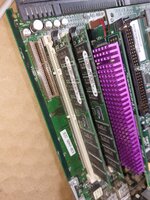
Looking at your setup, it might be worth keeping an eye out for RAM sticks that use lower profile chips. I have these thin 64MB SIMMs in my 6500. They only have chips on the side facing away from the cache slot.

SlimSocial_1667124985333.jpg
 
Knew it. Glad it’s working again.
Thanks for the sage advice!
Excellent news. I know and hate what you've been through.
It was a bit of an emotional roller coaster :D
Looking at your setup, it might be worth keeping an eye out for RAM sticks that use lower profile chips. I have these thin 64MB SIMMs in my 6500. They only have chips on the side facing away from the cache slot.
Thank you, good call. These are 20+ years old so it's definitely time to look into something lower profile, especially with the G3 L2 and especially with the G4 L2 that herd made in there.
TAMs are a good candidate for a recap now as well.
Good point. But that means I'll have to disassemble it again... :LOL:
 
TAMs are a good candidate for a recap now as well.

My one and only TAM the caps appear fine, I’ve run a cotton bud on the underside of the motherboard caps with no discernible goo/leaking to be seen. The biggest issue would be PSU in the subwoofer; getting into it is destructive and I can’t face it … until boot issues begin
 
@Byrd, I've been wondering about the subwoofer and did not realize its repair is a destructive process. Mine exhibited the TAM buzz for a while, which has since gone away. I know I'll have to address it at some point, though.
 
@ried there is a guide I found here on taking apart the subwoofer. It requires removal of the top rubber cap which (based on how old and perished the rubber feels) - will likely result in damage. Once you get that off though it's relatively easy to get to the internals. The Bose amplifier board looks pretty scant on capacitors and the TAM PSU I'd imagine is very close to that of a 6500, if not the same. But, I'm not going there any time soon :)

 
Anyone know where to source 64MB 5v EDO DIMMs for the TAM that have lower profile memory chips? I've seen a couple of TAM-compatible modules, but the memory chips are thicker (like my current modules). Apparently, the TAM and other Macs of its era are quite picky about the type of memory they use. No 3.3v, unbuffered, etc.

 
Back
Top