• Hello MLAers! We've re-enabled auto-approval for accounts. If you are still waiting on account approval, please check this thread for more information.

Micro-Channel Quadra 950 Liberated for $19.99 . . .

Me showing my ignorance here, but... did any Apple-branded DOS compatibility cards come with less than a 486? That Cyrix CPU will *not* (capital N-O-T) work in a 486 socket. Has about half the right number of pins to start with...

I'm sure there were third-party 386-based cards, granted.

 
As far as I know Apple released the first DOS card on the 6100 DOS compatible (486) then did a PCI Powermac Pentium 166 verion and thats it.

 
Dunno, I was thinking the DOS Compatibility Card for my Q630/P6360 (form factor, don't remember which, don't even know if I still have it or not) might have been a '386 . . .

. . . but, apparently not. IIRC, I've got a doubled-up '286 NuBus Card somewhere, but it might have gone down the whirlpool too.

Such is life! :-/ < sigh >

Did I mention that the SCSI Card has what appears to be a Fast/Wide SCSI II connector sticking out of the Backplane? Could it be connected to the two HDDs as a pair of Fast SCSI II Drives in a RAID Config? Otherwise, it makes no sense to me whatsoever, to have SCSI II hanging out the back, without implementing it somehow on the inside of the box.

Dunno, strange beast, I have no real desire to play around with any cockamamy system with HDDs in it that STILL requires a setup FDD to be accessed to even begin to function. Sounds like IBM had their collective heads farther up their digestive tract than even Apple managed at its very worst . . .

. . . and THAT'S goin' a fer piece! 8-o

 
It's always funny to see the huge old computers in ads and photos online, and then see pictures of the fairly minuscule chips that went into them. That is definitely a pretty awesome haul though, especially if you have the keyboard, monitor and mouse for it, or at least a set that matches it with some amount of accuracy. Put it next to your desk and go "What? This is a hard-core person's computer."

Or not.

If you happen to have a whole set up, photos of it put up somewhere would be pretty fun. Especially if you've got a comparable Quadra 950 to put it near. [:P] ]'>

 
That SCSI jack hanging out the back is probably a propreitary IBM SCSI-1 port plug, you will need a special cable to use external drives.

 
Don't assume the drives have sticktion just because they're not spinning. They don't start until the controller tells them to, and you're not far along enough yet in the boot process for that to have happened.

Of course, they could still be stuck. But I doubt it.

BTW the 8514/A outputs 256 colors at 1024x768 30Hz interlaced. You may have trouble finding a monitor that will sync to that.

 
Did I mention that the SCSI Card has what appears to be a Fast/Wide SCSI II connector sticking out of the Backplane? Could it be connected to the two HDDs as a pair of Fast SCSI II Drives in a RAID Config? Otherwise, it makes no sense to me whatsoever, to have SCSI II hanging out the back, without implementing it somehow on the inside of the box.
Apparently early IBM SCSI cards used a proprietary 60-to-50-pin adapter cable on their external connector. It's apparently the same connector IBM UNIX machines like the PC RT and RS/6000 used. Which is annoying, but in all fairness Apple's 25 pin DIN connector was not only proprietary (until other manufacturers copied it) but was electrically bad.

Dunno, strange beast, I have no real desire to play around with any cockamamy system with HDDs in it that STILL requires a setup FDD to be accessed to even begin to function. Sounds like IBM had their collective heads farther up their digestive tract than even Apple managed at its very worst . . .
In context the "Reference Disk" system made perfect sense. The Microchannel bus system allowed far more latitude for reconfiguring the layout of the system than PC AT clones did. (Or Nubus, for that matter. There were, for instance, RAM cards for the 80286 models that could remap or completely disable memory on the Planer in order to add an LIM/EMS 4.0 MMU.) Microchannel bus cards all came with a floppy that described what system resource changes they needed to function, and that data would be read by the setup program which would arbitrate resource requests from all the cards and come up with a working configuration to stuff into the nonvolatile RAM and allow said configuration to "just work" at boot time without having to re-detect everything. (In addition, the resource files for the individual cards would be copied to the main Reference disk so you wouldn't need to keep track of all the individual ones. Should the nonvolatile RAM contents be lost you could just boot the one disk and set the system back the way it was in pretty much one step.)

It certainly would of been possible to put the entire setup program in ROM and read the configuration databases off of ROMs in the installed cards, but IBM's system had some advantages, namely being cheaper and *potentially* more flexible. (For instance, Flash memory didn't really exist yet at the time, so using the Reference Disk system essentially allowed "BIOS updates" to recognize new hardware to happen without swapping chips.)

Eh, anyway. It seems stupid now, I guess, but we're also terribly spoiled by a quarter century of evolution.

BTW the 8514/A outputs 256 colors at 1024x768 30Hz interlaced. You may have trouble finding a monitor that will sync to that.
It's actually 43.5Hz. (I know, nitpicky.) It's a "standard" resolution in the sense that it was moderately widespread back in the day, but... yeah, I haven't used a system that was only capable of that *forever* so I honestly have no idea how common support for it is in LCDs. Any Multisync CRT monitor shouldn't have a problem with it, though.

 
I snagged a decent VidCard for the Sendakian WildThing™ on the 'Bay recently.

http://www.ebay.com/itm/230814274578

800px-MCA_IBM_XGA-2.jpg.f2c4d3c052aa6ceb5fabb884c46e3fed.jpg


Would a second 72 pin SIMM Memory Expansion Card be Beneficial?

Pics of the Proc have been on the to do list . . .

. . . for a while now! :lol:

What are you going to do with the guts of the Model 80 then (motherboard, PS, cards, drives, proprietary floppy)?
I have 2 working and restored model 80's, both with 486 upgrades (one is a PS/2 card with a 486 and the other is a CPU board that snaps into the 386 socket). Real nice machines, and fully stuffed with MCA cards plsu both have IBM WORM drives (130MB 5.25" hard cased opticals).

There are 2 funky RAM cards in a model 80 under the power supply. They have something like a PDS slot to connect to the motherboard and the RAM is in rows and columns of square metals cans soldered to the board (1,2,4MB max per card). Any other RAM would be on MCA cards and use either 30 pin SIMMs (3rd party boards Orchid made one) or 72 pin SIMMs (IBM made boards). If the CMOS battery (large 6V camera type battery) is low or dead then the machine will have booting issues but the hardware might still be 100% ok. If so you will need a MCA setup floppy to boot from and driver files for all cards installed.

I may be setting this hulking beast (Wild Things don't look very fast) as a working system for giggles.

For the shiznits part of the equation, I'm thinking about setting up my ATOM NetTop board behind the 5.25" Cover plate with an ATX PSU. The only mod to the internals will be drilling out the spot welds attaching the front drive bracket to the HDD Chassis and bolting the NetTop chassis up to the tapped holes. I'm thinking in terms of a swing-out Smoked Plexi cover plate replacement that'll match the panels on the Commodore 64 WorkStation I made back in the day, with a peripherals & Card Reader breakout box in it, maybe a vertically mounted portable USB type DVD behind the short section of a reversed 5.25" bezel?

I'm looking for excuses to put the CD-SC back together un-molested, possibly repaired, and build the largest, most redonckulous, hackintosh on the planet . . .

. . . with a Cyrix powered co-processor board . . . [}:)] ]'>

 
iCrap!!!!!!!!!!!!!!!! I re-installed the cards, hookied it up to monitor & KBD, flipped the switch and . . . nada! :p

Tried it a few more times, I hear two tink tinks coming from the PSU when I flip the switch.

No side panel installed, it booted to the setup floppy search when I first got it.

Suggestions?

 
Cool box, too bad you're having problems with it. I threw one of those away a while back, saved some of the pieces though. I think I have the RAM card and a SCSI card.. might find a use for it someday. I did also get a (very loud) 2GB 50 pin SCSI drive out of it too.

 
I have a PS/2 Model 80 with one giant MFM drive in it and internal 3.5" and 5.25" drives. When turned on it does nothing except the hard drive spins up and the speaker clicks as if power was applied and made it there, but no beeps and no disk drive activity. Nothing on the Sony Trinitron monitor that I attached.

Have you checked your power supply voltages with the motherboard attached (as a load)?

 
I haven't checked the voltages because the fan doesn't start up, maybe that's the problem now that I think about it.

< . . . staggers into kitchen to service coffee maker and peer into monstrosity . . . >

I yanked the XGA-2 card & found the notes I made as to which slots the cards were in originally on the previous page. I finally downloaded the reference diskette file Unknown_K linked, thanks, K!

Now I get two thumps out of the speaker like you do, no tink tinks, but still no fan. Next step is to make sure the cards are in the original positions. Maybe I'll try another power cable or two first. The one I'm using is known good, but I've had problems with PSU/Cord connector incompatibilities in the past.

I'm also wondering if the battery wasn't quite dead when I got it two years ago.

Does yours have a reference disk in it and is it hooked up to the proper monitor or a good MultiSync that can deal with the interlaced signal?

 
BTW the 8514/A outputs 256 colors at 1024x768 30Hz interlaced. You may have trouble finding a monitor that will sync to that.
Or a new pair of eyes after your current ones give out from the flicker strain.

These systems run x86 AIX really well.

 
No kidding . . . hence, the decent VidCard for WildThing™

It probably didn't matter much back in the day, that Video Sub-Standard evolved when Dinosaurs like WordPerfect, Lotus 1-2-3, and some DataBase from Borland or the like ruled the Earth. It was way better than anything else back when an 80 Column Card in an A2 or any NTSC CRT was for a command line or shell interface when it was introduced.

Where was Windows on this timeline, Win286? Weren't Apple VidCards and CRTs pretty much stuck at 640 x 480 back then? Dunno, need more coffe . . . xx(

 
Has anyone used a replacement battery pack in one of these beasts? I pulled mine and I I'm tempted to replace it with a freakin' 6V lantern battery! }:)

 
Well I like having the correct type of battery (plus they actually fit nicely). Think I have 3 Model 80's full of cards and upgrades, 2 with rare 5.25" MO WORM drives IBM used to make.

 
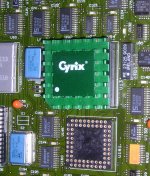
I finally pulled out the drive cage, it has two (matched?) IBM HDDs. I can get a pic of the Cyrix chip now, but it doesn't hava any printing on it, just a really neat integrated heat sink.

I like my computers to have a BORG Design Language air about them. [}:)] ]'>

 
Here's the shot of the Cyrix Upgrade Proc I promised . . .

Cyrix.2p.jpg

. . . when I'm not so exhausted and I get a chance to pull it, I'll see what it says on its underbelly and take more pics.

edit: curiosity got the best of me and I pulled it, bending only one pin slightly. but I should have waited, it just says:

c 1992 CyrixUSA and Japan

I wonder what this thing is? It doesn't have the 386/486 logo like the Google Pic Hits and if it actually is a Cx486DRx2 without a CoPro on board, why is the CoPro Socket empty? The pic got me thinking that the heat sink is taped onto a standard IC and that's what appears to be the case. Batteries for the camera are recharging, so that's all the pics for now . . .

. . . an' I ain't gonna mess with removin' the heat sink! :disapprove:

 
Back
Top