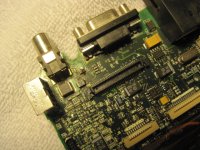
I have a 3400c that had some corrosion beneath the PRAM battery. It wasn't actually that bad, and I've cleaned the board with still unknown results. Hopefully three capacitors on the power board blew and replacing that will net some effect on the machine - which, if so, I'll take a few pictures tomorrow.
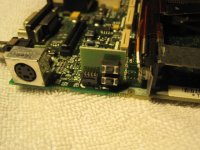
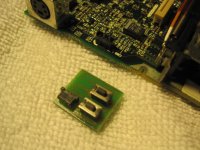
The worst of the corrosion was on a little circuit board with four leads soldered to a raised interface on the board - I don't know what you'd call it (the interface), which has a cap. Basically the board has two switches (each with one lead on each side) and is otherwise just soldered to the four leads in that interface. That's a bit verbose, but basically the four leads coming up from the board are connected (each) to one side of the two switches. So those soldered leads have totally rotted off, as have most of the [4] traces on that very simple board. I've desoldered the switches (I might have to eventually replace them but I don't know). The board itself is 1.5cm x 1.5cm. I couldn't find one that small, but bought replacement PCS anyway [to cut, I guess] and intend to resolder each switch and then possibly solder wires directly to the little cap on top of the interface. Then I plan, I guess, to krazy glue two plastic pieces to each side of the circuit board and then to the side of the laptop [because the board needs to withstand the pressure of someone pressing those switches from the case]. I guess the krazy gluing scheme is not ideal because it'll mean I can't as easily remove the board but I can't think of a better idea.
So two things - I realize that explanation is probably garbage in which case assuming the laptop works at all, as I said, I'll take pictures. 1) Any better ideas?
*** 2) [This is probably the crucial one] If I try to turn it on without that board connected at all will that cause two shorts, essentially? [No because the switches wouldn't normally be active?]
(PS: http://i.pchub.com/i/Apple-Macintosh-PowerBook-3400C-Main-Board-Motherboard-725-0199-A-600-4740-b-11039.jpg- you can see (sort of) the board I'm talking about immediately to the right of the PC card slot casing and against the edge of the board. I'd actually be much obliged if someone could take a picture of a correct one. Mine came slumped over and from what I can gather from this picture I think it was supposed to be straight-upright, parallel to the case-edge.)
The worst of the corrosion was on a little circuit board with four leads soldered to a raised interface on the board - I don't know what you'd call it (the interface), which has a cap. Basically the board has two switches (each with one lead on each side) and is otherwise just soldered to the four leads in that interface. That's a bit verbose, but basically the four leads coming up from the board are connected (each) to one side of the two switches. So those soldered leads have totally rotted off, as have most of the [4] traces on that very simple board. I've desoldered the switches (I might have to eventually replace them but I don't know). The board itself is 1.5cm x 1.5cm. I couldn't find one that small, but bought replacement PCS anyway [to cut, I guess] and intend to resolder each switch and then possibly solder wires directly to the little cap on top of the interface. Then I plan, I guess, to krazy glue two plastic pieces to each side of the circuit board and then to the side of the laptop [because the board needs to withstand the pressure of someone pressing those switches from the case]. I guess the krazy gluing scheme is not ideal because it'll mean I can't as easily remove the board but I can't think of a better idea.
So two things - I realize that explanation is probably garbage in which case assuming the laptop works at all, as I said, I'll take pictures. 1) Any better ideas?
*** 2) [This is probably the crucial one] If I try to turn it on without that board connected at all will that cause two shorts, essentially? [No because the switches wouldn't normally be active?]
(PS: http://i.pchub.com/i/Apple-Macintosh-PowerBook-3400C-Main-Board-Motherboard-725-0199-A-600-4740-b-11039.jpg- you can see (sort of) the board I'm talking about immediately to the right of the PC card slot casing and against the edge of the board. I'd actually be much obliged if someone could take a picture of a correct one. Mine came slumped over and from what I can gather from this picture I think it was supposed to be straight-upright, parallel to the case-edge.)
Last edited by a moderator: