
You are using an out of date browser. It may not display this or other websites correctly.
You should upgrade or use an alternative browser.
You should upgrade or use an alternative browser.
Making a G4 FW800 OS9 bootable.
- Thread starter Arthegall
- Start date


Okay, so a status update.
I acquired from eBay an MDD June 2003 single 1.25 Ghz board, CPU, heatsink, 2GB RAM matched combo. When the seller heard what I was doing, he through in the matching I/O panel (without the FW 800 port) for free.
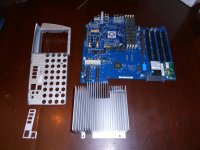
For comparison, here's a photo of the parts that came in my FW800 machine after I pulled them. Note the additional port for the FW800 and also the different heatsink.
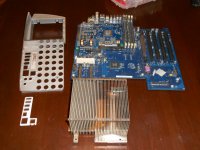
The machine I purchased was a single processor 1 Ghz FW800. The lowend model. It was DUSTY! And man did all that dust stink of cigarette smoke!
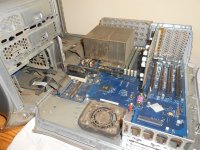
First thing I did was pull everything out and go to town with the high-powered vac and the canned air.
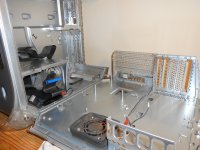
Then I put in the new parts and put everything back together. (For extra details on the heatsink installation process, see this thread in the lounge.)
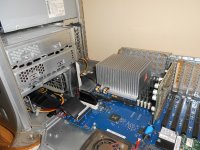
I acquired from eBay an MDD June 2003 single 1.25 Ghz board, CPU, heatsink, 2GB RAM matched combo. When the seller heard what I was doing, he through in the matching I/O panel (without the FW 800 port) for free.
For comparison, here's a photo of the parts that came in my FW800 machine after I pulled them. Note the additional port for the FW800 and also the different heatsink.
The machine I purchased was a single processor 1 Ghz FW800. The lowend model. It was DUSTY! And man did all that dust stink of cigarette smoke!
First thing I did was pull everything out and go to town with the high-powered vac and the canned air.
Then I put in the new parts and put everything back together. (For extra details on the heatsink installation process, see this thread in the lounge.)
Last edited by a moderator:
Then, the moment of truth. Would it all work?
BONG! It did! Whoopee!
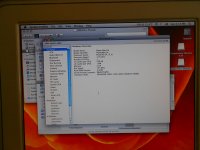
It booted into Leopard, and I installed a CPU temp utility to make sure the heatsink and grease were functioning properly. When I could see that they were, I pulled out the MDD 2003 CDs I acquired from an obliging friend, dropped in the OS 9 disk, and went to work.
Hmmm. The read me says that the OS9 package on the disk supports Classic only and will not make a bootable system folder. Really?
That doesn't seem right.
Well, I tried of course.
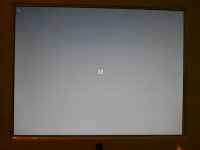
So, the next step is to ascertain exactly which machine the disks I have came with originally. My fear is that they were originally FW800 disks. I have to check with my friend to see. If they ARE June 2003 MDD disks, then I'm curious because they clearly don't support an OS9 boot (regardless of hardware), and the June 2003 MDD was supposed to be OS9 bootable.
If I do have the right disks, my next step will be to try to get ahold of a set of original MDD disks and also to try my 700Mhz eMac disks (I'm going to try that first). If neither of THOSE options work, I'll try to find an ATI eMac set.
I'll keep you posted!
Thoughts? Comments? Advice?
BONG! It did! Whoopee!
It booted into Leopard, and I installed a CPU temp utility to make sure the heatsink and grease were functioning properly. When I could see that they were, I pulled out the MDD 2003 CDs I acquired from an obliging friend, dropped in the OS 9 disk, and went to work.
Hmmm. The read me says that the OS9 package on the disk supports Classic only and will not make a bootable system folder. Really?
That doesn't seem right.
Well, I tried of course.
So, the next step is to ascertain exactly which machine the disks I have came with originally. My fear is that they were originally FW800 disks. I have to check with my friend to see. If they ARE June 2003 MDD disks, then I'm curious because they clearly don't support an OS9 boot (regardless of hardware), and the June 2003 MDD was supposed to be OS9 bootable.
If I do have the right disks, my next step will be to try to get ahold of a set of original MDD disks and also to try my 700Mhz eMac disks (I'm going to try that first). If neither of THOSE options work, I'll try to find an ATI eMac set.
I'll keep you posted!
Thoughts? Comments? Advice?

As you have a running OS X system, you can try the NetBoot for OS9 image from Apple. It contains 9.2.2 System Folders in a few languages. You can use Pacifist to extract the NetBoot HD.img from the NetBoot.pkg file. Mount the disk image, copy the System Folder to your hard disk and remove the Multi-User Prefs file from it's Preferences folder (otherwise you'll get a login prompt when you boot into OS 9.

I believe this will help. Trag gets credit for finding this and posting it in the Trading Post.
I totally spaced on the fact that the I/O panel would be a little different due to the lack of FW800. D'oh! Good thing the eBay seller you bought from had been down that road before and hooked you up with extra parts for free. That's awesome.
Also I believe you said you've called Apple asking for a disc and got denied. Since I've heard stories in the past of them doing it you might want to try calling again (maybe a few times? } ) if you feel inspired enough. Having worked in a call center doing Customer Service (although for a cell phone company that rhymed with E-Mobile) I can personally attest that sometimes the answer to your request is dependent on the rep, not the company or policy...
Congratulations on being one step closer to your goal. Good luck on the quest for the proper OS 9 disc!
I totally spaced on the fact that the I/O panel would be a little different due to the lack of FW800. D'oh! Good thing the eBay seller you bought from had been down that road before and hooked you up with extra parts for free. That's awesome.
Also I believe you said you've called Apple asking for a disc and got denied. Since I've heard stories in the past of them doing it you might want to try calling again (maybe a few times? }
) if you feel inspired enough. Having worked in a call center doing Customer Service (although for a cell phone company that rhymed with E-Mobile) I can personally attest that sometimes the answer to your request is dependent on the rep, not the company or policy...Congratulations on being one step closer to your goal. Good luck on the quest for the proper OS 9 disc!
Hang on, just had a thought.
The question mark has to be a good sign, right? It means a classic ROM is operative on the system.
When I tried using my eMac install disks on the FW800, I got a System 9.2.2 folder choice in the Startup Disk options, but when I actually restarted that way, I didn't get a question mark. It just hung and then restarted in X.
The question mark has to be a good sign, right? It means a classic ROM is operative on the system.
When I tried using my eMac install disks on the FW800, I got a System 9.2.2 folder choice in the Startup Disk options, but when I actually restarted that way, I didn't get a question mark. It just hung and then restarted in X.
Progress! After last night's failure, I called to mind this oft-repeated basic information from lowendmac.com (taken in this case from their Wallstreet PDQ page. See the last paragraph in the overview section).
This time, no question mark!
It started booting into OS9, and then crashed halfway through.
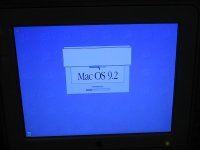
So, one issue resolved. Now to try the other install disk options I have available.
I went back, partitioned my boot disk with a 1GB partition for MacOS 9 and then reinstalled everything using the same install disks.If you have a hard drive larger than 8 GB, you should partition is so that the first partition is under 8 GB in size (for simplicity, we suggest 7 GB). Failure to do this could eventually result in an unbootable computer, as all System files must be within the first 8 GB of drive space. These Macs can work successfully with larger drives for some time, but once a System files goes outside of the first 8 GB of space, you'll have nothing but problems.
This time, no question mark!
It started booting into OS9, and then crashed halfway through.
So, one issue resolved. Now to try the other install disk options I have available.



viewtopic.php?p=163791#p163791
Mac OS 9 on the Mirrored Drive Doors /I was at the Apple store today, and while talking to my genius, I mentioned my problem. He went out back and got me a shiny new set of system discs for my specific machine that they had hanging around . . . He also said that if one were to call AppleCare and explain the situation that they would burn a copy of the original system from the vault and it would be free except for postage.
Gah! Booting with extensions off!? Duh!
I am SO out of practice with pre-OS X troubleshooting. Back in the day, the extensions-off reboot was as natural as breathing.
I'll try it after I reinstall the OS 9 software. I wiped the partition in anticipation of trying something else.
In other news, I've been running Apple Hardware Test 1.2.6, which I believe is the disk for the original MDDs.
Everything passes fine except my memory.
The FW800 board came with two 256mb sticks, a PC2100 stick which is incompatible with the new, 167mhz board, and a PC2600 stick.
The MDD board came with four 512mb sticks, all PC2700.
Using the MDD board, the FW800 RAM behaves as expected. I get a fail test on the PC2100 stick, and the PC2600 stick passes and functions fine.
But when I install the PC2700 RAM, Apple Hardware Test won't even boot successfully. I get the error screen below. I've tried with one stick, two sticks, and four sticks, and I get the same grey screen every time. Of course, running the computer in Panther, Tiger, and Leopard, I haven't noticed any problems at all. Only when trying to boot AHT 1.2.6.
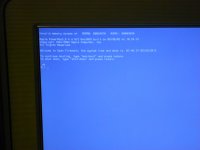
I haven't spent too much time swapping sticks around because the machine came stock with 256MB, and I've got a working 256MB stick to play with until I get OS9 running, which is the immediate goal. But eventually, I'm going to want a problem-free install of max RAM as well.
I am SO out of practice with pre-OS X troubleshooting. Back in the day, the extensions-off reboot was as natural as breathing.
I'll try it after I reinstall the OS 9 software. I wiped the partition in anticipation of trying something else.
In other news, I've been running Apple Hardware Test 1.2.6, which I believe is the disk for the original MDDs.
Everything passes fine except my memory.
The FW800 board came with two 256mb sticks, a PC2100 stick which is incompatible with the new, 167mhz board, and a PC2600 stick.
The MDD board came with four 512mb sticks, all PC2700.
Using the MDD board, the FW800 RAM behaves as expected. I get a fail test on the PC2100 stick, and the PC2600 stick passes and functions fine.
But when I install the PC2700 RAM, Apple Hardware Test won't even boot successfully. I get the error screen below. I've tried with one stick, two sticks, and four sticks, and I get the same grey screen every time. Of course, running the computer in Panther, Tiger, and Leopard, I haven't noticed any problems at all. Only when trying to boot AHT 1.2.6.
I haven't spent too much time swapping sticks around because the machine came stock with 256MB, and I've got a working 256MB stick to play with until I get OS9 running, which is the immediate goal. But eventually, I'm going to want a problem-free install of max RAM as well.
Okay, so I just got taken to beginner school by the mod. Good call, Bunsen. Turning off extensions on startup allowed the boot to complete.Try booting with all extensions off - hold down the [shift] key while booting
We are OS 9 live!
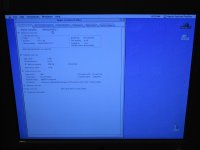
Couple of notes:
1) I'm running a MDD June 2003 single 1.25Ghz CPU/board combo inside what was originally a FW800 box. I'm using one 256MB stick of PC2600 RAM that was on the FW800 board.
2) I booted from my retail Tiger install disk, wiped and partitioned the drive, and installed Tiger.
3) I used the MDD OS9 disk to install an OS9 system folder. According to the documentation on that disk, the OS9 install is for Classic support only under OSX and will not support booting in OS9. But it does.
4) It crashes on startup unless extensions are off.
So all that's left is to find the extensions conflict.
Video-driver conflict has been suggested. I will look into that possibility and keep you all posted.
If you've ever used Ex Post Facto to install a not-officially-supported version of OS X on a machine, you know how I feel right now.
If you're looking for an OS 9 box, there definitely is merit to getting a machine that can boot from a retail OS 9.
They're much more common than whatever machine-specific install disk you need to make your machine behave properly.
If you're looking for an OS 9 box, there definitely is merit to getting a machine that can boot from a retail OS 9.
They're much more common than whatever machine-specific install disk you need to make your machine behave properly.


I tried the "call Applecare" last year. My very first call, I got someone who said "sure, I just need the serial number so I can figure out which model you have." (And it was going to be $10 shipping *PER DISC* in the set.) Sadly, I didn't have the serial number on me.
I called four more times over the next week, and never got anyone who knew anything about that. I tried many different departments, education, business, consumer. On one call, I was transferred around four times. The best answer I got later was "use Sheepshaver."
I called four more times over the next week, and never got anyone who knew anything about that. I tried many different departments, education, business, consumer. On one call, I was transferred around four times. The best answer I got later was "use Sheepshaver."
Okay, so I'm able to boot with all extensions on. I switched out the PC2700 RAM that was causing AHT to failboot, and put in the one 256MB PC2600 stick that passed AHT. So I'm at stock RAM levels right now, but, whatever.
After I did that I turned off all the extensions and worked up to a maximum successful set . . . which turned out to be all of them. I should have tried booting again with extensions after the RAM switch. Oh well. It works now anyways.
The problem is, the system folder I got from the install CD is gutted. No AppleTalk control panel. No Mouse control panel. No File Sharing extension. That's for starters, as they're what I need right now.
So, I'm in the process of cataloging everything (all control panels, extensions, etc.) in the system folder including version numbers.
I'm then going to catalog the system folder in my Wallstreet PDQ (a 9.2.2 International update downloaded from Apple and added to a 9.1 UK retail install).
I will see what the differences are an start adding things to the gutted system folder on my MDD and see what works and what crashes.
I will then take this hybridized, bastard, Borgified system folder, and *archive it*. I will then test it for a month or two using lots of software.
If everything works, I'll have me a new, custom OS 9.2.2 install for 2003 MDD machines.
I'll keep you all posted.
Update: File Sharing is live on the MDD-Borg, and it and the Wallstreet are now talking to one another.
After I did that I turned off all the extensions and worked up to a maximum successful set . . . which turned out to be all of them. I should have tried booting again with extensions after the RAM switch. Oh well. It works now anyways.
The problem is, the system folder I got from the install CD is gutted. No AppleTalk control panel. No Mouse control panel. No File Sharing extension. That's for starters, as they're what I need right now.
So, I'm in the process of cataloging everything (all control panels, extensions, etc.) in the system folder including version numbers.
I'm then going to catalog the system folder in my Wallstreet PDQ (a 9.2.2 International update downloaded from Apple and added to a 9.1 UK retail install).
I will see what the differences are an start adding things to the gutted system folder on my MDD and see what works and what crashes.
I will then take this hybridized, bastard, Borgified system folder, and *archive it*. I will then test it for a month or two using lots of software.
If everything works, I'll have me a new, custom OS 9.2.2 install for 2003 MDD machines.
I'll keep you all posted.
Update: File Sharing is live on the MDD-Borg, and it and the Wallstreet are now talking to one another.
This whole experience has gotten me thinking about how useful it would be to have an online wiki for the various versions and pieces of System 9.x.
It would list:
All the various versions of OS 9.x and when and how they were released.
Photos of CDs with part numbers, etc.
Box scans with system requirements, etc.
And, under each version of OS 9.x.x it would give a complete breakdown of what was in the system folder, control panels, extensions, etc. with version numbers.
And, it would have detailed information on important system components (like control panels and extensions). When they were first released, what they did, and which versions were used in which systems.
It would also have discussions of MacOS 9 compatibility with various software and of which machines were compatible with which versions and of how the OS was implemented differently between Old World and New World machines.
What a fantastically useful project that would be.
It would list:
All the various versions of OS 9.x and when and how they were released.
Photos of CDs with part numbers, etc.
Box scans with system requirements, etc.
And, under each version of OS 9.x.x it would give a complete breakdown of what was in the system folder, control panels, extensions, etc. with version numbers.
And, it would have detailed information on important system components (like control panels and extensions). When they were first released, what they did, and which versions were used in which systems.
It would also have discussions of MacOS 9 compatibility with various software and of which machines were compatible with which versions and of how the OS was implemented differently between Old World and New World machines.
What a fantastically useful project that would be.
Well, another incompatibility with OS 9 pops up.
It won't go to sleep properly. It goes to sleep, but the fans keep running (and as we all know, MDD fans are not quiet). It says there's a piece of hardware installed that's not compatible with sleep, and checking the system profiler, it appears to be a PCI card, of which there are none installed.
Could it be the graphics card itself? It's the GeForce4 MX, I think. It's whatever was the installed card on my FW800 board, and that being the lowend model, I think that's the one. I'll check later to be sure.
Any other ideas?
It won't go to sleep properly. It goes to sleep, but the fans keep running (and as we all know, MDD fans are not quiet). It says there's a piece of hardware installed that's not compatible with sleep, and checking the system profiler, it appears to be a PCI card, of which there are none installed.
Could it be the graphics card itself? It's the GeForce4 MX, I think. It's whatever was the installed card on my FW800 board, and that being the lowend model, I think that's the one. I'll check later to be sure.
Any other ideas?
Similar threads

- Replies
- 19
- Views
- 2K


- Replies
- 2
- Views
- 510
- Replies
- 5
- Views
- 2K
