• Hello MLAers! We've re-enabled auto-approval for accounts. If you are still waiting on account approval, please check this thread for more information.

Make the sound volume higher...

Hello,

today i tried the following on my Macintosh LC475. I connected one cheap pair of speakers in the computer's sound port and then i connected my logitech X230 speakers in the phone jack's port of the cheap speakers. So the sound was coming from the logitech speakers and it was a lot louder. It was great. Then i did the same connection on the Roland MT32 and it was amazing. So much louder and so clear sound from the Roland music on Sierra On Line games. Is there also another easy way to make the volume louder without using two pair of speakers? I am not familiar with sound stuff. 

 
You probably want a little amplifier.  A headphone amplifier might do the job, since presumably that's what's in the cheap pair of speakers?  You can get perfectly reasonable ones of those for not much money.

 
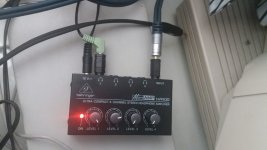
Today i got a mini stereo amplifier, the Behringer HA400 which has one 1/4" input port and four 1/4" output ports. I tested it with my external 4x apple cd drive with music cds and games that play music directly from the cd and i also tested it with the Macintosh LC475 computer. Below the connection:

1) For the cd: rca cable to 3.5mm male connected in the 1/4" input port of the amplifier via an adaptor 3.5mm female to 1/4" male.

2) For the Mac computer: one 3.5mm male to 3.5mm male cable connected the one edge in the sound out port of  Mac and the other edge in the 1/4" input port of the amplifier via an adaptor 3.5mm female to 1/4" male.

For the Mac there is sound only on one speaker. For the cd there is sound on both speakers. Do i have to so something to hear on both speakers from the Mac? I connected again my speakers in the sound out port of the Mac without using the 3.5mm cable and the amplifier and the sound was again from both speakers. The amplifier does a good job, the sound is so much louder but i would like sound on both speakers.

 
You mean the 3.5mm female - 1/4" male adaptor? Regarding the cables i have two of them, one cheap low quality and the other is a clicktronic cable.

 
Also make sure that there isn't something silly software-based going on, like having all the sound go to one channel in the Sound control panel.

 
Yes, do check that.  But I've had both cables and adapters fail in such a way that only one channel gets through, especially cheaper ones.

 
At the sound out panel there are permanently on the following options which cannot be changed:

Rate: 22.254 Khz

Size: 8 bit

Use: Stereo

At the sound in panel there is nothing to choose.

 
I've just tested the amplifier with the Roland MT32 and the sound is coming from both speakers. Great quality and so much louder. Only from my Mac computer the sound is coming only from one speaker. All tests with cheap adapters

 
Is there a possibility that the jack from the machine is damaged in some way? Have you tried with a simple set of headphones and heard what happens?

 
I will give it a try. The Logitech x230 speakers play normally directly connected to the sound port of the Macintosh LC475. Sound from both speakers. Also the same from one cheap of speakers I had recently. I will try later a set of headphones. 

 
I found what it happens. When i have the 3.5mm cable full connected in the adapter then the sound comes only from one speaker. I tested with one more set of speakers and i had the same problem. I tried to connect the 3.5mm jack having it little outside, not complete connection in the adapter and it works! Something has to do with the contact i guess. Below is the photo with the connection. I did that with three adapters and with all i had to play a little with the connection in order to hear both speakers. The same with my both cables, one cheap and one of good quality.

viber_image_2019-12-19_14-18-29.jpg

 
I’ve had this happen, especially on newer Macs with the three-tab miniplugs that transfer left, righ, and microphone input via the same wire.

 
Back
Top