
-
 Hello Guest! We're hosting a challenge to welcome vintage Intel macs to the MLA during the month of July! See this thread for more information.
 -
We've made some quality of life improvements to the Trading Post. More info here.
Macintosh SE - memory size switching resistor
- Thread starter Aektann
- Start date


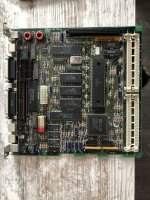



 (I'm specifically thinking of 32-bit addressing being turned off, when the About This Macintosh will show all the memory, but the system will seem to be using almost all of it, and there's no indication about how to get it to stop using almost all of it)


