• Hello MLAers! We've re-enabled auto-approval for accounts. If you are still waiting on account approval, please check this thread for more information.

Macintosh SE FDHD / Zip100 Plus!

markyb86

68000
Got this guy off of eBay last week. 49.99.
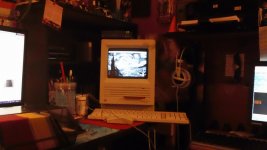
DSC00469.JPG

4MB ram, 20MB HDD. came with System 6.0.7

Seller said it booted to a question mark, which it did. So, I expected it to have a bad HDD or just formatted. Booted off of a System 7.0 disk, only once, after a Command+Option+Shift+Delete.

After it booted from the disk, it rebuilt the desktop, spat the disk out and loaded the 6.0.7 desktop.
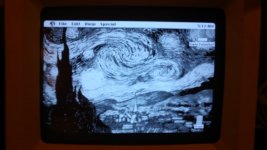
DSC00472.JPG

I cannot for the life of me figure out what program is setting a random background on each boot. Pyro! is installed but I'm pretty sure that its just for the screensaver. The hard drive is filled almost to capacity with word docs from the early 90's.

Onto the Zip100.. couldn't test it because the original owner left the cord out of the package. That came today as well.

Drive just lights up a solid green and amber and does nothing. Doesn't eject either. Had to paperclip the cute little thing. I love how these zip drives look, just wish they weren't so prone to disaster. Ugh. No fun time for the Compact today I guess. :disapprove:

Oh yeah, almost forgot... After the first boot off that 7.0 disk, it won't boot it again so I can't wipe the drive.. Nor can I boot any disk. Quite awkward.

 
That was the third desktop that loaded.. I have no idea how they get on there. I did find the folder with the images but thats about it. When It first booted, there was a terrible dragon staring at me from behind "Welcome to Macintosh"

That Van Gogh does look bad though.

 
Heh! Reduce the pixelcount to half screen and then blow it up to a pixel multiplied digital Lichtenstein and it might not make me wanna puke!

edit: that is one major pile of .TXT for displaying 25 words!

Best O.T find of the lot: Davisville, Rhode Island's Seabee statue and museum

sb-ext.jpg.b8cfccb4c20b266f700e06a24bea355a.jpg


p.s. I can't help it . . . I'm home trippin' on asthmatic bronchitis, laced with beaucoups antibiotics, bronchiodialators, anti-histemenes, pomegranate green-tea and sugar . . . xx(

p.p.s. the reason I posted at all was because I'm so dopey I was gonna ask if it was the same seller or if you maybe got a PC Parallel version . . . duoh! :I

p.p.s. erm . . . now what made me think of doing a painting of Beavis and Butthead going Bazooka BLAM! all over Barney's Purple . . .

. . . :lol: . . . OK . . . < cough . . . gasp! . . . HAR™ . . . cough . . . wheeze . . . > I'm done for . . . that freakin' squirrel did me in! xx(

 
I enjoy that painting as well. Since for the time being I'm stuck with that installation ( I don't want to make new disks ATM..) I went in and deleted the images in hopes of finding the app that is setting them as the desktop background. Seriously the only Application I can find in this mess of word docs, is Word itself. nothing else is executable besides the printer spooler and control panel.....

Going to keep trying with random disks until I get this right. Stinkin' zip drive.. boo hoo hooooo :'(

and @jt: lol you aren't TOO doped up to think its a PPT version of the zip since its both, however neither mode would work in this case :-x haha

 
:lol: Doped enough to forget the specs on a Zip+ will do . . . for a start . . . ::)

Seriously, (if you can really s-t-r-e-t-c-h the meaning) Take a look at Bazooka J. Squirrel and his cronies in the last post of this thread:

Russian squirrel pack 'kills dog" BBC ^ | December 1, 2006 if you can make it down that far without ROTFL'n in the pile of horse puckey.

. . . that'll just about get 'er done! :O

Meanwhile: @ themacguy

Between that'un, Sunflowerers, Irise lovers, Lily Pad lookers, Dancer obsessions, Courtesan cookoos and those with a taste for Tahitian T@T@$ (link not provided for obvious reasons, but one search term may suffice . . . [;)] ]'> ) I'm sure French Impressionism has pretty much got the "my favorite painting ever" market all but sewn up in the western world.

Sometimes I really do miss the big bad rotten apple . . . :'(

. . . no, not the one in Cupertino. :o)

p.s. If I think of something helpful, I'll pop back in for a bit! :lol:

 
Now you have me fearing for my dogs lives as the squirrels around here have been a little more friendly than normal lately...

 
Opened him up this morning.

First things first.. buy a long T15? Nope.

IFBfE.jpg.65393dc12072b0af553959c4bac93dae.jpg


Anywho, here's the logic board. Looks good to me. No leaks that I can tell. However didn't someone mention that purple battery was booo-jeet? I think its dead anyway so I'm gonna pull it.

UD75r.jpg.9668be908d046f5470c6595d10404f15.jpg


Now I didn't want to completely jack Uniserver's thread, so here's my screen question. I found the two potentiometers, but no luck on knowing which is which. They have the same markings and aren't labeled. I just want to move the image on the screen over about 1cm to the right to center it, otherwise looks good.

e1fa685c585c1a235e8f503aec4f7c19.jpeg.278dbe2ee21616d2742be6fade025623.jpeg


And then there is this:

Gjg3H.jpg.b8849461f465d058e58e54a80b9688ee.jpg


The only bad looking thing I can find. it looks like rust under the hot glue blooge but, is that something leaking? or just rust like I thought?

Thanks guys. :o)

 
Well since impatient Marky is impatient,

I scoured the google for a little while.

Here's what I wound up doing.. Took a second after a bit of reading with no pictures, but one of these tabs on the back of the screen needed moving. I'll attach a pic of which one moves horizontal. Used two unsharpened pencils as the tools per instructions. Have to do this with the computer on 8-o

moving this one towards you (or the way I marked the arrow) will move the picture to the right.

DSC00489.JPG

Now to install 6.0.8.

{EDIT: oops, forgot I had these..

4698b0706552805279cb0eecd5e95f2c.jpeg.f04c216508129e65b0f0dcde00318d19.jpeg


}

Last night I initialized the disk, copied the system folder from a 7.0.1 booter and messed around with the computer for a little bit. this morning over a bowl of Cinnamon Life Cereal, the thing boots to an error with the system folder, a boot disk may fix, etc.

Sad Marky is sad. I think the HDD is dying.

 
Last edited by a moderator:
Well, I have had 7.0.1 installed for about 6 hours now? And it's been working fine since. I've been sneakernetting some stuff to it from the G3. What a pain :O

Oh well it is functioning and that's all that matters. Gotta get that USB-Serial adapter soon so I can IRC from this thing, and try out BBraun's serial disk.

 
Besides the PRAM battery, is there anyway (I know, don't unplug it) to prevent the little guy from forgetting where his brain is (doesn't remember to boot from HDD) after unplugging it?

 
Hi,

You pretty much need a PRAM battery. You can't even leave it plugged in.

Why, you may ask?

Well...

Because of the way the power supply is designed (no soft power), flipping the switch cuts off ALL power from the logic board, and therefore the PRAM. In other words, there's no provision for a trickle "clock" voltage.

The only way to prevent the PRAM from being reset without a battery is to pretty much leave the computer on 24/7/365 (although, depending on current circumstances, that isn't very feasible).

The same is true of the Plus (I shipped it without a battery). Unless you keep it on forever, it'll never retain it's PRAM without a battery.

I hope this helps!

c

 
Any further word on the desktop pattern program? I'm familiar with Backdrop but that's the only one I can think of which runs on System 6. (Could have been easily confused with Backgrounder in the System Folder).

I'm with Trash80 on the Lichtenstein artwork--I'd love to see that as a desktop pattern, especially since he's my favorite artist.

 
I did! I should have posted here. Its called backsplash II. I couldn't for the life of me find the file in the original 6.0.8 install, however, I did find the download for it!

http://www.jagshouse.com/system6_to_system7.html

It's in the very last package. Some other useful things there too.

And, now that you reminded me.... 8-)

ppr2f.jpg.a40370266e07a7518ad697257eabfd3b.jpg


lemme know if you want the pict file (or any pict file at that...)

Backsplash II requires you to create a file in your preferences folder 'Backsplash PICTS'

which it will randomly choose one at startup unless you change the settings. You have to supply a PICT file. It could be any file with a PICT resource inside. on 6.0.8 all the files were startup screen files from macpaint?

I however am having no issue saving PICT's from photoshop 6 in 2 color.

 
Back
Top