
-
 Hello Guest! We're hosting a challenge to welcome vintage Intel macs to the MLA during the month of July! See this thread for more information.
 -
We've made some quality of life improvements to the Trading Post. More info here.
You are using an out of date browser. It may not display this or other websites correctly.
You should upgrade or use an alternative browser.
You should upgrade or use an alternative browser.
Macintosh SE crushed
- Thread starter Highsheep1
- Start date


Yeah, I tried this method, but it also didn't work....Just a thought, might not change anything but unplug/disconnect the following
- Internal hard drive (if present)
- Internal floppy drive (if present)
- Everything plugged in externally except the power cable
Are you using a PS/2 to ADB converter? Unplug it and retry without it.
Do you have something like troubleshooting tools? I had seen them on apple II, but I haven't seen them on any Macintosh..Just a thought, might not change anything but unplug/disconnect the following
- Internal hard drive (if present)
- Internal floppy drive (if present)
- Everything plugged in externally except the power cable
Are you using a PS/2 to ADB converter? Unplug it and retry without it.

Sorry, I thought I just need to report if it is nearly work. The +5V is 4.985V. And the pin 7 is 12.256, pin 8 is 12.254you are not listening to people - take the dam voltage readings , record them over time , 12 volt , 5 volt - and report back with actual voltage readings - nothing else
Guys, when time goes by , it even become worse. Look for this picture, the machine stops reseting but with error, and there're white pixels appearing from left to right on the screen. During this time, the speaker makes bad sound. This picture is taken I just seen the error occured, and just the beginning of the pixels appeared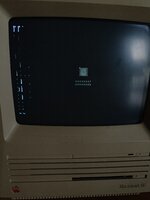
em.. because my first language isn't English, so I may can't express my idea well.... if there's anything that you can't understand, please tell me, and I'll try my best to let you understand...
the speaker made crack sounds.Guys, when time goes by , it even become worse. Look for this picture, the machine stops reseting but with error, and there're white pixels appearing from left to right on the screen. During this time, the speaker makes bad sound. This picture is taken I just seen the error occured, and just the beginning of the pixels appearedView attachment 76780


Did you plug the BlueSCSI in or unplug it while the machine was powered on?but when I plug in Blue SCSI, and it works well, the machine crush. I immediately remove the blueSCSI and restart,
Not sure if that would necessarily cause your specific issues, but plugging/unplugging SCSI(or ADB- the keyboard/mouse port) while the computer is on is not a good idea and could cause damage
When problem occurred, I quickly removed it. Don't worry, I did it only when I cut off power supply.Did you plug the BlueSCSI in or unplug it while the machine was powered on?
Not sure if that would necessarily cause your specific issues, but plugging/unplugging SCSI(or ADB- the keyboard/mouse port) while the computer is on is not a good idea and could cause damage
OK, I'll try doing itTry removing and reinstalling RAM and ROM.


My first language is Chinese. But if you use other language , I can also use translator.what's your primary language?

Make sure that you remove the programmer’s switch on the side and verify that the reset and interrupt buttons are working correctly. Could be jammed?Oh, and I can tell you what happens last before it crush. I opened the machine, and it worked. But for few minutes, it opened debugger automatically, and can't be existed. And for another few minutes, there was a white square with nothing on the center of the screen. Mouse and keyboard also couldn't use. I restart and it became to this situation.
well. If I press programmer's switch, there'll be a sad Mac face and with 0000000D 0000000F error codes, and the reset button works well.Make sure that you remove the programmer’s switch on the side and verify that the reset and interrupt buttons are working correctly. Could be jammed?
Things change.... After checking the power supply, it can successfully goes into the reading part. The question mark and the floppy icon appears. But I tried internal, external hard drive and floppy disk. All of them can't be read. For the floppy disk, the disk just goes out and the  mark is shown on the floppy disk. I can't find where the problem is.....
mark is shown on the floppy disk. I can't find where the problem is.....well... I only have this classic Macintosh... But for external hard drive, I make it on basilisk II and MiniVmac. And it can be identified and can start with these emulator. For floppy disk, I used installer from miniVmac and install it with an empty 800k dsk file. It also can be start. And I tried to listen for the sound. When I insert a floppy disk, only the wheels at the bottom of the floppy drive are spinning, but the heads are not reading or writing.Are you sure that you harddrives and floppy disk drive and floppy disks are functional? Could you test them with another Mac?
Similar threads

- Replies
- 5
- Views
- 528


