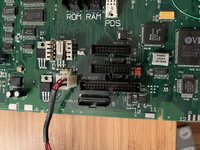
Hey
@jcs
I have a Macintosh Portable M5126 with exactly same problem. I mean,
exactly the same problem. I thought you'd like to know how I solved it.
1. Swapped the internal hard drive for a ZuluSCSI compact (with .ini set to MacPlus mode and Androda adapter) with a known working system image. With the ZuluSCSI plugged into USB power, everything works fine. Otherwise, the ZuluSCSI is not getting power.
2. Although the terminator power pin on the Macintosh Portable does not supply power, the Androda adapter reroutes that from +5V. Checking the voltage of the SCSI +5V pins on the internal SCSI connector confirmed that it is faulty.
3. After disassembly, I toned out to see that SCSI +5V connects to mosfet Q20's drain. And Q20's gate connects to resistor R173 (underneath the board). The other side of R173 connects to pin 42 of the Power Manager chip. This confirms what
@SuperSVGA already described. (This is all true for the M5126, but not the earlier M5120).
Below is my cheatsheet for the power manager chip.
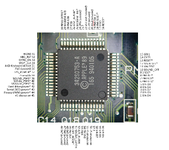
4. The power manager chip had been replaced on this Macintosh Portable. However, pin 42 is lifted off of the pad by flux/debris. A multimeter shows no continuity between the pin and the pad.
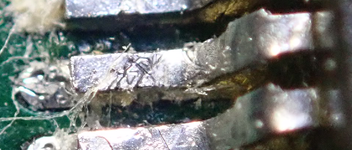
5. I cleaned it with isopropyl alcohol, applied fresh flux, reheated each pin, and then cleaned it again with isopropyl alcohol. Pin 42 now shows a clean connection.
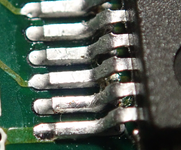
And that was it! The internal SCSI port now receives +5V power.
As soon as I test R173 with my multimeter, it activates the 5V going to the SCSI port and powers up the drive...
The multimeter activates the gate on MOSFET Q20. Since nothing else was connected to change the state of the gate, it remained active until shutdown.
- David