• Hello MLAers! We've re-enabled auto-approval for accounts. If you are still waiting on account approval, please check this thread for more information.

Macintosh Plus Voltage and Display "Static"

Hi,

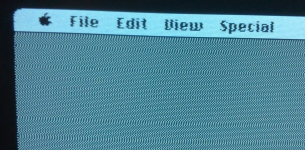
When my Mac Plus is powered on about half of the time it exhibits a strange static effect.  The display is still ~98% readable, but the image is very unstable and seems that every pixel is staticy with the surrounding pixels, especially horizontally.

My first thoughts were the voltage being off.

Using the external floppy port I was able to dial it in to the following:

Pin 5: -12.38v

Pin 6: +4.99v

Pin 7: +12.00v

pin 8: +12.00v

Is Pin 5 creeping a little too far away from -12.00v?  If so, what are some tolerance ranges?  Or any other ideas what may be causing the display issues?

The computer is still usable with the static effect, and the other half of the time the display is laser sharp.  The computer appears to operate normally aside from this problem.

Thanks

 
I have this problem with an SE/30, a strange static effect with every pixel, and the sides of the screen show a zipper effect.  My issues goes away after the machine is on for about a minute, but I'm worried every time I turn it on.  Don't know what the cause is, but I'm following your thread for other input.

 
Just as a sidenote. We will probably never actually see a report of spam in the thread. You must click on the Report button at the bottom of a post that has spam. This notifies all the mods/admins by email and puts a notification on our screen when we visit the site.

 
Can you post a photo or video?

I would doubt it's a voltage issue, especially as 5V is at the correct level. I'm not sure -12V is used for much anyway. It could be a problem on the analog board or the CRT neck board though -- something in the video buffer circuits. Or I suppose it could even come down to a loose connection on one of the cables.

 
At work now but when I get home I can get a video of the effect.

My next guess is going to be damaged solder points on the analog board, specifically on the J1 and J4 (video PIN). I was going to try my best to clear the old solder from those points and put in new solder as described in this document:

https://68kmla.org/files/classicmac2.pdf

 
Sorry for the delay, work has been busy lately.

Thank you TechKnight.  I'm hoping that it is just some solder points cracking and not the flyback.  I'm going to try to do the soldering tomorrow morning.

Can you post a photo or video?
I can't get videos to upload here, but I got a photo and then several frames of a video that show the effect.

The photo:

mac_plus_graphics_glitch.JPG

Notice the edges of the window and to an extent the text.

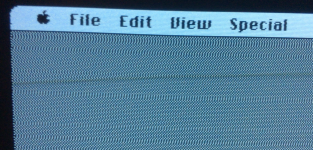
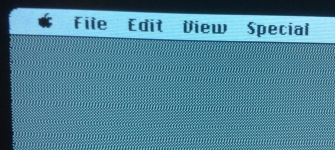
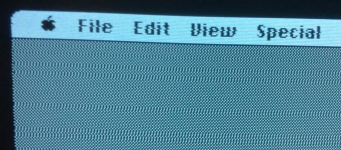
The video, flip through the photos to get an idea.  Everything is constantly moving.  IE, the deformed letters aren't staying still.  Hopefully that makes sense.

Screen Shot 2016-12-02 at 11.16.26 PM.png

Screen Shot 2016-12-02 at 11.16.39 PM.png

Screen Shot 2016-12-02 at 11.16.50 PM.png

Screen Shot 2016-12-02 at 11.17.04 PM.png

 
On a good note, this is the same Plus that used to have the messed up floppy drive.  That is now working great, so it's almost there :)

 
Last edited by a moderator:
Strange. The shifting pattern must happen because the video signal and the horizontal scan timing are getting out of sync with each other. Since the video signal is digital and can't shift continuously by sub-pixel amounts, that points to the horizontal scan jittering back and forth in timing by a few microseconds each scan line.

Referring to p. 16 of the guide linked above: the place the video starts on the screen is mainly a function of when Q3 switches off (i.e. the beginning of the HSYNC pulse) in relation to the video signal. At the beginning of HSYNC (i.e. when the signal on J4-3 goes low), the flyback pulse starts -- basically a big pulse of voltage on C4 which corresponds to the beam sweeping across the screen from right to left, and also a big HV pulse out of the flyback transformer. The timing of that pulse should always be exactly the same, dependent on the inductance/capacitance of the flyback and the value of C4.

But if for whatever reason, the length of the pulse varied a little bit each scan line, you'd see something like what you see. (techknight, is that what shorted turns in the flyback would do?) But several other components are also involved in this circuit and could be at fault: C4, R1, L3, L2, C1. Of those, C1 often needs replacing anyway, but I've never heard of it creating this particular problem.

The other possibility is that the pulse is always the same length, but Q3 isn't switching off at a consistent time each scan line. That would point to either a faulty Q3 or some problem in the circuits driving it: U2, Q6, T2 etc. I'm not quite sure what the mechanism would be, except perhaps a bad connection somewhere creating a noisy, high-impedance connection that was sensitive to noise (perhaps on J4?).

A scope would help debug this. All that said, the flyback may still be the most likely culprit, just because it is a known failure point and can fail in complex and varying ways.

 
The waviness you see on the screen may be also caused by a worn out power supply. I had the same issue with a high-hour Plus I purchased several years back. The picture would be steady on power up, then shift out of sync as the unit warmed up. 

 
I finally got around to retouching a few of the solder joints last night.  Specifically, all 4 of the J1 connector at the analog board, and the first and last pin of what I believe to be the J4 connector on the analog board (both of those looked visibly cracked).

Giving the computer a one minute test run, that seems to have largely cleared up the video problem.  I need to get some double sided tape to reapply the plastic part over the back of the analog board.  Once I do that I'll be able to put it through a more thorough testing to see how my repairs really hold up, and if they solve the problem 100%.  I'm really hoping the flyback transformer has a bit more life to give :)

 
Back
Top