
I FINALLY got my Macintosh Plus working, but some of the system 6 disks don’t work.

-
 Hello Guest! We're hosting a challenge to welcome vintage Intel macs to the MLA during the month of July! See this thread for more information.
 -
We've made some quality of life improvements to the Trading Post. More info here.
You are using an out of date browser. It may not display this or other websites correctly.
You should upgrade or use an alternative browser.
You should upgrade or use an alternative browser.
Macintosh Plus System 6 Disks, SCSI Hard drive setup, and transferring software/programs.
- Thread starter MacintoshMan1999
- Start date

I guess I forgot to add more details,
right now the 6.0.3 System Utilitys disk is only recognized when I use Disk First Aid, and when I try to repair the disk it says it cannot be read.
another problem is me trying to initialize a SCSI Hard Drive, what conector does it use? Would Fast SCSI work?
And finally is there a way to transfer software from a pc to the plus? I’d like to get some.
right now the 6.0.3 System Utilitys disk is only recognized when I use Disk First Aid, and when I try to repair the disk it says it cannot be read.
another problem is me trying to initialize a SCSI Hard Drive, what conector does it use? Would Fast SCSI work?
And finally is there a way to transfer software from a pc to the plus? I’d like to get some.

Yeah, you're in a tough spot. The Plus only reads 400K and 800K floppies, which can't be written by any modern computers. Not having a hard drive or other mass storage device makes things even more difficult.
Easiest solution is to have a less-ancient "bridge" machine as a go-between.
You may be able to transfer files over a serial cable, but that's slow and difficult to get going.
Possibly your best bet is a SCSI2SD, which is a scsi device that can plug into an old mac and emulates a hard drive but uses SD cards as a storage medium, which can also be written to by modern computers. You'd probably need an adapter and other cables, as the Plus only supports external devices.
I do know that Steve at BigMessOWires sells 800k floppies with system and other software: http://www.bigmessowires.com/classic-mac-floppies/, but that only takes you so far.
Easiest solution is to have a less-ancient "bridge" machine as a go-between.
You may be able to transfer files over a serial cable, but that's slow and difficult to get going.
Possibly your best bet is a SCSI2SD, which is a scsi device that can plug into an old mac and emulates a hard drive but uses SD cards as a storage medium, which can also be written to by modern computers. You'd probably need an adapter and other cables, as the Plus only supports external devices.
I do know that Steve at BigMessOWires sells 800k floppies with system and other software: http://www.bigmessowires.com/classic-mac-floppies/, but that only takes you so far.
Last edited by a moderator:


Did this disk ever work for you? Did it just recently become unreadable?right now the 6.0.3 System Utilitys disk is only recognized when I use Disk First Aid, and when I try to repair the disk it says it cannot be read.
When I finally got it working the internal floppy drive refused to work, the external drive did. I put some of the other system disks in the external drive and most of them didn’t work but 1 or 2 did, before I was swapping disks to see what ones worked and what ones didn’t I had unplugged the internal disk drives ribbon thinking I’d fix it later. But oh god... SO MUCH DISK SWAPING!  So I eventually opened it up, re attached the ribbon cable, closed the case and put a disk in it. Most of the time I’d say “the disk is unreadable, would you like to format?” I picked no and it would eject. I finally figured out that if I put a blank disk in and formatted it, the drive would work. When it worked I opened disk first aid and put the unreadable disks in and it fixed most of them. The internal disk drive still acts up though. Right now most of the disks are readable, the system utility’s disk especially.
In short, most of the disks didn’t work but now they do.
Thank you,
Jack
So I eventually opened it up, re attached the ribbon cable, closed the case and put a disk in it. Most of the time I’d say “the disk is unreadable, would you like to format?” I picked no and it would eject. I finally figured out that if I put a blank disk in and formatted it, the drive would work. When it worked I opened disk first aid and put the unreadable disks in and it fixed most of them. The internal disk drive still acts up though. Right now most of the disks are readable, the system utility’s disk especially.In short, most of the disks didn’t work but now they do.
Thank you,
Jack
For some reason my plus can read and write data to some 1.4MB disks, no clue how. Was laughing in disbelief when it actually formatted and created a directory.Yeah, you're in a tough spot. The Plus only reads 400K and 800K floppies
2 out of 15 don’t work, just checked


A drive made before 1.4 mb floppies may write them as 400 or 800k but it's not generally considered reliable.
Ahhh, ok thanks
So far they have been 100% reliable
So far they have been 100% reliable
Last edited by a moderator:
You can try cleaning the disk itself using this technique: Simple fix for unreadable disks.Most of the time I’d say “the disk is unreadable, would you like to format?” I picked no and it would eject.
I was wrong when I said “in-readable” it said “damaged”. My mistake.
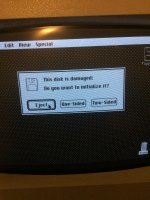
Un*
Yep, that sounds about right.
Any suggestions?
I’m not sure if any type of software could fix this issue, disk first aid only seems to do so much.
I’m going to get a 3.5” drive cleaning kit for the internal drive, it can be finicky. When I boot up my Plus sometimes it reads fine, and others it doesn’t. What I do when it’s not working is I boot from the external drive, when it fully boots I take a floppy and put it in the internal drive and format it. Drive works fine after.
Any suggestions?
I’m not sure if any type of software could fix this issue, disk first aid only seems to do so much.
I’m going to get a 3.5” drive cleaning kit for the internal drive, it can be finicky. When I boot up my Plus sometimes it reads fine, and others it doesn’t. What I do when it’s not working is I boot from the external drive, when it fully boots I take a floppy and put it in the internal drive and format it. Drive works fine after.

+1 on getting a cleaning disk. I was going to suggest cleaning the drive heads. If you don't have a cleaning disk, some cotton swabs and some Isopropyl alcohol will do wonders if the head is dirty. You can easily get these kinds of problems with dirty heads. To use this method you usually have to take the cover off the drive.
I have found that with the age of disks and that many of them are leaving behind remnants on the heads, they need to be cleaned a lot more frequently then back in the day. Also, formatting a disk can sometimes temporarily move the gunk off the head and allow it to work right again.
Hopefully it is just dirty as opposed to something wrong with the mechanics.
I have found that with the age of disks and that many of them are leaving behind remnants on the heads, they need to be cleaned a lot more frequently then back in the day. Also, formatting a disk can sometimes temporarily move the gunk off the head and allow it to work right again.
Hopefully it is just dirty as opposed to something wrong with the mechanics.
Last edited by a moderator:
When I put it back together I had cleaned the read/write heads, should I open it back up?+1 on getting a cleaning disk. I was going to suggest cleaning the drive heads. If you don't have a cleaning disk, some cotton swabs and some Isopropyl alcohol will do wonders if the head is dirty. You can easily get these kinds of problems with dirty heads. To use this method you usually have to take the cover off the drive.
I have found that with the age of disks and that many of them are leaving behind remnants on the heads, they need to be cleaned a lot more frequently then back in the day. Also, formatting a disk can sometimes temporarily move the gunk off the head and allow it to work right again.
Hopefully it is just dirty as opposed to something wrong with the mechanics.
If you cleaned it before all this happened then it should be good. Unless a disk was flaking and redeposited stuff on the head. I have had this happen, but usually more frequently with 5.25" drives and disks. Double-Density 3.5" disks seem to be a lot more flaky then any other disks, at least from my experience. I have had far more 3.5" DD disks for Amiga and Macintosh go bad then 5.25" DD or 3.5" HD disks.
Last edited by a moderator:


Similar threads


- Replies
- 6
- Views
- 493


