• Hello Guest! We're hosting a challenge to welcome vintage Intel macs to the MLA during the month of July! See this thread for more information.

Macintosh Plus — raster lines but no chime

I am working on restoring a Mac Plus that seems to have several issues.

Initially it would not power on. I resolved this by replacing the 2.5A fuse and also the RIFA caps, which had been blown. At this point the computer would chime but nothing else. However, if I tapped the analog board near the center, I could see screen activity.

I reflowed the analog board where the connectors are (“J”) and after that the screen came to life. I could see the floppy icon with a blinking question mark. However the drive itself wasn’t working. I took out the floppy drive and cleaned it up, replaced a broken gear, and applied new lubrication.

This is where I get lost: I plug the floppy drive back in, power up the machine, and I get the following:

- No startup chime
- CRT is powered and I can see horizontal raster lines, but no actual video

Reseating RAM and ROM chips has no effect. I have not been able to get it out of this state. I don’t really understand what removing the floppy drive could’ve done…but perhaps it’s just bad luck and something else has broken while I worked on it.

If anyone has suggestions for what to focus on, I’d be grateful! I’ve checked voltages from the external floppy port pins, and it seems the analog board is providing the proper voltages.
 
That's an unusual fault ... something happened along the way and the floppy repair is likely a red herring. With it back together, I'd reflow the CRT and analog board connectors and clean what plugs, RAM slots you can on the analogue board, motherboard with electronic solvent cleaning spray.
 
@Byrd -- thanks for the suggestions. I reflowed the connectors and also sprayed the connections and sockets with electronic cleaner. Unfortunately I'm seeing the same behavior as before.

I will be picking up another Mac Plus logic board soon and will try swapping it out to see if it makes a difference. This way I will at least know from where the problem originates.
 
Ok, so I obtained some known working boards to do comparisons, and I have confirmed that the issue is solely on the logic board. The analog board, CRT, and disk drive are functioning fine.

Having already taken care of the easy stuff (cleaning contacts of RAM and ROM chips and re-seating them), I'm trying to figure out what might be going on with the board. The capacitors are not leaking and they are holding approximately the values they are supposed to. Anybody with experience troubleshooting a Mac motherboard of this era (128k, 512k, Plus)?
 
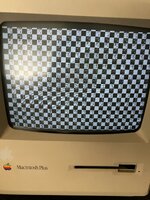
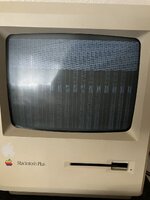
I have tried swapping in known good RAM and ROM chips, to no avail. I should note that I am seeing various patterns on the screen now. The current RAM config I have setup is 2mb (Row A only, with resistors set in proper position -- "256k" cut, and "One Row" connected). Here are the two patterns (highly distorted) that I am seeing lately, it tends to alternate between the two:

IMG_1699.JPEG IMG_1701.JPEG
 
Since you have no chime and apparently no reset, start with the chip that handles both: the SND chip (schematic here). Check the multiple power pins (that chip is powered by the 5 and 12V rails) and GND, and then check with a logic analyzer or a scope if the output ^RES pin actually issues a reset pulse on startup and when you press the reset button.

I would also start by replacing all caps, if the board is not working and any other diagnostic (or power flowing through the board). Even if the capacity is fine, ESR may not be (also, how did you measure the capacity in-circuit?).
 
Last edited:
@arroz Thanks for your reply. Funny you should mention the SND chip, I went down a rabbit hole with that one last night. I measured the grounds, power voltages (+12 and +5) and it checks out. ~5V on ^RES (pin 5) is steady, and goes low momentarily when you depress the reset button on the board. I also confirmed that the reset pulse is reaching the CPU pns 17, 18. Furthermore, you can hear the speaker "click" once as the reset occurs.

Fair point about measuring caps in-circuit, I wasn't thorough on that part. I desoldered one leg of each of the electrolytic capacitors to measure those with my multimeter, but for the little non-polarized ones, all I did was check that there weren't any shorts or unusual resistances in-circuit.

I guess I just want to make sure I've eliminated most other potential failures before replacing all 25 or so little caps. Most of the research I've done on these boards indicates that it is rare for the logic board caps to be the source of issues, but maybe it is time to go down this road.
 
Last edited:
The small caps should be fine, the problem tends to the electrolytic ones. I haven't actually replaced mine (mostly because the tantalums in that format are prohibitively expensive and I already had a large enough shopping cart on Mouser), but they are ~40y old, so… I should, even if with new electrolytics.

If that does not fix it, and you already cleared the obvious bad RAM/ROM situations, I would probably look next into the PALs. Connectivity and probing some signals. If you have good boards around, use them as a reference. I'm not entirely sure but IIRC there are multiple versions of the PALs and ROM and they all have to match each other. People with more experience in these boards can point you the correct references.

Good luck!
 
Back
Top