• Hello MLAers! We've re-enabled auto-approval for accounts. If you are still waiting on account approval, please check this thread for more information.

Macintosh Plus non-stop ejecting

Hi,

I picked up a Macintosh Plus the other day.  It worked fine with the exception that the floppy drive would not eject.  No audible sounds of it even trying.  After a few seconds the disk would reappear on the desktop.  It was able to read and boot from a disk no problem though.

I took apart the computer, removed the floppy drive.  Cleaned and lubricated with white lithium grease, opened the eject motor and gently forced the motor to move as it was jammed.

I reassembled the computer, powered it on and put in a cleaning floppy disk (RadioShack used to sell them a decade ago).  It attempted to read (as it is supposed to), then attempted to eject.  It actually tried and almost did :) Progress, right?  Wrong.  It didn't stop trying.  The eject motor ran non-stop.

Putting in a known-good disk gave non-stop ejecting.  Powering on with no disk was now resulting in non-stop ejecting motor running.

I swapped in a known-good 800k floppy drive, flipped the power switch on, and same result.  Non-stop ejecting motor.

Additionally, the startup chime does sound and the floppy drive with a question mark appears... but the question mark never flashes.  The mouse can still move though.  If I start up with the floppy drive disconnected, that is.  If I have it connected (previously defective drive or known-good unit), I'm also now getting some unsteadiness to the image.  Same symptoms, but with the edges of the floppy disk and stuck question mark struggling to stay together.  Hard to explain.

Any ideas on what would cause this sudden behavior?

I did wear an anti-static wrist strap the whole time and rest the logic board on anti-static bubble wrap while working on the initial floppy drive.


 
Have you tried another mouse or no mouse at all? Sometimes the button jams and sends an endless eject command to the mac... My 512k did that the other day after I took the mouse apart. 

I've never used any anti-static wrist straps and so far [knocks on wood] I've never had any problems. 

If the computer was already experiencing floppy problems when you got it though, something might be wrong on the logic board, a bourns filter to be more precise. 

Since a known good floppy drive works, the problem lies on the Logic board or on the analog board. I don't think there's a voltage issue, so the Logic board is likely to be the source of your problem. 

If the bourns filter turn out to be bad, luckily they are still being made today. It's just a matter of desoldering and soldering the new one in place of the old one.

 
A non-stop ejecting behavior is most of the times related to ejecting motor broken gear.

On the 800k, the motor is hold by two black screws and the ribbon.

On the underside of the motor itself, a bright plate is hold again by three screws, once removed, a set of gears are present.

Only one of the full set is probably broken (the lower right one)

Another possibility, one of the two switches are faulty or stuck.

 
BadGoldEagle:  I tried with no mouse connected, same behavior; nonstop eject motor running the moment the power is switched on, regardless of there being a disk in the drive.

Bibilit: That was my first thought as well; my thinking being that when I freed the jammed eject motor on the original drive I perhaps damaged a plastic gear (despite my best efforts not to).  However, the 800k drive I switched in was known good, and tested with an external drive enclosure plugged into my Mac SE not even 20 minutes before being installed in the Plus.  I suppose it is possible that the gear gave up between the SE and Plus, but highly unlikely from a statistical standpoint.  More likely would be the ribbon cable getting damaged, though I have never had that happen (still possible though).  The only other 800k drive I have is in my other Plus, and I'd rather not involve any parts from a working machine if possible.

All:

I do have another Plus with a Rom-Inator installed that is mechanically and electronically in great shape (physically not so much), however I'm hesitant to mix any parts from that unit to this unit as I don't want to damage anything from it if there are voltage problems/shorting somewhere.  I'm almost wondering if the IWM chip is malfunctioning and constantly sending the eject command to the drive.  Is this a common problem?

 
ok, i had a similar problem not long ago with a drive ribbon (the one going from the drive to the logic board) if you only swapped the drive and not the complete unit including that ribbon, that can be your problem.

but the problem can be also in the Logic Board side, never had this issue before...

Maybe you can try the original drive in the external enclosure ??

 
Ah I see, I thought you meant a ribbon cable from one drive component to another drive component. I haven't tried a different floppy drive cable.

Tonight I can try putting the original drive in the external enclosure and testing it with the SE. I have a feeling that I will end up with a working drive (perhaps with weak ejecting strength, but working none the less).

I will also try the floppy drive cable from my working Plus. I don't mind trying a swap of cables :) Little chance of the questionable Plus wrecking a cable from my good unit.

Actually... I may have a spare floppy drive cable (34pin I think). :)

 
The Plus requires a floppy cable with a yellow stripe, which tells you that two pins are disconnected (I can't remember which ones). A normal (aka red-stripped) cable will exhibit this non-stop ejecting problem when used on a Plus, unless you cut the wires for those two pins.

c

 
Last edited by a moderator:
Agree with CC-333, red stripe vs. yellow stripe floppy ribbon issue. It can be caused by other things but check the ribbon cable first. It's simple.

 
Upon opening up the defective Plus I instantly saw that it did have the red-stripe cable.  Opening my working Plus revealed a yellow-stripe cable.

My best guess is that at some point years ago the drive eject motor siezed up.  In an attempt to fix it, the original owner swapped in a new floppy drive cable.  Unfortunately this was the wrong cable.  However, with the eject motor seized this probably appeared as though it resulted in no change to the machine.  Plus was then stored away in the garage until I found it on Craigslist who knows how many years later and now here we are...

Should I cut the cable currently in there (on the appropriate two wires), or acquire the correct Plus floppy drive cable and save the red-stripe for a machine with a 1.4mb drive?  I imagine the red-stripe cables are still easy to get a hold of, and aren't in danger of going extinct.

 
After facing this problem with some of my Mac Plus-es (and also the 512k), I found this thread, as well as this earlier one. This helped me greatly.

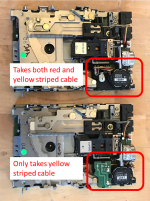
To add to it, I checked some 7-8 of my spare drives, and found two different types with respect to this red stripe/yellow stripe issue. All the ones that accept red or yellow have the Omron R2DG-31 eject motor (top one in photo). The ones that only take the yellow ribbon have the later R2DG-38 motor model (bottom one), that was also used in the 2MB high density Sony drive

Picture1.png

 
Back
Top