• Hello MLAers! We've re-enabled auto-approval for accounts. If you are still waiting on account approval, please check this thread for more information.

Macintosh Classic RAM not working

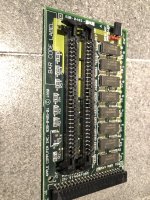
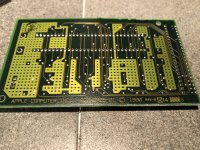
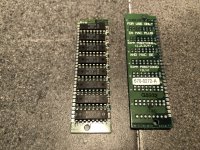
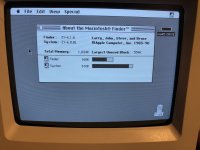
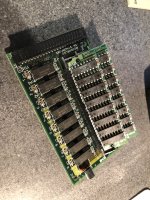
Hello, I recently got my Macintosh Classic up and running. It had some system issues, but that isn't what this is about. So one day, about a month ago (before I resolved the system issue with the help of people on this forum) I took the computer off of my shelf and it wouldn't boot. It gave me some error messages and when I removed the RAM it booted again. Now with the machine running, the 1MB of onboard RAM is not enough to do anything. I tried using the expansions card without the SIMMs installed. I switched the jumper as well, and it still didn't work. Does anyone know if there is a solution?

Thanks,

Dylan
IMG_9586.JPG

IMG_9587.JPG

IMG_9588.JPG

IMG_9589.JPG

IMG_9590.JPG

IMG_9591.JPG

 
Last edited by a moderator:
Two things come to mind – first, what error messages do you get? A Sad Mac screen will have an error code that might tell us something. Second, I notice the shunt on the expansion card is on "SIMM NOT INSTALLED" – what happens when you move it to "SIMM INSTALLED", with the extra RAM in, and try to boot? What happens without the extra SIMMs?

 
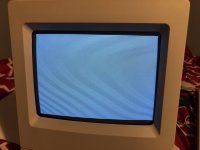
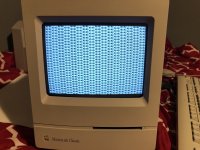
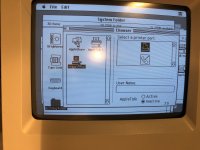
The error message is 00000005 00100000 with the SIMMs installed and setting on SIMMs installed. If I remove the SIMMs, I get a white and black bar screen, as you can see in the photo. And as you can see in the second photo, I get this vertical rolling image when leave it set as SIMM installed, but remove the SIMMs

Thanks,

Dylan

IMG_9592.JPG

IMG_9594.JPG

 
Last edited by a moderator:
Sorry, but don't understand your answer.

What's happening with the card card only (so without any stick of ram) and jumper moved to " simm not installed" ?

You have got 1 Mb of Ram onboard, the card only will give you another 1 Mb (when jumper set correctly) then the card plus sticks a maximum of 3 Mb.

So card alone and jumper "not installed" 1 Mb

Card + sticks and jumper "simm installed" 1 Mb + whatever is present.

 
Last edited by a moderator:
Yeah, I did make that a little confusing. With the SIMMs not installed and jumper set to SIMM not installed, I get the white and black bars that I attached to my last reply.

Thanks,

Dylan

 
Ok, that is what I was thinking, but I just wanted to see if maybe that was a common thing with these cards.

Thanks for the help!

Dylan

 
Can you really do much with only 1mb of RAM? The only things I could open were simple games like Tetris. I wanted to use Word and programs like that with the computer, but no such luck.

Thanks,

Dylan

 
You can certainly make do with only 1MB. I did for 3 years!!  If you use a minimal System 6 install and something like Microsoft Word 3 it will work just fine. 
 

Heck I did SuperPaint, HyperCard, and all kinds of games on mine with just 1MB  of System ram. 

 
Ok thanks for the info! I checked and the version of word I have is 4.0, so I will just find some older versions of the software I have.

Thanks,

Dylan

 
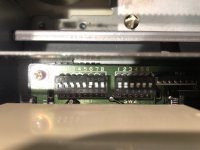
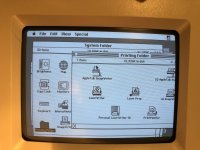
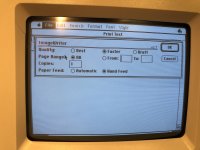
Sounds good! I do have another possibly big question, that I should maybe start another discussion for. I am trying to use an ImageWriter ii with the Macintosh. I think that they were used together at one point, because I pick both of them up from the same guy. But anyways, I cannot get it to print. I looked up the different settings for the DIP switches, and tried to set it accordingly. I also think that I have the proper system files installed for the printer. They are ImageWriter, ImageWrite LQ, LaserWriter, etc. But no ImageWriter ii. Are the ImageWriter and ImageWriter ii system files the same? I will attach photos of what I have going on. I did get the self test on the printer to work, so I know it at least sort of works.

Thanks for the help,

Dylan

IMG_9603.JPG

IMG_9607.JPG

IMG_9608.JPG

IMG_9609.JPG

IMG_9610.JPG

 
The error message is 00000005 00100000 with the SIMMs installed and setting on SIMMs installed. If I remove the SIMMs, I get a white and black bar screen, as you can see in the photo. And as you can see in the second photo, I get this vertical rolling image when leave it set as SIMM installed, but remove the SIMMs
Hmm I have a classic that is showing that screen with the lines when no memory expansion is installed, and distorted bars when it is installed. Yours boots if you remove the expansion card?

 
I have the same issue…but here is the thing, I have two classics with 3 expansions card AND one classic is totally fine and boots with all expansion cards with or without extra ramsticks installed. The other one was battery bombed but I got it working…without the expansion card installed it boots fine but with it in it wont boot anymore, with any of the cards with or without ramsticks.
If I have any card in it starts with a sad mac, No sound, error code 00000005 00100000.
It is verry weird and the fault cant be on the expansion card/s because they work just fine in my fully functional classic.
 
Found this video with Adrian Black on youtube!


My problem still presist though, had a broken trace under the LS174 chip and pin 5. So now the mac boots with a ramcard if I choose the ”No sims installed” but system still says its only 1mb of ram! with ”sims installed” still gives me the 00000005 00100000 code.
I even changed the LS174 for for another one but same same.
 
Back
Top