
-
 Hello Guest! We're hosting a challenge to welcome vintage Intel macs to the MLA during the month of July! See this thread for more information.
 -
We've made some quality of life improvements to the Trading Post. More info here.
You are using an out of date browser. It may not display this or other websites correctly.
You should upgrade or use an alternative browser.
You should upgrade or use an alternative browser.
Macintosh Classic II blank screen after recap
- Thread starter mitchW
- Start date


I was looking at the hot air gun on my desk for some time now. And I figured, prehaps is the sound IC dead, as I soldered the wrong capacitor. So I took it off. The problem however, presisted.
Then I pulled the U10 (EGRET, 341S0851) and now the reset line isn't stuck anymore.
Finally some progress!!!
The monitor turns on now and I get a checkerboard pattern.
Then I pulled the U10 (EGRET, 341S0851) and now the reset line isn't stuck anymore.
Finally some progress!!!
The monitor turns on now and I get a checkerboard pattern.
I have a dead LC III logic board with major battery leakage. I'll swap the EGRET.
What this EGRET even does? ADB and stuff? Should the board boot to the insert disk icon without this chip?
I tested the board with the case removed. Sometimes I tested it without even the board in the computer, held just by piece of cloth agains the bottom rails.
EDIT: Found a list of what Egret and other chips do. Also there is a list of a computers using SWIM chip, that sometimes goes in the Mac Portables.
http://www.mess.org/mess/driver_info/mac_technical_notes
What this EGRET even does? ADB and stuff? Should the board boot to the insert disk icon without this chip?
I tested the board with the case removed. Sometimes I tested it without even the board in the computer, held just by piece of cloth agains the bottom rails.
EDIT: Found a list of what Egret and other chips do. Also there is a list of a computers using SWIM chip, that sometimes goes in the Mac Portables.
http://www.mess.org/mess/driver_info/mac_technical_notes
Last edited by a moderator:

i have good news, i have a dead screen classic (enhanced sound) II here, i took off the EGRET and like 4 legs fell off of it.. it was rotted out.
cleaned up all the pads, and soldered on a EGRET from a dead LC-III and it works now… the only problem now is the sound is dead…
so i guess i will work on that. darn cap goo!.
cleaned up all the pads, and soldered on a EGRET from a dead LC-III and it works now… the only problem now is the sound is dead…
so i guess i will work on that. darn cap goo!.
Thanks. I'll do that. ASC chip is which one? Hmm, would the bad ram cause blank screen error?
To clear what I've written before: the EGRET chip is not the culprit, as when I swapped it with the one from LCIII, it didn't help at all (I got blank screen). However without the EGRET, I get checkerboard.
Hope that clears it.
I'll post results.
To clear what I've written before: the EGRET chip is not the culprit, as when I swapped it with the one from LCIII, it didn't help at all (I got blank screen). However without the EGRET, I get checkerboard.
Hope that clears it.
I'll post results.
I removed the U1, U2 and U4. Also removed the U14 RAM chip. There is no cap goo damage. See the attached pic how clean the traces are
Still the reset line gets stuck on and I get blank screen.
I believe that something connected to the U10 Egret chip must be shorted as without the Egret chip it shows the checkerboard.
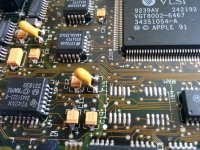
Still the reset line gets stuck on and I get blank screen.
I believe that something connected to the U10 Egret chip must be shorted as without the Egret chip it shows the checkerboard.
I am returning to this board after 2 months, the situation is the same.
I've pulled all the small chips, U1,U2,U3,U4,U5,U6,U7,U10,U11,U12,U15, but it will only display checkerboard wihtout U10 present (Egret). Others don't make any difference in operation. I also did the RC1, RC2, RC3 - no difference.
Underneath the chips, all the traces are intact, as this is probably the cleanest old Mac logic board I've ever seen (in the start, there were no leaking capacitors).
Is possible that the other Egret chip is also dead? The other one was pulled from a dead LC III board.
I've pulled all the small chips, U1,U2,U3,U4,U5,U6,U7,U10,U11,U12,U15, but it will only display checkerboard wihtout U10 present (Egret). Others don't make any difference in operation. I also did the RC1, RC2, RC3 - no difference.
Underneath the chips, all the traces are intact, as this is probably the cleanest old Mac logic board I've ever seen (in the start, there were no leaking capacitors).
Is possible that the other Egret chip is also dead? The other one was pulled from a dead LC III board.
Ok, I've swapped the Egret from another Classic II (Rev. 1) board, but it didn't help at all. The Egret chip was definitely okay, as it works okay on the other board.
Also when I tried the working board with the Egret chip removed, it was completely dead, the exact opposite of what the broken one does, as the broken one does checkerboard without the Egret.
I am running out of ideas, I've already spent about 20 hours on this thing.
Only thing that might help are the schematics, but as for the most of the Macs they're unavailable.
Also when I tried the working board with the Egret chip removed, it was completely dead, the exact opposite of what the broken one does, as the broken one does checkerboard without the Egret.
I am running out of ideas, I've already spent about 20 hours on this thing.
Only thing that might help are the schematics, but as for the most of the Macs they're unavailable.


In reviewing this, I read that the egret chip was swapped out several times with other egret chips with the same result. So unless everyone of those egret chip is bad, the problem is not there. It has to be elsewhere. So what's holding down the reset pin on the Classic II? I think the chips other than the Egret chips Uniserver is pointing too are the key, even if the chips are good, their traces and VIAs could be bad and cap goo shorting out traces as well. So start checking traces and VIAs as well around the 'usual suspects'.
It also good to dunk the board in a 3 to 2 parts mixture of distilled water (3) and ammonia (2), and slosh it around for a couple of minutes. This will eliminate what cap good is under the chips. If this liquid turns color (I noticed that it would turn green in many cases), that there was cap goo it eliminated. Then rinse out the board with distilled water and then high proof isopropyl alcohol (I use 70% or higher) Then dry the board with compressed air; if you don't have an air compressor, use a hand held hair dryer set to high air flow and high hot heat. DO NOT USE compressed air in a can.
I know that with an Apple II, if you flex the board back and forth slightly to loosen up chips that are in sockets, you start to break connecting traces at around where sockets are soldered to the trace.
It also good to dunk the board in a 3 to 2 parts mixture of distilled water (3) and ammonia (2), and slosh it around for a couple of minutes. This will eliminate what cap good is under the chips. If this liquid turns color (I noticed that it would turn green in many cases), that there was cap goo it eliminated. Then rinse out the board with distilled water and then high proof isopropyl alcohol (I use 70% or higher) Then dry the board with compressed air; if you don't have an air compressor, use a hand held hair dryer set to high air flow and high hot heat. DO NOT USE compressed air in a can.
I know that with an Apple II, if you flex the board back and forth slightly to loosen up chips that are in sockets, you start to break connecting traces at around where sockets are soldered to the trace.
Last edited by a moderator:
Thanks,
The Egret is fine.
Well, I would be glad if there was any cap goo, but as I said, this board was very clean. And trust me with that, as I recapped at least 50 old Mac's boards, so when I find a clean one, I know it. I cleaned it with a mixture of degreaser and distilled water about 4 times, so I don't think that there is any goo left. Dried in oven at 80 deg. C for 1 hour after every cleaning. Also for the traces and vias, I doubt that there is one broken or shorted, but if it is, I don't think it is from cap goo. I have a feeling that this computer was retired early in its life, as the case is still snow white and the board was extremely clean. Possibly retired from an error that it troubles me now.
I lifted the reset leg from the Egret chip, so now the line stays high. Now it will sometimes boot to the checkerboard and sometimes not. I talked to my electronics friend and he said that if that chip is reseting itself, there must be a problem with something connected to this chip, also my logic says the same.
Before a recap, if I recall correctly, there was checkerboard at all times.
The Egret is fine.
Well, I would be glad if there was any cap goo, but as I said, this board was very clean. And trust me with that, as I recapped at least 50 old Mac's boards, so when I find a clean one, I know it. I cleaned it with a mixture of degreaser and distilled water about 4 times, so I don't think that there is any goo left. Dried in oven at 80 deg. C for 1 hour after every cleaning. Also for the traces and vias, I doubt that there is one broken or shorted, but if it is, I don't think it is from cap goo. I have a feeling that this computer was retired early in its life, as the case is still snow white and the board was extremely clean. Possibly retired from an error that it troubles me now.
I lifted the reset leg from the Egret chip, so now the line stays high. Now it will sometimes boot to the checkerboard and sometimes not. I talked to my electronics friend and he said that if that chip is reseting itself, there must be a problem with something connected to this chip, also my logic says the same.
Before a recap, if I recall correctly, there was checkerboard at all times.
I finally made some progress. I managed to get the chime and white screen. It looks like there is a broken trace or perhaps a component that likes heat.
If I heat the board with the heatgun in the area underneath the Egret chip it will chime sometimes, sometimes it will do a jailbar pattern, sometimes it will do the checkerboard, and so on. I still have the reset pin lifted from the Egret, so I guess something must be wrong in this area. I checked it with the magnifying glass and removed the chokes for the ADB and audio, but I can't see any signs of anything broken...
If I heat the board with the heatgun in the area underneath the Egret chip it will chime sometimes, sometimes it will do a jailbar pattern, sometimes it will do the checkerboard, and so on. I still have the reset pin lifted from the Egret, so I guess something must be wrong in this area. I checked it with the magnifying glass and removed the chokes for the ADB and audio, but I can't see any signs of anything broken...
Similar threads

- Replies
- 2
- Views
- 150
- Replies
- 4
- Views
- 209


- Replies
- 1
- Views
- 156

