• Hello MLAers! We've re-enabled auto-approval for accounts. If you are still waiting on account approval, please check this thread for more information.

Macintosh Classic I HD problem

Hello all,

I have a problem which developed with my Macintosh classic. When I switch it on it will only show a grey screen with the mouse pointer (which you can move around the display)?? I have only managed to get it to boot a floppy with system 6.3.3 so this rules out screen problems and floppy problems. Any ideas??

Also, it only went wrong recently when I opened a program. The screen froze and the watch pointer appeared then the screen became all scrambled so naturally I switched off the machine, upon rebooting I noticed the CRT turned on very quickly and the HD spun and then stopped after about 2 seconds. The HD does seem to turn but it doesn't keep turning to boot from.

Any help would be much appreciated. 

Thanks in advance

 
start it again and don't insert a floppy. Wait a bit and see if the flashing floppy icon with a question mark appears.

if it does then it is confirming that your hard drive is starting to go bad.

-

if you are not familiar with opening and working on these macs then you will have to do some research.

-

hard drives go bad for many reasons, but seems yours was working recently it could be many things. Rubber seals melting with age inside the hard drive cover, rubber stop for swing arm melting, bad connections etc etc

-

I have got many drives working again but you have to do your homework first.

-

you can do more damage if you don't know what you are doing

-

 
Last edited by a moderator:
Hello,

Thanks for your response. I think it occurred because I didn't power it off safely and just flicked the switched off at the back. I read about the leaky capacitors so when I saw the checkered screen I panicked and switched it off. I understand that switching it off when the hard drive is in operation is a good way to bust it up. I left it for about 30 mins at the start up and the floppy icon did not appear. The computer also doesn't seem to detect the HD or the additional RAM and will no longer boot from the ROM?? I am literally at a loss with this one.

Thanks

 
Hello,

I will try that when I can find some torx t15 screwdrivers to remove the screws. I have found a website where someone seems to be having the same problem as me but the discussion is locked.

Here is a link https://discussions.apple.com/thread/122361

I can boot system 6.0.8 by floppy, but it says I am out of memory when I try and boot system 7.

I can't also get disk aid or Apple hd sc applications to work!!!

I think the hard disk work but it still only spins for a few moments and then nothing.

Any ideas

Thanks

 
I'm not sure there is anything wrong with those components as they were all working fine for 2 hours use. I'm sure it is a problem with the hard disk as this is the only component that doesn't sound as if it is operating correctly.

 
Hello,

Ok I checked the caps and they were all fine. But when I unplugged the hard disk the Macintosh worked perfectly with no screen problems and prompted me for a boot disk. The moment i plugged the hard disk back in it no longer boots.

Does this mean that I will need a new hard disk?

If so, what could be the problem with my current one?

Thank you

 
Switching off the computer when the HD is busy shouldn't cause any physical harm to the drive itself, but it will cause data corruption.

I guess?

c

 
the hard drive could have liquifed rubber on the platter........if so its dead

-

there could be any number of things gone wrong with the head's, the swing arm, the motor, connections, circuitry etc etc

-

take out the hard drive and take some pictures of it then post them here

 
I think it may be a bad SCSI chip. The hard drive was working perfectly. I only bought it 2 days ago and have had a solid 2 hours use with the HD working. I am not a pro with old Macs and it seems I can't get the hard disk out without removing all of the surround circuitry. I think with all the work involved I might just try buying another one.

I just keep encountering more problems. It now won't boot at all and shows a black screen with the sad Mac icon.

 
Last edited by a moderator:
If the power supply is weak which is part of the analog board or the motherboard caps are bad and power is weak lots of I'll things happen.

How did you check the caps? Did you pull one and remove the goo? Traces? The classic is the worst.

 
Hello,

I would just like to say thank you to everyone who has helped me try to fix my Macintosh classic. I have managed to get it working again! All I did was rub some isopropyl alcohol around the SCSI chip and the hard drive initialised. The caps actually look okay, they are much better than others that I have seen. The PRAM battery is also fine with no corrosion or leakage.

Final question: does anyone know how to get games for the old macs onto floppies that will run properly? I have managed to work it out with system software but my computer will not expand the .sit files that all the games seem to end with.

Thanks again

 
the caps 'look' ok...............and that's all.

when you cleaned it with alcohol you cleaned off the electrolyte and it worked. It will fail again. These caps always look ok....even after they have leaked.............there is no visable difference to the cap..........what you will see is basically a 'stain' on the motherboard , directly under the cap. That stain is electrolyte and it is conductive and will start to short things out. Usually the first thing to go is the sound. What is the volume of the sound when you put it a full volume?

-

take out that battery ASAP...........if that leaks you machine will be dead for good.

-

all the battery does is hold the date and time................too big a risk to have it in their

if you want you mac to stay alive get that battery out and leave it out.

I removed every battery from all my macs.................and its no big deal the time and date being wrong.................makes no difference to me

-

your mac, your call..................your risk!

 
Sorry, I didn't mean the caps look ok I meant the area around them! I didn't see any staining nor did I see much corrosion. The sound doesn't work at all. But even after cleaning around the capacitors I still have no sound. And yes I did clean around the other 4 capacitors.

 
no sound!!!!! - caps

-

look.............never mind the caps...........get that battery out

-

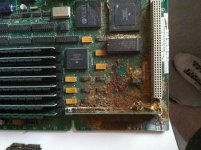
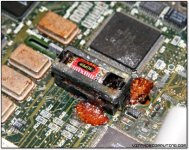
heres what WILL happen............not if..........but WHEN that battery starts to leak

Mac_SE_LogicBoard acid spill.jpg

burst_battery_small.jpg

 
Cleaning caps will do nothing if they have leaked / dried up. They no longer do the job they must be replaced. No sound may be the speaker has gone bad uniserver found that out for us.

 
Back
Top