• Hello MLAers! We've re-enabled auto-approval for accounts. If you are still waiting on account approval, please check this thread for more information.

Macintosh Classic 2 Keyboard and Mouse Not Recognised

Moosey

6502
Hello all, 

Today I became a proud owner of a Macintosh Classic 2! After so much research and debating, I finally bit the bullet (mainly after finding a smashing deal) and I am super happy! 

The seller did point out one major flaw of this unit though, and that was that the machine doesn't recognise the mouse of keyboard. He said that the machine has recognised it a couple of times, but then after a few minutes, it stopped again. I haven't had any luck with it - and that's plugging the keyboard into the ADB port and the mouse into the keyboard, the mouse directly into the machine etc. My suspicion is that potentially someone hot-plugged them and its caused an internal hardware issue, I saw this post suggesting its a fuse? Any other ideas and what type of fuse it is and where I can get a replacement? 

He also mentioned a whistling noise, which isn't the standard CRT noise you'd expect, but more of a 'Falling bomb' noise...except backwards starting low and then high. Is this something I need to worry about, something I can fix now and save some other components potentially?

Thanks!

 
He said that the machine has recognised it a couple of times, but then after a few minutes, it stopped again ... Any other ideas and what type of fuse it is and where I can get a replacement?
If the fuse was blown it wouldn't even be able to intermittently recognize the keyboard/mouse. More likely is that the capacitors on your logic board need to be replaced, especially if the Classic's making whistling noises. There are a few between the ADB port and the MCU for the keyboard/mouse that could've caused damage.

 
If the fuse was blown it wouldn't even be able to intermittently recognize the keyboard/mouse. More likely is that the capacitors on your logic board need to be replaced, especially if the Classic's making whistling noises. There are a few between the ADB port and the MCU for the keyboard/mouse that could've caused damage.
Amazing, I'll crack it open today and have a look at what board it is and order some capacitors! By the looks of it, it's been opened before as there's no case screws! Not sure what I'll find! 

Are the fuses easy to order if it does come down to that? 

 
Amazing, I'll crack it open today and have a look at what board it is and order some capacitors! By the looks of it, it's been opened before as there's no case screws! Not sure what I'll find! 

Are the fuses easy to order if it does come down to that? 
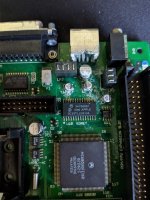
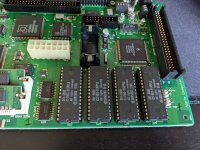
I cracked it opened, and there is some definite corrosion and leakage exactly around that area! Looks like it needs a proper cleanup and the caps replaced! There's numbers also written on the board so it seems like it's been serviced before perhaps.

IMG_20200509_085631.jpg

IMG_20200509_085708.jpg

 
Clean the board in water and scrub it perhaps with a soft toothbrush. You can use a bath in vinegar to reduce corrosion. At last I would use isopropanol. Then replace the caps. There are a lot of tutorials how you can do it.

It could be that the board works after the cleaning in water, but you should recap the board!

 
Clean the board in water and scrub it perhaps with a soft toothbrush. You can use a bath in vinegar to reduce corrosion. At last I would use isopropanol. Then replace the caps. There are a lot of tutorials how you can do it.

It could be that the board works after the cleaning in water, but you should recap the board!
I have ordered some 99% isopropyl as I only have 70% and I was scared to use it on the board! Would it have been okay then as you've suggested water, and I've seen suggestions of using a dishwasher!

 
70% IPA should be fine

People seem to use a lot of different things to clean boards that I personally wouldn't use, but I think the components are pretty resilient. I think the key is to allow it to dry properly.

Ultimately, cleaning when the caps have cleaned is just a short term fix, and it may have no effect. You will need to recap this board.

 
Take the ROM and RAM chips off the board before cleaning. I used a dishwasher for some boards, but scrubbing with a toothbrush in warm water and a little bit soap is my favorite. Afterwards I dry the board in an oven at 50 degrees celsius for about one hour. Never had any problems with this procedure.

 
Perfect thanks for the suggestionsI'll take everything off the board, de-solder all the caps, clean it all off with 99% and then solder on the new caps! I'll let you know how it goes

 
I'm looking for some help! I seem to have taken a few of the solder pads off with the capacitors! First time I did it I was pissed, the other times I'm convinced it's just easy to do even when being careful! 

The traces are still there for the positive sides I can solder to, but what should I do for the negative sides? Jump them over to another pad?? 

 
If the traces for the negative sides aren't completely gone, follow them back until you find somewhere to solder a jumper wire. Otherwise, look for the schematics and use them to find a place for the wire.

 
After you finish recapping and repairing this logic board, if it still doesn't work, I would recommend trying to remove the IC labeled EGRET, cleaning underneath it, and reinstalling it. There is a lot of corrosion visible near it in your photo, and this chip is known to be very temperamental when it has corrosion on it. I think that it has something to do with ADB, so this might help fix your problems.

 
So I managed to finish recapping it - it still boots properly which I assume is a good sign? Would it still work with a capacitor not soldered correctly? I'm worried I have really messed up this board! I also soaked this in alcohol for a few hours and so I'm letting it dry out now and there was a lot of crap that came off it so hopefully, that fixes it and if not, I will give that chip a go! 

Are there any pro's on this forum that could potentially fix up my motherboard? 

 
If it still boots I highly doubt you've messed up the board. Pictures of the board will help if you want to verify everything is soldered right.

 
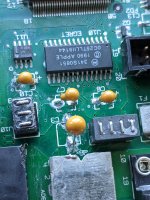
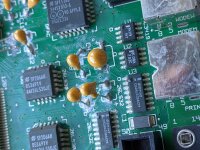
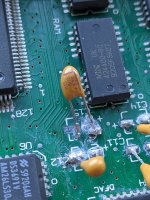
I am highly ashamed of my job on this board, all be it my first time it's horrendous! As I ripped off the pads I was terrified of scrubbing it with alcohol so I nearly soaked it! Now the corrosion is still there! Here's some pictures of the board, the last one is the worst as it has the pad completely torn off where as the others either had the pad torn off, with the trace still attached of the pad came off and the tiny bit of the trace was still pointing up so I soldered to that! 

I'm thinking I may either need a professional or to buy a microscope and try to jump the trace back to a new pad as well as giving the board another good scrub! 

My main concern is totally ruining a working board, and it looks like I'm getting there! 

IMG_20200518_082026.jpg

IMG_20200518_082032.jpg

IMG_20200518_082040.jpg


View attachment VID_20200518_082038_LS.mp4
 
Sorry, long post incoming.

Firstly, some specific advice/questions to help with the problems you are experiencing. I would highly recommend carefully removing the through hole components and replacing with surface mount ones, they will cause you less problems and they are actually easier to solder onto the board once you have the right technique.

You are having problems with lifted solder pads probably because of trying to remove a component when not all of the solder is melted, and potentially because too much stress has been put on the pads (too much heat, possibly). Are you using flux?

Are you using a good quality solder? I highly recommend using lead solder instead of lead free. I tried lead free and it was a nightmare, I couldn't get anything done right with it.

TLDR: Watch Branchus Creations videos on YouTube about how to do good soldering and how to deal with broken traces / broken solder pads: https://www.youtube.com/branchuscreations

We all have to start somewhere. I've done many soldering jobs I'm not proud of, but now I'm glad to say I am doing solder jobs that I am proud of. I'm not an expert by any means but my soldering skills have improved a lot recently, just from practice and watching videos on the subject. I've attempted soldering in the past and always had mixed success/total failure.

  1. Watch Branchus Creations videos: https://www.youtube.com/branchuscreations - he knows what he's doing and will show you how to do really good soldering. Search for his videos on how to repair solder pads and the general soldering tips video.
  2. Invest in the right equipment. A cheap soldering iron won't cut it. Get one that you can temperature control and change the tips. What soldering iron/station are you using?
  3. Use a thicker soldering iron tip, I use a thick chisel edged tip instead of a small one as I find I can push/move solder around exactly where I want it with that.
  4. Use tons of flux. Flux keeps everything 'wet' and means your solder will adhere to the solder pad really easily. The solder should flow very easily if the temperature is right and you use lots of flux. It will be messy but you can clean it off afterwards.
  5. Keep your soldering iron tip clean, really clean. Clean it between each use, look after the tip and it will look after you.
  6. Use lead solder, instead of lead free. Lead free requires really high temperatures and its just difficult to use. I tried lead free and my solder joints were really awful looking.
  7. Experiment with different temperatures. The temperature is important. Old boards/old solder joints will need more time to heat up, even at a higher temperature, bear this in mind. I tend to set my iron to quite a high temperature, usually in the 350-370 C range as I've found this works well for me. Sometimes I've had to go a bit higher to get old solder to melt, even when adding new solder to it.
  8. Make sure you fully clean the solder pads and remove any crap from them before you solder the new components on. You need to use flux, and desoldering braid for this. You can get a perfectly clean pad, free of any old solder, and then you can clean the board with isopropyl alcohol or ethanol to ensure its ready for new flux/solder for your new component.
  9. Be quick, but also patient. Don't apply too much heat to the board/a given solder joint. Lacking of patience has made this harder than it should be on numerous occassions - sometimes a joint just needs a bit of time to heat up, especially if there's a lot of solder on the joint (perhaps more relevant to through hole components but still a useful tip I think).
  10. Don't pull components until all the old solder is gone, I tried this a few times and almost ripped copper traces from a board. Use lots of flux and desoldering braid/wick to get rid of the old solder.

In terms of removing the old surface mount capacitors, I use the twist and push DOWN method - this is controversial and there are many opinions on it. This is strictly not the 'correct' method and it does have risks - but I have done this on about 8 logicboards so far and haven't had damaged pads from using this method. Maybe I've been lucky but I feel like this is the easiest method. The key is to not put any pressure pulling the component UP - only push DOWN with your tweezers and give it a gentle twisting until you can feel it free from the legs. Afterwards you should be left with the old solder and capacitor legs still on the board, but the actual capacitor will come free.

A desoldering station is probably the best way to remove components, but it's another thing to buy and not necessary unless you're going to be doing this a lot. For removal of old solder I just use a lot of flux/desoldering wick, repeating until it's all gone. A solder sucker works well too.

I hope this helps. This is not exhaustive advice - you will probably learn a lot more by just watching some YouTube videos on soldering surface mount components.

 
Sorry, long post incoming.

Firstly, some specific advice/questions to help with the problems you are experiencing. I would highly recommend carefully removing the through hole components and replacing with surface mount ones, they will cause you less problems and they are actually easier to solder onto the board once you have the right technique.

You are having problems with lifted solder pads probably because of trying to remove a component when not all of the solder is melted, and potentially because too much stress has been put on the pads (too much heat, possibly). Are you using flux?

Are you using a good quality solder? I highly recommend using lead solder instead of lead free. I tried lead free and it was a nightmare, I couldn't get anything done right with it.

TLDR: Watch Branchus Creations videos on YouTube about how to do good soldering and how to deal with broken traces / broken solder pads: https://www.youtube.com/branchuscreations

We all have to start somewhere. I've done many soldering jobs I'm not proud of, but now I'm glad to say I am doing solder jobs that I am proud of. I'm not an expert by any means but my soldering skills have improved a lot recently, just from practice and watching videos on the subject. I've attempted soldering in the past and always had mixed success/total failure.

  1. Watch Branchus Creations videos: https://www.youtube.com/branchuscreations - he knows what he's doing and will show you how to do really good soldering. Search for his videos on how to repair solder pads and the general soldering tips video.
  2. Invest in the right equipment. A cheap soldering iron won't cut it. Get one that you can temperature control and change the tips. What soldering iron/station are you using?
  3. Use a thicker soldering iron tip, I use a thick chisel edged tip instead of a small one as I find I can push/move solder around exactly where I want it with that.
  4. Use tons of flux. Flux keeps everything 'wet' and means your solder will adhere to the solder pad really easily. The solder should flow very easily if the temperature is right and you use lots of flux. It will be messy but you can clean it off afterwards.
  5. Keep your soldering iron tip clean, really clean. Clean it between each use, look after the tip and it will look after you.
  6. Use lead solder, instead of lead free. Lead free requires really high temperatures and its just difficult to use. I tried lead free and my solder joints were really awful looking.
  7. Experiment with different temperatures. The temperature is important. Old boards/old solder joints will need more time to heat up, even at a higher temperature, bear this in mind. I tend to set my iron to quite a high temperature, usually in the 350-370 C range as I've found this works well for me. Sometimes I've had to go a bit higher to get old solder to melt, even when adding new solder to it.
  8. Make sure you fully clean the solder pads and remove any crap from them before you solder the new components on. You need to use flux, and desoldering braid for this. You can get a perfectly clean pad, free of any old solder, and then you can clean the board with isopropyl alcohol or ethanol to ensure its ready for new flux/solder for your new component.
  9. Be quick, but also patient. Don't apply too much heat to the board/a given solder joint. Lacking of patience has made this harder than it should be on numerous occassions - sometimes a joint just needs a bit of time to heat up, especially if there's a lot of solder on the joint (perhaps more relevant to through hole components but still a useful tip I think).
  10. Don't pull components until all the old solder is gone, I tried this a few times and almost ripped copper traces from a board. Use lots of flux and desoldering braid/wick to get rid of the old solder.

In terms of removing the old surface mount capacitors, I use the twist and push DOWN method - this is controversial and there are many opinions on it. This is strictly not the 'correct' method and it does have risks - but I have done this on about 8 logicboards so far and haven't had damaged pads from using this method. Maybe I've been lucky but I feel like this is the easiest method. The key is to not put any pressure pulling the component UP - only push DOWN with your tweezers and give it a gentle twisting until you can feel it free from the legs. Afterwards you should be left with the old solder and capacitor legs still on the board, but the actual capacitor will come free.

A desoldering station is probably the best way to remove components, but it's another thing to buy and not necessary unless you're going to be doing this a lot. For removal of old solder I just use a lot of flux/desoldering wick, repeating until it's all gone. A solder sucker works well too.

I hope this helps. This is not exhaustive advice - you will probably learn a lot more by just watching some YouTube videos on soldering surface mount components.
This is amazing advice thank you so much! No need to apologize for a long post when it's this helpful! 

I am definitely going to take this on board and I will be looking at these videos and probably investing in a microscope to aid me! 

I would love to re-do all my work, desolder it all and then give it the board a proper clean and solder them down properly! 

Any advice for the pads that still have the traces attached but have come off the board? should I just cut these off or try and re-attach them? 

 
Any advice for the pads that still have the traces attached but have come off the board? should I just cut these off or try and re-attach them? 
It depends how much they have detached, maybe you could add some further photos once you've desoldered and cleaned the board?

Ideally, you would do a repair or put new solder pads on (possible but hard work, I've never done it but watched a youtube video on the process).

 
Back
Top