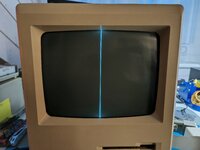
Could be a cracked solder joint.
Indeed!
Today, I had the exact same issue. My 512K had been slowly acting up. Sometimes tapping the left side of the computer would correct the video for a bit.
Here is the photo from Mac GUI with my annotations. The white outline is where the four pins of the connector are soldered.
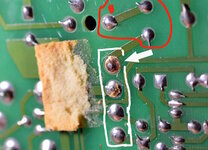
1. Clean the contacts on the connector. I use a small metal file, Deoxit, and a dental pick to make sure they are clean and clamp well.
2. Remove the old solder from the four connector joints. This is a tip from
@JDW Basically, it only takes a couple of minutes of effort using a solder sucker or desoldering braid. In exchange, any oxides or corroded particles are removed. While just reheating the joints usually works, you may not be getting the best connection unless you remove the old contaminants.
3. Resolder the four connector joints with fresh solder.
4. Although most people find that the vertical line problem is due to cracked solder where the white arrow is pointing, the circuit continues along the joints marked in red. It turns out my Mac had cracked solder where the red 'B' is indicated. Cleaning and resoldering that joint fixed my issue!
- David