• Hello MLAers! We've re-enabled auto-approval for accounts. If you are still waiting on account approval, please check this thread for more information.

Macintosh 128k Revival!

PB145B

68000
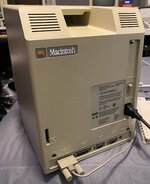
Some of you may have seen in my finds thread that I am finally the proud owner of a bone stock 1984 Macintosh 128!
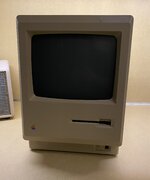
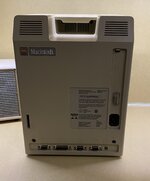
IMG_0448.jpeg
IMG_0449.jpeg
IMG_0450.jpeg

Very good condition!

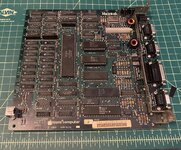
First issue to tackle was bad RAM, which is a common issue on the 128k due to the high failure rate of the Micron brand RAM chips used.

Here was the error I was getting.

IMG_0447.jpeg

Had to do some hex to binary conversion to decode the error. There ended up being four bad chips, F5, G9, G11 and G12.

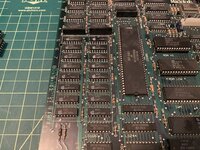
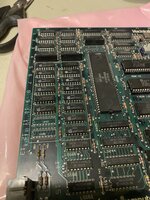
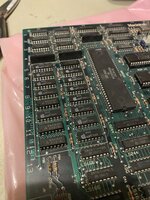
Here is some pics of the logic board before, during and after the RAM replacement.

IMG_0451.jpeg
IMG_0452.jpeg
IMG_0453.jpeg
IMG_0454.jpeg

Went very smoothly! Thankfully I still had some good RAM chips on hand left over from one of my IBM XT projects.

I considered socketing them, but I really wanted to preserve the stock appearance, so I decided not to.

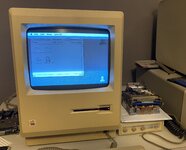
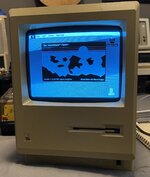
And here is the end result.

IMG_0455.jpeg

Happy Mac once again! It’s probably been many years since this machine has actually booted properly. The analog board and CRT are in great shape. The display is bright and crisp.

Now I’m working on the 400k floppy drive, which is being a bit finicky. The one in my 512k gave me hell also, but I eventually got it. Once I get that sorted this thing will be good to go! Oh and there’s a RIFA on the A/B I need to replace as well, THEN it will be done.

More to come!
 
Some of you may have seen in my finds thread that I am finally the proud owner of a bone stock 1984 Macintosh 128!
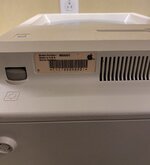
View attachment 76023
View attachment 76024
View attachment 76025

Very good condition!

First issue to tackle was bad RAM, which is a common issue on the 128k due to the high failure rate of the Micron brand RAM chips used.

Here was the error I was getting.
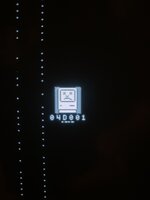
View attachment 76026

Had to do some hex to binary conversion to decode the error. There ended up being four bad chips, F5, G9, G11 and G12.

Here is some pics of the logic board before, during and after the RAM replacement.
View attachment 76027
View attachment 76028
View attachment 76029
View attachment 76030

Went very smoothly! Thankfully I still had some good RAM chips on hand left over from one of my IBM XT projects.

I considered socketing them, but I really wanted to preserve the stock appearance, so I decided not to.

And here is the end result.

View attachment 76031

Happy Mac once again! It’s probably been many years since this machine has actually booted properly. The analog board and CRT are in great shape. The display is bright and crisp.

Now I’m working on the 400k floppy drive, which is being a bit finicky. The one in my 512k gave me hell also, but I eventually got it. Once I get that sorted this thing will be good to go! Oh and there’s a RIFA on the A/B I need to replace as well, THEN it will be done.

More to come!
I would recommend socketing the RAM chips. Might not be stock config, but it'll make replacing bad RAM way easier in the future
 
I would recommend socketing the RAM chips. Might not be stock config, but it'll make replacing bad RAM way easier in the future
I have a desoldering station so it’s very easy for me to remove them anyway. The replacement RAM chips should be much better than the originals too. If they fail again in the near future maybe I’ll consider sockets, but for now I’m happy with my decision.
 
I am finally the proud owner of a bone stock 1984 Macintosh 128!
Congratulations! Its a Macintosh! I'm guessing most of these need some TLC to keep them running at this point, and you are definitely doing a great job with this one. You handled the memory replacement well, which gave me courage to tackle a fix I was hesitant to try. I just have to add that your original Macintosh is a wonderfully clean example, right down to the ROMs, and it was great seeing all the pictures.
 
Congratulations! Its a Macintosh! I'm guessing most of these need some TLC to keep them running at this point, and you are definitely doing a great job with this one. You handled the memory replacement well, which gave me courage to tackle a fix I was hesitant to try. I just have to add that your original Macintosh is a wonderfully clean example, right down to the ROMs, and it was great seeing all the pictures.
Thank you! Yeah, they definitely need some TLC 40 years later, but for the most part they are reasonably reliable machines I'd say. All the important stuff seems to hold up pretty well. Things like failing RAM chips are quite trivial in my opinion, but they can be a pain in the butt to replace without the proper equipment.

Oh, and yes, I completely forgot to mention it does indeed still have the version "A" ROMs! It also still has the original analog board with the small flyback transformer, which is still working fine.
 
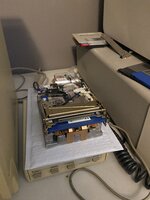
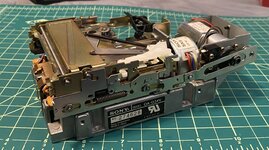
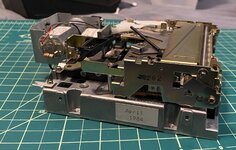
Making progress on the 400k floppy drive from this Macintosh!

I noticed the head movement was very stiff, so I removed the head assembly and cleaned all of the old grease off of the stepper motor worm gear. It was very thick and sticky! I relubed it with lithium grease. Head movement is very smooth now!

I’ve been using the cable from my external M0130 drive and my Macintosh 512k for more convenient (and safer) testing.

IMG_0460.jpeg

IMG_0459.jpeg

It successfully booted this Microsoft Multiplan 1.1 disk which I made for the 512k back in 2020. It’s still picky about reading a few of my disks, but I think it may actually be a disk issue and not a drive issue. Because I formatted a few fresh disks with the 512k’s internal drive and they read just fine in the 128 drive.

There’s just something so satisfying about seeing a 40 year old 3.5” floppy drive come back to life!
 
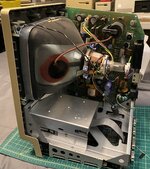
Some more photos of the lovely 400k drive and an internal shot!

IMG_0464.jpeg
IMG_0465.jpeg
IMG_0466.jpeg

I just can’t believe how clean and original this machine is!

I actually think this restoration is pretty much done. I’ll get some more pics of the Mac reassembled.

I have no idea why the drive doesn’t like some of my disks, but I have reformatted and re-imaged a few on my PowerBook 180 and it’s reading them fine now! I have also written disks on the 128k drive and read them successfully in other machines, so the alignment must be good!
 
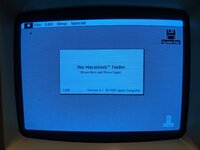
All back together! Took a screenshot of System 2.0 running to show that it’s indeed still a “128k” machine!

IMG_0476.jpeg
IMG_0493.jpeg
IMG_0494.jpeg

The CRT could still use some more adjustment, but for now I’m just so glad it’s running so well! The case could use a bit of cleaning too.

I will say, this restoration went quite smoothly! I wish I hadn’t messed with the floppy drive alignment, because I really don’t think it needed it, but I got it back pretty much 100% I think so it’s all good, but what a waste of time that was!

Now it’s time to see what software will actually run on this thing! I’m going to have a blast with this for sure.
 
Just got one myself with same issues. One bad RAM replaced and it boots fine. Right now fighting the floppy drive. Appreciate your comments. I got it physically working but will not read or format disk. I just bought a box of new double sided disks hoping they will work. The few I had were from other equipment and were very old and used. I actually have two of these drives and both are acting the same. Therefore , the new disks. Thanks for the post.
 
Just got one myself with same issues. One bad RAM replaced and it boots fine. Right now fighting the floppy drive. Appreciate your comments. I got it physically working but will not read or format disk. I just bought a box of new double sided disks hoping they will work. The few I had were from other equipment and were very old and used. I actually have two of these drives and both are acting the same. Therefore , the new disks. Thanks for the post.
Yes, double sided disks will work fine! It will just use the bottom side. Actual single sided 3.5” disks are very hard to find nowadays.

Wish you luck on getting the floppy working! Before inserting any new disks, definitely clean the head carefully with a cotton swab and alcohol if you haven’t already.
 
Looks terriffic

If i may note only one thing; the screen size should be a bit smaller, but often that inductor is stuck :/
 
Looks terriffic

If i may note only one thing; the screen size should be a bit smaller, but often that inductor is stuck :/
Thank you! I always struggle to settle on what the “correct” screen size is. Even in pictures from back in the day it seemed to vary from machine to machine.

For example, in that classic pic where Steve Jobs is leaning over three Macintoshes, the one in the middle has different screen geometry than the two on the sides, so I don’t know!
 
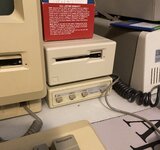
@PB145B I love the little Kensington power station. I have one of those plus a matching serial switcher. I like how they stack on top of each other perfectly with the floppy drive. :)
 
I always try to set it to the measurements mentioned here =)
Oh great! I’ll have to try those measurements out.
As above. The Pina guides help specify it as well.
Good to know! I need to actually check the Pina guides out. I actually never have, which is kind of embarrassing considering how long I’ve been fiddling with compacts!
@PB145B I love the little Kensington power station. I have one of those plus a matching serial switcher. I like how they stack on top of each other perfectly with the floppy drive. :)
Oh yeah, I meant to make a post in my “finds” thread about that but never got around to it. I found that fairly recently at Goodwill and immediately thought “Macintosh” when I saw it! It actually lists a whole bunch of machines on the bottom label, Macintosh, Apple II, IBM PC, Compaq Portable, and some others, basically all of the classics!

But it definitely matches the Mac best, I was amazed how perfectly it fit under the disk drive! I wouldn’t mind having a couple more of them actually.

Is Kensington the actual OEM? Mine doesn’t have a brand on it anywhere, just a part number.

Here’s a better pic of it with my 400k external drive. Such a cool piece!

IMG_0592.jpeg
 
Is Kensington the actual OEM? Mine doesn’t have a brand on it anywhere, just a part number.
Kensington is the OEM, but it's so early that at this time they're called "Kensington Microware." That one you have is called the "Control Center," and the A/B switch box is called (unsurprisingly) the "A-B Box." The Control Center & A-B Box are also sold as part of their "Maccessories" line of products, which dominates the lettering on the packaging, with the Kensington logo relatively small. So if you're looking for more, that'd be another keyword to search for.
 
Kensington is the OEM, but it's so early that at this time they're called "Kensington Microware." That one you have is called the "Control Center," and the A/B switch box is called (unsurprisingly) the "A-B Box." The Control Center & A-B Box are also sold as part of their "Maccessories" line of products, which dominates the lettering on the packaging, with the Kensington logo relatively small. So if you're looking for more, that'd be another keyword to search for.
Oh, that’s great to know! Thanks for the info. That will be of great help in my search for sure! :)
 
Back
Top