Macintosh 12” RGB Display (M1299 / M1296) with Vertical Linearity issue?

VeryVon

6502
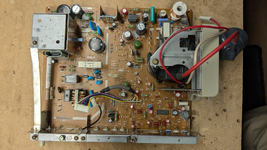
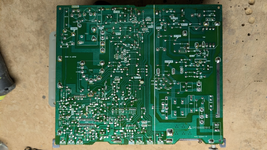
I have this monitor that looks pretty good but the top of the display stretches out and then squeezes towards the top (see picture below.) Must be pretty low hours on it as well because I can find no sign of electrolyte leakage, the caps test out good with BlueESR, even the ones near the big hot resistors and heatsinks are fine. I've gone over the board a few times and replaced two of the transistors that others have reported going bad (Q401 & Q402) but no change. I've also moved around all the pot adjustments on the board (especially V-LIN which expands / contracts the image a bit, but the loss of linearity is relatively constant.)

Does anyone have an idea of which PCB components could lead to a loss of linearity in the current near the top of the scan? Without schematics I'm having a tough time figuring that out.
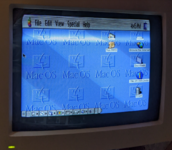
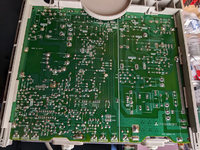
1661387665357.png
1661387711499.png
 
I have information for the M1297 AppleColor RGB Monitor I haven't got around to uploading it yet, do you suppose its similar enough?
 
For that sort of fault, my money is still on capacitors. Note that ESR testing is not 100% reliable!

I work with CNC machines, some of them old, bad caps are fact of life for me. My typical approach when I suspect bad caps and have no schematic is just to brute force replace them all, but I understand that is a pretty serious undertaking on a typical CRT!

I'd start by following the traces from the V-LIN pot and replacing caps as you find them.
 
I have information for the M1297 AppleColor RGB Monitor I haven't got around to uploading it yet, do you suppose its similar enough?
@jajan547 I don't know but if you can upload the information I'll compare it and let you know.

For that sort of fault, my money is still on capacitors. Note that ESR testing is not 100% reliable!

I work with CNC machines, some of them old, bad caps are fact of life for me. My typical approach when I suspect bad caps and have no schematic is just to brute force replace them all, but I understand that is a pretty serious undertaking on a typical CRT!

I'd start by following the traces from the V-LIN pot and replacing caps as you find them.
@lobust totally agree. At first I take a shot at understanding theory of operation before brute force, but If it comes down to it I will definitely just replace all caps.

Looks like the thread was lost in server crash but I have a backup here
@slomacuser thank you! I have watched all @techknight 's LC RGB M1296 troubleshooting video's which were extremely helpful, especially in realizing the bad design of how they located capacitors near those two big resistors and along side a heat sink.
 
Last edited:
Haha so sad, I'm kinda having the same problem as yours. But mine the vertical is fully collapsed, only showing the horizontal line.
Still investigating what could be wrong.

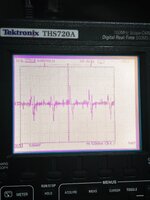
Last time I tried to tapped the input of TA8403K with my finger, the vertical is wobble, seems the power IC is working though.
 
Let me know how it goes. Do you have the same board as the one I have pictured? I'm sure you already know, but all the 4XX components are the vertical section, 5XX is horizontal.

Thanks for renewing my interest in this project, I pulled it out (I've saved everything) and i'm re-investigating it with the help of AI. AI doesn't solve the problem of course, but often it helps soften the problem up a little bit, and provide new perspectives (even when they're dead wrong haha.)

Looking the board over again, I re-capped most of the main board (excluding the big caps near the PS) including the notorious C418. Didn't help. I also remembered there's two 4XX caps around IC 501 I didn't replace because I didn't have the parts, so I might try to get some parts and do those.

1781745237001.png
1781745254711.png
 
Last edited:
Let me know how it goes. Do you have the same board as the one I have pictured? I'm sure you already know, but all the 4XX components are the vertical section, 5XX is horizontal.

Thanks for renewing my interest in this project, I pulled it out (I've saved everything) and i'm re-investigating it with the help of AI. AI doesn't solve the problem of course, but often it helps soften the problem up a little bit, and provide new perspectives (even when they're wrong haha)
Yes I'm having the same board, and I'm just realized about that component numbering LOL 😂

I'm also CRT newbies, so I tried to check the components one by one carefully. Without a schematics it would be slow, but AI also helped me through.

Do you still have the monitor?
Did you fully recaps your boards?
 
Do you still have the monitor?
Did you fully recaps your boards?
Yes and mostly, yes. I just ordered two more caps to complete the job.

BTW, did you check and make sure the solder joints for DY are good? Re-flowing a cracked solder joint could be an easy fix for you, if evident.
 
I see, did you also recaps the neckboard?

Yes I reflow the DY and all other "Hot" pins, but currently still stuck on the same issue
:LOL:
How about yours?
 
I haven't re-tested mine yet, but I assume it's same state as when I put it away (hopefully it didn't get worse!)

Sounds good. I didn't recap the neckboard.
 
For a horizontal line I’d suspect the vertical driver. I recently had a different Apple monitor with that symptom. It was a shorted driver chip but that short took out a “fusible resistor” that was there to protect the flyback transformer. Replacing both restored the operation.
 
Can you share which type of monitor of yours? Or better can you share the schematics and point which resistor?
I'm CRT newbie, but maybe I can pinpoint mine based on yours
 
Can you share which type of monitor of yours? Or better can you share the schematics and point which resistor?
I'm CRT newbie, but maybe I can pinpoint mine based on yours
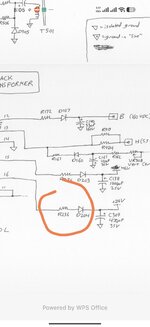
This was in an A2M6020 AppleColor Composite monitor. I can send you the schematic if you PM me your email. The resistor R236 was blown when IC301 failed. It killed the power to IC301 (which is about +24V).
 
Back
Top