• Hello MLAers! We've re-enabled auto-approval for accounts. If you are still waiting on account approval, please check this thread for more information.

Mac SE - Sad Mac - error 00000003 00000800

Hello,

I bought a Macintosh SE at a flea market, but unfortunately, it doesn’t work properly. It displays a Sad Mac with the following error code: 00000003 00000800.

After opening it up and cleaning out the dust, I noticed that the RAM sticks were installed in slots 3 and 4. When I moved them to slots 1 and 2, the Mac seems to start up (I can hear the hard drive spin and the power LED turns on), but the screen stays black and there’s no Sad Mac anymore.
There’s no sound (no bong or sad Mac music).

Any ideas or advice would be greatly appreciated! Thanks!

Best regards
 
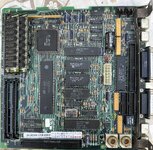
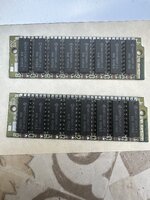
What to do depends on what version of logic board you have and the RAM size. Is it possible to post a good quality picture of the logic board, as well as the RAM sticks you're using?
 
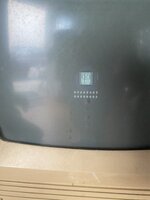
Thanks for your help! When I place the RAM in Bank A (slots 1 and 2), the Sad Mac no longer appears — but I still get a black screen, no chime, and no image. The hard drive spins and the LED lights up, though.

Could this still be related to bad RAM, or should I suspect something like the analog board or video circuitry?

You'll find attached the photos of the logic board and the RAM sticks I'm using.
Let me know if you need close-ups or more details.
 

Attachments

  • image2.jpeg
    image2.jpeg
    2.5 MB · Views: 10
  • image0.jpeg
    image0.jpeg
    1.3 MB · Views: 10
  • image1.jpeg
    image1.jpeg
    1.6 MB · Views: 10
Excellent- thank you!
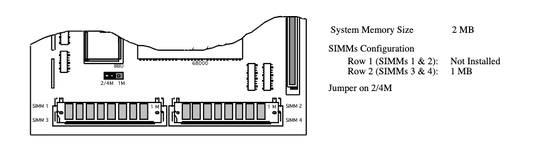
So, I *believe* you need install the RAM in slots 3 & 4 (in the photo they're in slots 1 & 3). Then you need to move the jumper to the 2/4M side (in the photo it appears to be on the 1M side).
If that doesn't work, try the RAM in slots 1 & 2, but from what I understand the RAM on jumpered versions of the logic board need to me in slots 3 & 4 (I don't have a jumpered SE to confirm this, but the documentation I can find seems to indicate it).
(edit: yes, technical docs confirm the use of slots 3 & 4 on your motherboard version (page 3: https://www.tech-insider.org/mac/research/acrobat/9204.pdf )
 
Last edited:
Thanks for the detailed explanation and the documentation!

I tried moving the RAM to slots 3 and 4 and set the jumper to the 2/4M position as suggested — unfortunately, I still get the same Sad Mac error: 00000003 00000008.

This makes me wonder if the RAM sticks themselves might be faulty. I do have a Macintosh Classic (which is more recent), but its RAM is faster (and possibly not compatible), and it doesn’t seem to recognize it when I test.

Do you think the RAM could be dead, or is there anything else I should check?

Thanks again :)

Edit : after cleaning the RAM sticks, the error code almost changed: it’s now 00000003 00000800 instead of 00000003 00000008. Only the last three digits are different — now it's 800 instead of 008.
Does that mean anything specific?
 
Last edited:
It would seem one of the sticks is bad, and the error codes suggests it was moved from slot 3 to slot 4. However, I would just ensure the SIMM leads and the sockets themselves are very clean (if you have contact cleaner, it may help) using some *lightly* abrasive cleaning. And see if the error changes depending on the sides the SIMMs are installed in.

Classic RAM should work without issue in the SE - speed is only an issue if the motherboard is expecting something faster. Just make note of the SIMM size, and adjust the jumper accordingly. If the RAM from the Classic is only 256k, you won't be able to use it in the SE - the SE requires a minimum of 1MB.
 
Last edited:
It would seem one of the sticks is bad, and the error codes suggests it was moved from slot 3 to slot 4. However, I would just ensure the SIMM leads and the sockets themselves are very clean (if you have contact cleaner, it may help) using some *lightly* abrasive cleaning. And see if the error changes depending on the sides the SIMMs are installed in.

I agree with all of this. Edge connectors get manky pretty easily, usually more easily than RAM chips go pop. But it's far from unheard of for RAM to go pop.
 
Thank you all for your replies! After installing the RAM from my Macintosh Classic into the SE, everything is working perfectly! I’ll go ahead and add some new RAM sticks soon. Thanks again for your help!
 
Back
Top