
the rom and IWM chips look fine the sockets are clean. I can try reflowing some of those rusted joints.A lot of rust also in the other side of the board, some legs are rusted in the ROMs area.
I will remove everything in a socket for checking purposes.

-
 Hello Guest! We're hosting a challenge to welcome vintage Intel macs to the MLA during the month of July! See this thread for more information.
 -
We've made some quality of life improvements to the Trading Post. More info here.
You are using an out of date browser. It may not display this or other websites correctly.
You should upgrade or use an alternative browser.
You should upgrade or use an alternative browser.
Mac SE no bong, no display. not getting anywhere with troubleshooting
- Thread starter marcocet
- Start date


Nothing seems to happen when i press it.is the reset switch doing something ? Can be stuck also.
The reset button shows 450 ohm not pressed and 0 when press so seems to be working?
The Interrupt shows 3750 ohm when not pressed in though? Is 450 for the reset button too low?
also interupt button may be broken as it doesnt change resistance when pressed
13.5V is high - not sure exactly what would cause that (power supply issue?). Usually the problem is the opposite with voltage too low. I think most (maybe all) of the chips would run off 5V.Yea im getting all the necessary voltages on the logic board from J12 and on the floppy connector.
12 volts is around 13.5 now which i didnt think was the case before. Is the 12 volt rail used for chips themselves or just HDD/FDD drive?
At this point, it really could be anything wrong with the logic board.
May be worth taking a close look with a magnifying glass on backside to see if there are any broken solder joints, and on the component side to look for broken or corroded traces or components.
After that, I'd go through the diagnostics in a systematic way. For example, follow the algorithms for "dead sets" in the Larry Pina repair books.
Good luck!
Yea im not sure why it is that high. I didnt think it was that high when i measured previously13.5V is high - not sure exactly what would cause that (power supply issue?). Usually the problem is the opposite with voltage too low. I think most (maybe all) of the chips would run off 5V.
At this point, it really could be anything wrong with the logic board.
May be worth taking a close look with a magnifying glass on backside to see if there are any broken solder joints, and on the component side to look for broken or corroded traces or components.
After that, I'd go through the diagnostics in a systematic way. For example, follow the algorithms for "dead sets" in the Larry Pina repair books.
Good luck!
Yea I will do that and look closer for traces
Oh interesting i didnt realize there were books other than dead mac scrolls. I will take a look at the dead sets section!
Thank you !
Yeah you could also check out: https://vintageapple.org/macbooks/pdf/Macintosh_Repair_&_Upgrade_Secrets_1990.pdfYea im not sure why it is that high. I didnt think it was that high when i measured previously
Yea I will do that and look closer for traces
Oh interesting i didnt realize there were books other than dead mac scrolls. I will take a look at the dead sets section!
Thank you !
and https://archive.org/details/macclassicse00larr
Yea sorry I meant I would check that out. I didn't realize the author had more books other than dead mac scrolls.Yeah you could also check out: https://vintageapple.org/macbooks/pdf/Macintosh_Repair_&_Upgrade_Secrets_1990.pdf
and https://archive.org/details/macclassicse00larr
Hey been a little while. I never had much luck looking for problems physically on the board, but I ended up getting a Zoyi ZT-703S starter scope for some other projects and hopefully it will be helpful here. I tried to measure the output of the oscillator crystal and output is shown in the attached video. Im unsure if this is an issue with the board or if im doing something wrong.
View attachment IMG_0463.MOV
This doesn't seem right.
View attachment IMG_0463.MOV
This doesn't seem right.
Alright well im getting the same reading from the crystal on my mac plus which is fully functional so. Not sure whats going on thereHey been a little while. I never had much luck looking for problems physically on the board, but I ended up getting a Zoyi ZT-703S starter scope for some other projects and hopefully it will be helpful here. I tried to measure the output of the oscillator crystal and output is shown in the attached video. Im unsure if this is an issue with the board or if im doing something wrong.
View attachment 93990
This doesn't seem right.
I dont seem to be getting anything on the CLK pin on the cpu so maybe that could be it?Alright well im getting the same reading from the crystal on my mac plus which is fully functional so. Not sure whats going on there

In looking at your logic board pictures on the first page, that's some serious oxidation/rust.
It would be a good idea to soak the board in vinegar, or use an ultrasonic cleaner with detergent specifically for electronics, to stop that corrosion.
The pictures appear to show broken traces on the top and the bottom of the board and possibly rotted capacitors but it's hard to tell without a continuity check, or from just a picture.
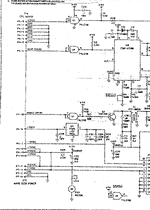
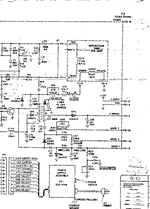
The only schematic I found for the SE was here:

 oldcrap.org
-And they are fuzzy looking .gif files.
oldcrap.org
-And they are fuzzy looking .gif files.
I'm not much help but contributing what I can. Can only recommend to use a magnifying glass/headset to spot what looks like dark spots interrupting the green traces on the chip legs, or caps, and then verify the traces with a meter.
It would be a good idea to soak the board in vinegar, or use an ultrasonic cleaner with detergent specifically for electronics, to stop that corrosion.
The pictures appear to show broken traces on the top and the bottom of the board and possibly rotted capacitors but it's hard to tell without a continuity check, or from just a picture.
The only schematic I found for the SE was here:
apple-mac-all-schematics-68k - Old Crap Vintage Computing
Apple Macintosh - Apple and Bomarc schematics for Portable, Plus, SE, SE30, Classic, II, IIci, IIcx, IIfx, IIsi, LC II, LC III, Quadra 840av.
oldcrap.org
I'm not much help but contributing what I can. Can only recommend to use a magnifying glass/headset to spot what looks like dark spots interrupting the green traces on the chip legs, or caps, and then verify the traces with a meter.
Attachments


Yea there is a decent amount near the I/O. I was hoping the machine would still work sense its just I/O traces.In looking at your logic board pictures on the first page, that's some serious oxidation/rust.
It would be a good idea to soak the board in vinegar, or use an ultrasonic cleaner with detergent specifically for electronics, to stop that corrosion.
The pictures appear to show broken traces on the top and the bottom of the board and possibly rotted capacitors but it's hard to tell without a continuity check, or from just a picture.
The only schematic I found for the SE was here:
-And they are fuzzy looking .gif files.apple-mac-all-schematics-68k - Old Crap Vintage Computing
Apple Macintosh - Apple and Bomarc schematics for Portable, Plus, SE, SE30, Classic, II, IIci, IIcx, IIfx, IIsi, LC II, LC III, Quadra 840av.
I'm not much help but contributing what I can. Can only recommend to use a magnifying glass/headset to spot what looks like dark spots interrupting the green traces on the chip legs, or caps, and then verify the traces with a meter.
I washed the board with soap and water but yea I can do that.
Where do you see the broken traces and bad caps?
Yea same schematics I found, they are quite bad unfortunately. I did find a SE logic board recreation project though. Assuming it has the same layout it could be helpful? But unsure if its exactly the same. https://archive.org/details/macintosh-se-reloaded-master
There looks to be a lot of spots on your board that could be a problem. The RPx chips are the Resistor Packs, if these have rotted traces it can cause all sorts of issues.
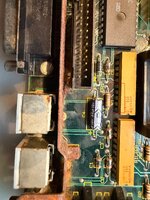
On any trace where you see black or discoloration, it could be a broken trace. You'll need to verify continuity with a meter.
I wasn't aware there was a Reloaded board for the SE, that's a solid choice in your situation. The only trouble is knowing if your components are still good from that amount of damage. To build a Reloaded board and have it behave the same way as the old board, would be a disappointment.

SE's you can get for really cheap, might be easier to buy a complete SE with an ugly case or bad monitor, just for a good Logic Board.
Does your Analog Board look as bad the Logic Board does?
On any trace where you see black or discoloration, it could be a broken trace. You'll need to verify continuity with a meter.
I wasn't aware there was a Reloaded board for the SE, that's a solid choice in your situation. The only trouble is knowing if your components are still good from that amount of damage. To build a Reloaded board and have it behave the same way as the old board, would be a disappointment.
Macintosh SE Reloaded Master : Kai Robinson : Free Download, Borrow, and Streaming : Internet Archive
An archived clone of Kai Robinson's Macintosh SE Reloaded Github page's files and directories.
archive.org
SE's you can get for really cheap, might be easier to buy a complete SE with an ugly case or bad monitor, just for a good Logic Board.
Does your Analog Board look as bad the Logic Board does?
Hm alright. ill give that a shot.There looks to be a lot of spots on your board that could be a problem. The RPx chips are the Resistor Packs, if these have rotted traces it can cause all sorts of issues.
View attachment 94082
On any trace where you see black or discoloration, it could be a broken trace. You'll need to verify continuity with a meter.
I wasn't aware there was a Reloaded board for the SE, that's a solid choice in your situation. The only trouble is knowing if your components are still good from that amount of damage. To build a Reloaded board and have it behave the same way as the old board, would be a disappointment.
Macintosh SE Reloaded Master : Kai Robinson : Free Download, Borrow, and Streaming : Internet Archive
An archived clone of Kai Robinson's Macintosh SE Reloaded Github page's files and directories.archive.org
SE's you can get for really cheap, might be easier to buy a complete SE with an ugly case or bad monitor, just for a good Logic Board.
Does your Analog Board look as bad the Logic Board does?
Yea I think that might be a bit more than worth for this machine unfortunately.
My power supply and analog board are super clean and seem to work, i was able to hook up my plus logic board to the crt and got a clear image.
The case for this machine is pretty beat if im honest... Grabbed it from facebook marketplace and hoping it would be a relatively easy project. Lol
Crt still works though maybe ill throw an rpi in it and drive the crt over gpio like i have seen done online before.
Sounds like a good use of what's left of it. 
Yea going to try it out at least for sure.Sounds like a good use of what's left of it.
I have a radius full page display card for SE I was hoping to try out buy ig that wont be happening with this one. Would need a way of getting output from it anyway.
Similar threads


- Replies
- 9
- Views
- 3K


- Replies
- 23
- Views
- 7K