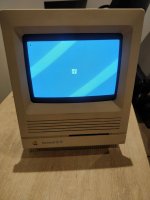
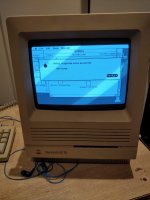
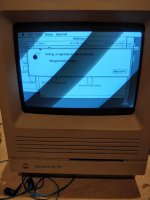
Recently acquired an SE/30, originally it had just a vertical line on the screen and no chime.
I've re-capped the digital and analog boards. Washed the digital board with denatured alcohol.
Now it just shows the stripped screen and death chimes, same as here:
I'm fairly new to these kinds of repairs and working with classic Macs so apologies if I've missed anything obvious.
What I've tested:
Tested capacitors are soldered OK following: https://68kmla.org/forums/uploads/monthly_2020_05/post-2686-0-63668700-1502804268.png.9ee7e68f85620e11a65918b16be49067.png
Voltage on Floppy Port pins is OK +12v on 7/8, +5v on 6
Swapped around the ram, various configurations and simms, seems with 4 simms it doesn't chime on first boot or reset button only when pressing the interrupt button?
The ROM is held firmly in place, have tried holding it on boot.
Traces appear OK and have tested A2-A22 to the 74F258 chips OK
Board:
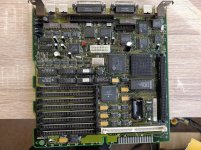
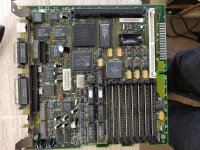
Broke C13 ground pad , soldered a wire to ground from it and tested OK:
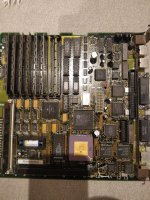
Any suggestions on what to try next?
Replace the 74F258 chips?
Unfortunately I don't have a working SE/30 or ROM to test with
I've re-capped the digital and analog boards. Washed the digital board with denatured alcohol.
Now it just shows the stripped screen and death chimes, same as here:
I'm fairly new to these kinds of repairs and working with classic Macs so apologies if I've missed anything obvious.
What I've tested:
Tested capacitors are soldered OK following: https://68kmla.org/forums/uploads/monthly_2020_05/post-2686-0-63668700-1502804268.png.9ee7e68f85620e11a65918b16be49067.png
Voltage on Floppy Port pins is OK +12v on 7/8, +5v on 6
Swapped around the ram, various configurations and simms, seems with 4 simms it doesn't chime on first boot or reset button only when pressing the interrupt button?
The ROM is held firmly in place, have tried holding it on boot.
Traces appear OK and have tested A2-A22 to the 74F258 chips OK
Board:
Broke C13 ground pad
, soldered a wire to ground from it and tested OK:Any suggestions on what to try next?
Replace the 74F258 chips?
Unfortunately I don't have a working SE/30 or ROM to test with
Last edited by a moderator: