• Hello MLAers! We've re-enabled auto-approval for accounts. If you are still waiting on account approval, please check this thread for more information.

MAC SE/30 crash

becks

6502
hi,

now my mac is finally booting, after removing the vga card.

After starting the mac all seems working,

but after executing an program i get an crash (apple suitcase).

the crash is only after the first boot,

power off power on and all is working and i can execute the program.

if the mac some time off, and i power it on i get the crash again after executing the program.

removing ram and booting with only 2 modules, i got the same error.

its systemsoftware 7.5 installed.

thanks for your help!
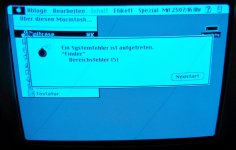
mac_crash.jpg

 
Are you sure you tried to boot the machine with only two (zwei, nicht vier) RAM modules? I thought the RAM had to be put in four at a time. If that's the case, perhaps you have some RAM that has bad contacts.

J White

 
hi,

ups sorry i ve installed 4 modules for testing,

the mac have overall 8 modules installed.

i remove the last 4 modules, and test only the first 4 modules -> same error

i cant change the last 4 modules against the first 4 modules, because the last 4 modules to small to boot from, get an warning -> to few ram installed.

i ve change the smd capacitor from the logic board.

thx

 
hi,

is there an possibility testing the ram?

like memtest for the x86?

Any other idea what the reason for the crash is?

thanks

 
did you replace the big 220uf and 470ufcaps, techtool pro can check your ram for you

what numbers are you getting on your +12 +5 -5 rails?

IS your board the socketed cpu kind? maybe try to remove and re-seat your cpu?

 
I think you should change them.

You can just use radial's and bend the longer + lead over.

I know the axial's are harder to find locally and usually more expensive.

This issue might be a noise issue because of the degraded caps in the PSU, pushing more noise into the main board,

and because those 2 caps you you have not replaced are allowing the noise because they are degraded as well.

Also make sure to wipe the contacts of the RAM its self, sometimes skin oil + dust can make a poor connection.

But at-least your computer is mostly working… you should be happy for that :)

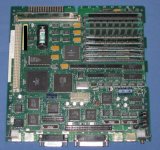
Could you post a picture of your main-board when you get a chance?

 
Hello,

thanks for your help.

now i ve change both caps on the logic board,

but in the morning i got the same crash.

i attach an picture from the board, what is the reason that you want it?

greetings

mac_se_30_board.jpg

 
i wanted to have a look at your cap job...

it looks good.

Also i was going to steal and re-use your S/N but i see you already took care of that for me.

;-)

 
hi,

i test the mac with the same ram and type,

but the same error see above.

howto reinstall os?

it is 7.5 installed is this the preferred version?

could the capacitor in power supply the reason?

thanks a lot for your help

 
Does it seem like it works second or third boot because its now warmed up?

Could you turn it on(the first time), leave it on before you click on anything for about 5 min... then try to open the application?

See if it works.

 
Back
Top