• Hello MLAers! We've re-enabled auto-approval for accounts. If you are still waiting on account approval, please check this thread for more information.

Mac Mini

quinterro

68020
Bought a Mac Mini off eBay, it arrived a few days early. It was advertised as having no operating system, but found out it still had MacOS installed - but all user accounts are password protected.

Comparing against my Ryzen mini PC for comparison.
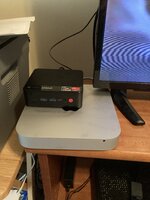
7177D893-7157-42CA-AB99-E8836D9F3D25.jpeg

I bought 16GB of memory for it and a 480GB SDD. If I’m going to have to take it apart to replace the hard drive, I want to put a drive in that won’t need replacing anytime soon.
 
Bought a Mac Mini off eBay, it arrived a few days early. It was advertised as having no operating system, but found out it still had MacOS installed - but all user accounts are password protected.

Comparing against my Ryzen mini PC for comparison.
View attachment 51251

I bought 16GB of memory for it and a 480GB SDD. If I’m going to have to take it apart to replace the hard drive, I want to put a drive in that won’t need replacing anytime soon.
I finally got the recovery partition to load by connecting an Apple keyboard to it. It has Mountain Lion (10.8) on it.

I’m wiping it and reinstalling 10.8 on it, then I’ll upgrade it to something more recent.

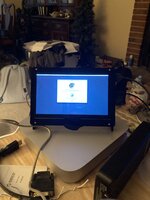
B60FFDF1-7322-4D2D-9D21-7767485A95DD.jpeg
It’s a 1024 X 600 panel, but will scale down 1920 X 1080 to fit. Kind of hard to read it though.
 
No, not 2009, but the newer 2010-present Unibody style, probably from 2012 (the 2012 model came stock with Mountain Lion).

Also note the lack of an optical drive slot (the 2010 model was the only Unibody Mini to have one).

c
 
Very nice, what year Mini is it?
It’s a 2012 model.

Currently it has 12GB memory from my Dell Latitude until the 16GB I ordered arrives. The 4GB it came with wasn’t enough.

After using SSD-equipped computers for so long, a spinning rust drive is extremely slow.

It’s currently running MacOS Catalina.
 
One thing that annoys me is the plastic cover on the bottom of the unit. It has no grip on the table surface whatsoever.

I may have to stick some rubber feet on the cover so the Mac will stay put.
 
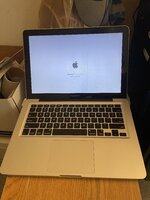
Today I got the laptop equivalent of the 2012 Mac Mini: a 2012 MacBook Pro.

IMG_2711.jpeg

The eBay seller put MacOS Catalina on it, but I’m doing a reinstall just in case.

Since the hardware is almost identical to the Mac Mini, it should be able to use Ventura once I have installed more memory.
 
With an SSD, they make for a fantastic Chromebook with ChromeOS Flex. Or as a Windows laptop. I fear hacking Ventura on there is going to be slow as molasses no matter what you put in it. It's dirt slow with Catalina, that last official OS.
 
With an SSD, they make for a fantastic Chromebook with ChromeOS Flex. Or as a Windows laptop. I fear hacking Ventura on there is going to be slow as molasses no matter what you put in it. It's dirt slow with Catalina, that last official OS.
I did have a 240GB SSD and 12GB of memory to put in it. So far it runs Catalina very well.

With the original 4GB memory and the 500GB hard drive it was really sluggish.

My Mac Mini has Ventura on it, primarily because I wanted to try MAUI in Visual Studio, which requires a recent version of Xcode on a Mac to build iOS applications. The version of Xcode on Catalina wasn’t recent enough.
 
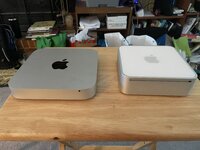
Today I received the Mac Mini’s older brother: a 2009 Mac Mini.

For some reason I can’t use internet restore to install 10.11. I have 2 4GB SO-DIMM modules and a 240 GB SSD to install to upgrade the 4GB and 250GB SATA hard disk currently installed.

I have the feeling that by the time I’m done with the upgrades I’ll have a new appreciation for the design of the 2012 Mac Mini.

IMG_3475.jpeg
 
Memory and SDD installed. It bongs, but stays on a gray screen. I’ll put the original 4GB back in and see if it gets any further.
 
The original hard disk and memory sticks are back in and it's booting..... slowly.

I'm guessing the reason the screen was white with the SSD in there was that it had Windows 10 on it.

Still trying to reinstall El Capitan, getting an error message when it is loading installation information:
"An error occurred while preparing the installer. Try running this application again."

I'll probably end up making a USB installer to get around this issue.
 
The USB installer worked. Unfortunately since it is using the original mechanical hard disk it takes 30 minutes after rebooting to finish the installation.

I’ll put the SSD in and try again later today.
 
SSD and 8 GB memory are installed, El Capitan installed. Now installing updates.

Once the updates are done I’ll install the cover.
 
Couldn’t resist upgrading Mac OS to Catalina so things like Steam, Chrome, Firefox and Visual Studio Code would install.

I’m tempted to try Linux or Chrome OS Flex on it as well.
 
After the fun of trying to get an old CanoScan LIDE 70 to work, I may partition the drive and install Mountain Lion. This appears to be the last version of MacOS supported by the drivers.

The scanner worked with my Lombard, but was quite slow. The iBook G4 worked better, but sometimes the 1024 x 768 screen was a bit limiting.
 
Back
Top