• Hello MLAers! We've re-enabled auto-approval for accounts. If you are still waiting on account approval, please check this thread for more information.

Mac Keyboards with Windows and Linux, convenience?

Trash80toHP_Mini

NIGHT STALKER
68040
1. I HATE the "Windows Key!" Occasionally I'll use it on purpose, otherwise  .  .  .   > :( <

2. I HATE switching "Command Key - Ctrl/Alt" modes between KVM'd Mac/PC environments.

How well does a Mac KBD get along with Windows? I know a lot of you prefer using your Nimitz Class AEKs for everything, what's the scoop?

Looking at this one:

s-l1600.jpg.282210e0c9eee2079863d591c12e0f43.jpg


Has anyone got experience with Kinesis' "tactile membrane" keyswitches?

Shoulder has been bothering me (rotator cuff tendonitis) a lot from heavy mousing about during long AI graphics sessions on a 27" tall computer desk's worksurface. I bent up a clear plexi KBD drawer yesterday, dropping the peripherals suite to a downward angled 24" and with some height/ angle tweaks it's about perfect.

Time to go whole hog on the ergonomics front and this one appears have everything that the Apple Ergo had so very, very wrong.

LOVE the corded independent halves with twin column of  keys on the left and PageNav column on the right. There's plenty of room to reinstate my fully programmable Nostromo GamePad on the left.

edit: Mods, the "Steaming MAD" emoticon link's borked, animation display's as above.

 
Last edited by a moderator:
An ANSI Apple USB keyboard works OK under windows. You'll be missing a few keys like print screen and scroll lock. ISO Apple USB keyboards typically have a different layout than ISO Windows keyboards though, causing trouble for people in Europe and elsewhere.

 
Yep, different layout with far less unused keys cluttering a KBD that's optimized for Mac OS is the point.

I use Firefox under Win7, not Win7 or anything that runs on it whenever I can help it. QS'02/9.2.2 is my working environment of choice. I have a fabulous suite of licensed graphics and dongled CAD/CAM software that runs faster and better now than it did on the DA/466 workstation back in the day. ;)

Is there any difference between G4 era KBDs and current Mac KBDs besides any possible X inspired key clutter? Doesn't look like it in the pic.

 
Last edited by a moderator:
I know with the pictured keyboard I would be hitting the PageUp key instead of or in addition to the Enter key something like 75% of the time.  Right shift looks tiny too.  Nothing one couldn't get used to though I guess.

 
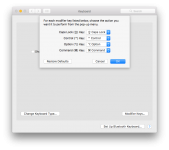
Mac keyboards work fine on Windows/Linux systems and the keys map like you'd expect. 

Control = CTRL

Option = Alt

Command = Windows (also called "meta".)

You can re-map them on Mac OS X, but I don't believe this is built into Windows.

Screen Shot 2017-07-02 at 10.21.16 AM.png

I'm used to the Windows arrangement, so on my Mac at home, I use a "Windows" keyboard - Sun Type 6 USB with PC layout. I try to learn each keyboard individually so I don't really end up with problems hitting alt+ or ctrl+ instead of command+ even if the layout is different from system to system.

Sometimes remapping is necessary for situations where, for example, you're using an older PC keyboard (thinking of a USB ThinkPad keyboard in this case, but there are other example, such as the SGI version of the AT101) on a Mac and it doesn't have a Windows key. The Command key is one of the more important keys on a Mac keyboard, so in that case I end up re-mapping, either CTRL to command and caps to CTRL or just caps to Command.

Ironically, having a Windows key is less critical on a Windows computer than on a Mac, because you can do most of what you do win+ keyboard shortcuts using desktop icons or by right-clicking on the start button on Windows 8/10.

 
LOL! Gotta love that one.

sstaylor, you should try a $10+- cheapie with that PageNav Key column on the right for a bit. It's unbelievably convenient when browsing or reading so it's now a minimum requirement for me.

It'll be wonderful to edit the KCHR resource to implement my CapsLock numeric keypad again  .  .  .

Home

Page UP

Tab

Page Down

End

.  .  .  the convenience of that Tab key next to 4 on the NumPad home row for a numeric input session is just heavenly.

.  .  .  I HATE Capslock even more than the accursed Windows Key. I'd rather edit numbers to text a/0 have the page whack out to let me know Capslock's doing something useful most of the time.

 
Last edited by a moderator:
Some keyboards put a tab key on the number pad, although if you're home row typing, you can usually move your right hand to the ten-key and use the left to tab/esc as necessary.

.  .  .  I HATE Capslock even more than the accursed Windows Key. I'd rather edit numbers to text a/0 have the page whack out to let me know Capslock's doing something useful most of the time.

What? None of this means anything. Are you talking about a function/Fn keyboard on laptops that sometimes lets you use the right half of a keyboard for numbers?

Interestingly, Apple doesn't put a caps-lock key specifically on the iOS keyboards (most software keyboards don't feature it, really) and Google doesn't put them on Chromebooks, or at least didn't at first.

For a hot moment there in 2010 there was some discussion generally about whether there was something better the space could be doing (added to of course by fans of the early Apple keyboards' and UNIX' traditional use of that space for a control key) anything better. It fizzled out, however, and nothing has really changed.

 
What is this windows key you are talking about [:o)] ]'>.

I've been using Unicomp's 101 key keyboards, and the PC122 now. I like that larger space bar, and extra space in between my control and alternate keys.

On the PC122 however, there is a windows key off to the side in the left-hand 10-key cluster:

BLKPC122Front_800x301.jpg.4b6d7d0a62c716ab981f8cef52d4a06f.jpg


Last edited by a moderator:
What? None of this means anything. Are you talking about a function/Fn keyboard on laptops that sometimes lets you use the right half of a keyboard for numbers?
I've got small format desktop KBDs with simple numeric pads built in, mine's a lot more flexible.

It makes perfect sense as an addendum to the description I was making of the KCHR Resource Numeric Keypad layout remap of the CapsLock table I was describing.

Pictures are more powerful than words: Simple ResEdit PB Keyboard Hack . . .

63523658.jpg.071f396bcd83aa28ea5f1aeb6e883f5f.jpg


Numeric entry with one hand free to shuffle the books you're cooking beats tabbing with the off hand any day of the week and twice on Sunday if that's when you're trying to catch up on bookkeeping in Quicken and a monster Spreadsheet.

 
Last edited by a moderator:
I actually use a Kinesis Freestyle 2 myself ( http://i.imgur.com/sX89JdX.jpg) and I like it, however beware if you're used to stiff heavy keys this board is not for you. It's reasonably tactile and on the better end of the traditional "rubber dome" world. 
Thank you so much, that's GREAT news! I've never has trouble with the DuoMooshBoard, so I think I can adapt to anything. Have you used it with a few inches of separation between the halves?

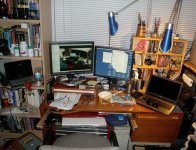
How do you manage to keep your workspace that tidy? Mines messier, but similar, right down to the monitor setup, scattered tools, personal maintenance equipment, KVMs and an empty Ramen bowl w/chopsticks!  Stereo gear's behind me so I've got shelves. Not fair at all, I spent the day cleaning heaps of crap off mine and I moved some off the top of HP3 for the shot!

PlexiKBDdwr-170703.jpg

Still running the Pavilion off to the left in the bookcase while I set HP3 up. Pavilion screen's not worth spanning, but I moved it there a couple of months back so I could judge how a CheapBook might work out eventually. After height and angle tweaks of the KBD drawer are done, I'll be moving the file drawer back to the left side where it belongs and swapping LCD positions so the Mac's menu screen will be to the left of the main screen on the KVM and HP3 will be up on a stand with the KBD angled down as far as it will go as the 1080p "Menu" screen for Win10/Linux to the right of the main 1600x1200 display.

 Every once in a while HP_Mini or a PowerBook sits about where your laptop does.

Thanks for the review, I'll order one right up! [:D] ]'>

 
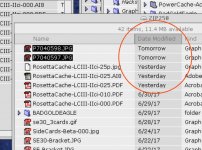
The files are from the future! :lol:

The timestamps probably got mangled. It's happened to me a few times, and I've never figured out why.

c

 
Just got a really nice surprise, the KBD arrived almost a week early!

Very nice tactile feedback on the low pressure activation domed keyswitches. Got it hooked up to the KVM and so far so very, very good. It's definitely going to take some getting used to. But it's dreamlike to have my elbows/forearms resting on the new, lower desk chair's armrests with both wrists and fingertips pointing straight up and down each staggered key column. It's perfect for the new clear plexi KBD drawer. A bit of height adjustment and maybe a downward angle toward my mouse hand and we'll see what happens.

I've taken the Nostromo GamePad off the drawer already because the double row of function keys on the left side might just take its place in the workflow.

Not too bad at all trying to touch type on the new setup after just this post's experience. OORAH! [:D] ]'>

 
Day One Report: Still getting used to it, and loving every second of it  .  .  .  most of them anyway. [:P] ]'>

Left hand's OK because I'm accustomed to angling standard KBDs for heavy cut/paste sessions in graphics apps.

Caps Lock gets hit a LOT less when I do so, which will be very convenient.

I'm terribly missing the numeric pad for scaling/rotation input and the calculator.

Heavy ResEdit session of the Caps Lock tagle in the KCHR Resource coming up:

First estimation of changes to my old bookkeeping/spreadsheet input setup:

Caps Lock isn't labeled in the pic, but it's the PageNav/NumPad activation key.

63523658.jpg.071f396bcd83aa28ea5f1aeb6e883f5f.jpg


Re-mappings off and additions to the PowerBook layout in pic:

Right Command Key -> Period/Dot might prove to be be a fly in the ointment, we'll see.

A -> Escape's a no-brainer. Three tap sequence will beat the snot outta reaching across 9cm on this layout.

D-> Down Arrow to restore the Inverted T convention for cursor keys.

Z-X-C-V -> Command Key Macros for Illustrator Command Key Macros TBD

Q-W -> Command Key Macros for GraphicConverter - TBD

------ could swap AI/GC Rows, dunno, analysis required.

G -> TAB between HOME and END as above will be nice to have on the split KBD

R -> Delete

1-2-3-4 -> Command Key Macros - TBD

It's too soon to post pics. ATM I'm experimenting with angling the left and right edges up and down in a far-split config with a real Numeric Keypad angled in between the halves for use in Windows and Linux environments. Gaming KBD style wrist rest options under consideration. Setup will definitely be getting beautifully contoured, teak stained custom wrist wrests, renewable butcher's wax furniture finish goes without saying. [:D] ]'>

 
Last edited by a moderator:
Back
Top