• Hello MLAers! We've re-enabled auto-approval for accounts. If you are still waiting on account approval, please check this thread for more information.

Mac IIci onboard video to VGA Monitor

Elfen

68020
Since the boards need recapping, I'll assume that the onboard video of my IIci's are Kaput!

But it could be something else. I hook up my Macs to a Gateway 700e (I think) monitor using a Mac2VGA adapter. I have several kinds of these adapters, and they are all set to work with the IIfx's 24bit Apple video card and the LCs that I have AND they all work with the settings I have on them:

640X480 VGA or 800X600 SVGA with H-Sync, V-Sync and Composite on Green "ON".

This setting works with the video card (the same Apple's 24bit video card as in the IIfx) in the IIci.

But in removing the card, and putting the adapter on the Mac IIci's built in video - Nothing but a dark screen on both (semi) working IIci's. The video card works on both of them - monitor lights up and the  flashing "?" inside the floppy disk shows up. The cursor is also there and the mouse can move it.

Note: I did remove and threw out the PRAM battery as a precaution so they have no PRAM Batteries but they do turn on!

So, in asking, is there something with the Mac IIci video I need to be aware of or are these the right settings and the built-in video is kaput until a recapping is done? As knowledgeable as I am in these old Macs, I should know this but I need.... help and verification.

BTW - 1 Mac with the Daystar 040 has 20MB and the other has 8MB. This should be enough to have built-in video work. Right?

 
Last edited by a moderator:
I'll try it tomorrow when I get the chance.

make sure Ram Bank A is populated with ram.  if you don't,  then onboard video is not going to display.
Correct me if I'm wrong; memory tells me that Bank A needs either 256KB SIMMs or 1MB SIMMs for the video to work. Putting in 4MB SIMMS wont work for the video.

 
well the 4 meg simms should work, if they are good. you could try some 1meg simms just to see.

the IIcx and the Iici,  you can install 8 - 16 meg simms in them. and the onboard video should still work.

 
yeah i don't think the standard VGA setting will work with the IIsi / IIci,  however the VGA setting on the adaptor does work with the Q700 and starting with the LC-I

 
Strange. I managed to get all three Mac IIci boards going (YES!). But I could only get it to display on one adaptor on an unlisted setting, and the IIci thinks it's a portrait display. The Screen is in Blue as well, but it works! Unfortunately it will not work on any other adapter. Thanks for pointing out the direction to go.

 
While sorting out my Mac stuff I tried out my IIci connected to a Viewsonic lcd via the onboard video. I was just making sure it worked and didn't notice what the resolution was. I'll try to remember to take a pic of the video adapter and settings when I get home

 
i think i just turn switch 6 on for the IIsi and IIci. on my db15 to vga adaptor. and that gets me 512x384

the other DB15 to vga adaptor, the switch settings are all different.

pretty sure 640x480 on my second adaptor is switches 1 and 2 on... the rest off.

vga-adapter3.jpg.ec6153a63ffa2d0ec67b131724d21f6e.jpg


here is one with a ton more swtiches.

70020drawing.jpg.1f8787646dd86c919af8615714b8f938.jpg


AFAIK, there's no way to get a standard 60Hz VGA signal out of the Vampire Video Victims for use with a fixed sync VGA Monitor or LCD. Gotta find a good multisync display or go NuBus, but early NuBus cards were almost uniformly 60Hz VGA hostile as well.

IIci supports:

12" Monochrome

13" RGB

Portrait

.  .  .  or that's what GttMFH2e specifies.

LEM: adds support for the 12" RGB's 512x384 @ 60.15Hz*****

gamba2 adds Multiple Scan 14 & 15 support for the IIci & IIsi to the list, but only with third party adapters. (Sync on Green silliness?)

*****60Hz fixed freq. VGA Display might display something at 512x384, but the input for the 12" RGB Display is 60.15Hz, so the IIci's output freq. would be out of sync for most practical purposes, or so I would think.

 
Thanks to you all for the information! I will continue when I get the boards recapped.

Uniserver - that's one of the adapters I have! LOL!

Trash80toHP_Mini - Yeah, the IIci thinks it's Portrait and I cant change it.

WayneStewart - Thanks!

The Gateway EV700 I'm using is a multi-sync monitor. And it works great with the 24bit video cards an the LCs that I have!

 
The adapter I used was one of the common TTL ones that were sold under several labels. It was the model with the single row of 8 switches.

The switch settings were for the multiple resolutions 16” to 17” 1024x768

switches 12578 were on

 
I've got a couple of 60Hz VGA limited LCDs to play around with if I get the chance. One of my "Liberty" adapters is DA-15 to DA-15 and I'm wondering if that might be an example of the Vampire Video Adapters mentioned as compatibility requirement for Apple MultiSyncs in the gamba2 chart?

Not all MultiSync Displays are flexible enough to handle all Mac & NuBus resolution/freq combos. I have a 21" MAG CRT for testing that is simply awesome for testing purposes. It has Mac/DA-15, VGA/HD-15 and 5-BNC inputs with LED readout panel indication of VGA/Mac (likely more) signal, res & freq for whatever is active. But even with that, I've seen "out of Sync" indication on the panel for oddball Mac resolution/freq inputs that don't phase the 17" Sony Trinitron MultiSync in the least. Very strange stuff, Display Juju. :unsure:

 
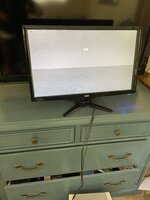
Just want to say thanks recapped my IIci and I was finally getting a startup chime but no video. Came across this post and say the comment about the multi scan not work. So I connected to a vga monitor and set to 512x384 and now I got video so again thanks
 

Attachments

  • IMG_4143.jpeg
    IMG_4143.jpeg
    2.7 MB · Views: 4
Back
Top