• Hello MLAers! We've re-enabled auto-approval for accounts. If you are still waiting on account approval, please check this thread for more information.

Mac Classic Video Issue

Tempest

6502
While playing around with my Mac Classic this weekend I noticed something happening with the video. Sometimes two moving lines would appear at the top and bottom of the screen and the video would 'shake' a bit. This happened to me before but it fixed itself before I could figure out the cause (actually I hit the side of the mac and it went back to normal), however this time they appear to not be going away. Anyone know what could be causing this? The motherboard was recapped a few years back, but not the analog board. Could there be bad caps on the analog board?Here's a video showing the problem. Sorry for the shaky footage.http://www.atariprotos.com/temp/mac.mov


 
When I had the guy recap the system I had him adjust the image so it filled the entire monitor because the black border area annoyed me.  Could that be causing issues?  It was fine up until now.  

So if it's the analog board, what should/can I do?  Does anyone in SE Michigan area offer repair services?  There's no way I'd feel comfortable shipping this out somewhere.

 
Could that be causing issues?
probably not.

The Classic range is known for analog board issues, so a recap of the Analog Board should be done anyway.

I will have a look at voltage outputs

 
I have a Mac SE here as well that doesn't have the video issues (but hasn't been recapped).  Is there any advantage to using a Classic over an SE other than the 1.44MB drive which I don't use anyway?

I'd still like to get the Classic recapped though.

 
The Mac SE is bulletproof compared with the Classic (no problem so far with leaking capacitors, nor power supply)

In my opinion, in nowadays use, both are similar.

And yes, apart the 1.44MB drive, no big difference.

Classic AB are most of the time easy to repair (passthrough capacitors)

 
I guess I'll just switch over to using the SE for a while until I can get my Classic's Analog Board fixed. 

 
Question about repairing the analog board.  Someone told me that it could be a cracked solder joint.  I don't mind attempting to heat up and repair a cracked joint (assuming I can get to it), but since this is in the high voltage area I'm worried about getting zapped.  Does the Mac Classic have anything that bleeds away the voltage after it has been unplugged (say for a day or two) or do I still have to manually discharge it before I attempt to fix any solder joint?

 
I would discharge the tube and remove the analog board to work on it.

Looking for cold solder joints in general is a good thing to do during recapping. For intermittent issues I would recap 1st before hunting too hard.

From repairing arcade chassis I usually check for cold joints where the yoke plug attaches. 

 
Last edited by a moderator:
Yeah everyone says that where the yoke plugs into the analog board at J1 is usually the main culprit.  Especially if slapping it on the side fixes the problem sometimes (which it did in my case).  I just plan on trying to reflow each of the pins with a little extra solder and see if that fixes things.  If not, then I'll have to send it out to someone for recapping (that's beyond my skills).  

Any tips on fixing what I believe to be a noisy hard drive?  The hard drive is a nice 1GB one so I don't want to replace it, but it makes a rather loud high pitched whine.  I thought it was the internal fan at first, but now I think it's the hard drive because it sort of 'winds up' when I turn it on and the fan should come up to speed pretty much instantly.  I do plan on unplugging the hard drive while I have the case open to see if it is the fan though.

 
Last edited by a moderator:
Recapping these is actually pretty easy since the PCBs are not thru hole plated, but it is best to have a pro if you're not comfortable.

The SE I picked up had video problems till I recapped the analog board. 

HDD wise, at this point I'm doing all I can to abandon mechanical drives. Scsi2sd has been a godsend. 

Also assuming you're the same Tempest from the neo forums? If so... Hi!

 
Last edited by a moderator:
Cool man. Long time no see!

Yes, that. There is a great thread on here with how to install them and recommended configs. it's worth it for reliability alone and the speed increase is great. 

I settled on using a v5 in my SE with 2 virtual hdds, one for system 6 and one for os7. I also managed to get a 2nd scsi2sd working as a virtual zip drive.  My powermac I use a V6 now for better speed, but a v5 should be fine for the older stuff. 

 
Well one issue at a time I suppose.  Let me try and fix the video before I worry about hard drive replacements. :)

 
No worries. I would be shocked if a recap doesn't square it away. MacCaps ought to get you going. 

As always I'm a short-ish drive away if you ever need anything :)

 
Actually do you know of anyone local to SE Michigan who does recaps?  I honestly don't think this is something I want to attempt on my own.  I know there was someone near Dearborn or Southfield that did it for me the last time (blanking on the name).   

I'm hoping that I can find a cracked solder joint and that will fix things.

 
Last edited by a moderator:
Well I opened it up tonight, but I didn't see any cracked solder joints in the usual places.  I did push lightly on the neck board as someone suggested and it did seem maybe a smidgen loose, but I don't know if that means anything.   I turned it on and the lines are gone, but I'm sure they'll be back once I put the system back together. 

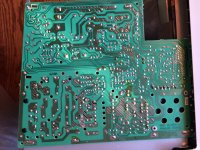
Here are some pictures I took of the back of analog and neck boards.  I see nothing obvious.

http://www.atariprotos.com/temp/analog1.jpg

http://www.atariprotos.com/temp/analog2.jpg

http://www.atariprotos.com/temp/analog3.jpg

http://www.atariprotos.com/temp/analog4.jpg

http://www.atariprotos.com/temp/analog5.jpg

analog1.jpg

 
Last edited by a moderator:
Back
Top