

• Hello MLAers! We've re-enabled auto-approval for accounts. If you are still waiting on account approval, please check this thread for more information.

LC 575 pulled pad

Hi Guys,

I picked up an LC 575 motherboard to upgrade my colour classic.

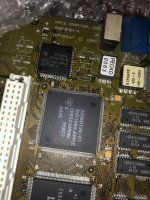
Unfortunately while removing the caps I pulled the pad on C5. Please see the photo.

Some questions.

1- How bad is it?

2- What does C5 do/control?

I'm really hoping to get a LC575 board up and running as the 475/575 are one of my favourite old Mac's.

UNADJUSTEDNONRAW_thumb_2f7c.jpg

 
I have yet to try pad repair. There are legit methods/parts to do it, but I haven’t gotten that far.

From the look of it, that pad simply connects to a trace running to that nearby chip. In the short term, you could just solder a small wire from that pin to the terminal of the new cap. If you are using radial electrolytics with long legs instead of original surface mount types, it will be even easier.

 
I would solder a little piece of 30 gauge wire from the cap terminal to the other end of that trace. It's not the end of the world, for sure, and it's much easier than trying to fix it correctly, in the short term and if you don't know how.

 
I would solder a little piece of 30 gauge wire from the cap terminal to the other end of that trace. It's not the end of the world, for sure, and it's much easier than trying to fix it correctly, in the short term and if you don't know how.
^ this. Much easier than trying for a "proper" repair. Just solder down the good side and then run the jumper from the other side to that IC pin. You'll need a fine-point soldering iron for that though.

That capacitor does something for sound (that IC is the sound chip) so while the computer will likely run without it, your sound may be missing or distorted.

 
I would desolder the pad from the capacitor you removed. Super glue that pad in place and allow it to dry. Then solder jumper the pad to the trace and solder the cap in place.

 
It just goes to the trace that goes to that big Apple chip in the top left corner. You will need to slightly scrape off the top coating on that trace to show the copper so you can solder bridge it to the pad.

 
It just goes to the trace that goes to that big Apple chip in the top left corner. You will need to slightly scrape off the top coating on that trace to show the copper so you can solder bridge it to the pad.
What are those two vias right on top of and below the pad connected to?

 
I can't tell from the low rez picture. I figure a via surrounded by copper is just a channel to the ground plane. If there was a connection to the missing pad you would see a trace to it directly.

 
Back
Top

