
-
 Hello Guest! We're hosting a challenge to welcome vintage Intel macs to the MLA during the month of July! See this thread for more information.
 -
We've made some quality of life improvements to the Trading Post. More info here.
You are using an out of date browser. It may not display this or other websites correctly.
You should upgrade or use an alternative browser.
You should upgrade or use an alternative browser.
Larger CRTs on Early Compacts
- Thread starter raoulduke
- Start date


So... do I understand these points correctly?
If, for not-so-far-fetched instance, I had a fully functional Plus logic board and analog board and a gutted Lisa that was basically only case and CRT, could I plug the Plus boards (designed to drive a 9" CRT) into the Lisa's 12" CRT and have a working machine? Do the 9" and 12" CRTs fall into different size categories? If so, how non-trivial would increasing the Voltage output of the Plus AB be?
- Most (many, several, a few?) black and white CRTs have the same pins in the same arrangement at the end of their neck.
- Electronics designed for one particular black and white CRT should be able to drive a same-size or smaller CRT (with the same neck-pins) without issue*.
- Electronics designed for one particular black and white CRT should be able to drive a larger CRT (with the same neck-pins) but may have issues with brightness.
If, for not-so-far-fetched instance, I had a fully functional Plus logic board and analog board and a gutted Lisa that was basically only case and CRT, could I plug the Plus boards (designed to drive a 9" CRT) into the Lisa's 12" CRT and have a working machine? Do the 9" and 12" CRTs fall into different size categories? If so, how non-trivial would increasing the Voltage output of the Plus AB be?

If by "correctly" you mean "in a grossly oversimplified way" then yes, approximately, but there are very likely to be enough exceptions in each category that it's dangerous/stupid/foolhardy to take state those bullet points as rules.So... do I understand these points correctly?
Just for shiznets and giggles I gave Google a search string that netted me a PDF service manual for some random Ball-brand CRT monitors from 1977 on Bitsavers; the same manual covered the 5", 9", and 12" versions of the display, and scanning the manual (which I'll admit that I'm very not qualified to interpret in its entirety) several things stood out:
1: The manual did say that the raw voltage settings in the horizontal output stage for the 9" and 12" tubes were the same while the 5" was different. However:
2: The part numbers and values of a *substantial* number of components is different between all three models, or in some odd cases the 5" and 12" would share one part while the 9" would be unique, which is obviously counter to item #1. Probably most importantly the high voltage transformer is *always* different between the three sizes, but there are resistor and capacitor changes here and there across the circuit. (Another interesting anomaly is the 5" and 12" use the same deflector yoke while the 9" is different.)
Does #2 definitively prove that if you, in this particular case, took the 9" version of this chassis and stuffed a 12" tube in it it'd melt/blow up/be completely unusable? No, so far as I know it might work hunky dory and the company just used different components out of an abundance of caution. Or it might work hunky-dory for a while and then melt. Or it might work, sort of, but be out of focus and impossible to size correctly unless you went through the circuit board and swapped out at least some of the components for the correct value. This is analog shiznet pretty much black-magic to anyone who hasn't been trained in the art of TV repair and don't forget that poking around a live CRT carries the definite risk of putting a few thousand volts across your heart muscle.
Considering the damage computer novices do to machines by confusing, say, PC parallel ports with Mac SCSI ports because they happen to use the same connectors I'd say that it's not-so-borderline irresponsible to encourage a novice to look at the "matching pins" on the back of CRT tube and just "try it", because the possible repercussions are a lot worse than just letting the magic smoke out. If you're genuinely smart enough to know what you're in for and able to ask the right questions of the right people then it might be an interesting experiment for someone to try (IE, putting a compact Mac's analog board onto a Lisa or whatnot's tube... after looking up the datasheets and confirming they're at least mostly compatible, obviously), but if you're not, well, I guess some anonymous voice on the Internet isn't going to change your mind if you're determined to go through with it anyway.


There is really no clear-cut answer to this. the majority of the B&W CRTs have the same pinouts.
But, they are all different in regards to G1, G2, and Anode voltages.
But, they are all different in regards to G1, G2, and Anode voltages.

If you're thinking of the Poor Man's Greyscale Project, as documented on the Power Colour Classic sub-site over at Applefritter, it's always worth bearing in mind that, though he got it to work, kind of, in the end he found the results unsatisfactory and decided to use an off the shelf 9" VGA monitor, ie, a complete, known-good system of matching CRT, analog board and deflection yoke. It's not that great an example of success to take as inspiration. IIRC, he gave up on trying to get the image aligned and in focus after much struggle.* I know people have successfully driven compact 9" CRTs with the electronics from an Apple 12" Mono monitor.
And that's given an example where he not only swapped over the analog board but the CRT yoke (the high voltage, beam deflecting electromagnetic coils) as well, and where the analog board was able to drive the CRT at all. The first is a pain in the neck (pardon the pun), the second isn't in any sense a given between two different monitors.
And those are displays from the same manufacturer, where if anything, they would have had an incentive to use a common analog board and common components if possible, to save money. The fact that they didn't strongly suggests it's not in fact possible, or at the very least feasible.Ball-brand CRT monitors from 1977 / the same manual covered the 5", 9", and 12" versions of the display
Gotta agree. One of the things I learned - right here in fact, a few years back - by brainfarting some of my own hack ideas, was that there's a certain level where the questions I need to ask indicate that I probably don't know enough to even try the hack. Now, stuff at logic level and under 12V DC isn't going to kill anyone, but CRTs? Imma do a heck of a lot more reading before I start messing with those things.This is analog shiznet pretty much black-magic to anyone who hasn't been trained in the art of TV repair
But these discussions are still worth having IMO, because at least they winnow out the feasible hacks from the unfeasible ones I shouldn't probably waste any time, money or gear on, at least not yet.
In that spirit, [mod hat] I would ask once again for everyone here *coughGorgonops* to exercise a tad less snark please and thankyou.
Heck, I exploded a PC handheld document scanner thing once by plugging it into a Mac ADB port, and there's only four pins and 5V at play there.confusing, say, PC parallel ports with Mac SCSI ports because they happen to use the same connectors / look at the "matching pins" on the back of CRT tube and just "try it"
Roger, and I do apologize. My impatience with the "summary as presented" was simply due to, well... and please don't take the personally MinerAl, is that the entire thought-process behind it is wrongheaded, IE, it's applying "tinkertoy" logic to analog electronics and dangerous "here there be dragons" ones at that. It's an easy mistake for a novice to make, I've made it myself. (Granted not with anything *electronic* quite so dangerous._In that spirit, [mod hat] I would ask once again for everyone here *coughGorgonops* to exercise a tad less snark please and thankyou.
There once was a publishing outfit called the "Howard W. Sams Company", and starting in 1946 they used to make a fair chunk of their living selling little pamphlets called SAMS Photofacts, which contained physical layouts, detailed schematics, parts lists, etc. And a TV repairman would typically have a floor-to-ceiling bookshelf crammed full of them because every single television uses a different pile of black magic to make it work. To just concentrate in the area of discussion here, TV tubes come in all sorts of flavors that have nothing to do with their socket pinout; for example, tubes vary in their "deflection angle". Draw a "V" from the edges of the screen on a TV tube to the front of the electron gun and the angle covered by the "V" is its deflection angle. The general rule is that smaller tubes have smaller angles and larger ones larger because generically speaking bigger tubes are shallower compared to their size than smaller ones, but within a given screen size two different monitors might have different angles. The drive circuitry and yoke itself need different tweaking for different angles, which means getting the geometry right if you swap a different size/angle tube may well call for rebuilding half the analog board. Television tubes also differ in their "flatness", which again, requires systematic changes to the upstream circuitry.
I stumbled across this, the target audience is TV repairmen, and talks about TV/computer monitor scanning systems. The TL;DR digestion is this: the "theory" is generally consistent across different monitors but the devil is seriously in the details, so if you're going to fix a given monitor you're almost certainly going to need the manual.
In short, willy-nilly swapping tubes around is going to net you a monitor that works poorly, if at all, and it's dangerous if you don't know what you're doing. Trying to digest it down to a few bullet points and telling a novice to have at it is a really bad idea. I'm genuinely sorry I seem to be unable to make this point completely nicely. Again, many apologies.
And it should be added, a logic board with VGA-compatible video output, rather than trying to adapt a classic Mac's internal video signals to VGA.If you're thinking of the Poor Man's Greyscale Project / it's always worth bearing in mind that / in the end he / decided to use an off the shelf 9" VGA monitor
Last edited by a moderator:
Now on the other hand if you want to try using the existing TRS-80 analog board and matching CRT, and getting a Mac logic board to drive it ... that might just barely be possible, maybe. It's been established around here before that the timing and resolution of compact Macs is close to EGA, and needs just a simple level and sync converter circuit to drive some EGA monitors.
Here's a thread that discusses some of the complexities and gotchas.
If the TRS scans at a similar rate, and has a similar number of lines of vertical resolution (342 lines for the mac), and the same page refresh rate (60Hz) you might be in with a shot. It won't be plug and play by any means, but it would mark it out as possible, with some signal adaption.johnklos said:compact Macs put out 22.3 kHz, if I remember correctly. EGA is 21.8 kHz, which is close enough that it should work
Here's a thread that discusses some of the complexities and gotchas.
Last edited by a moderator:
I'll drop in relevant links and threads as I find them.
https://68kmla.org/forums/index.php?/topic/11043-vga-on-compact-crt/
https://68kmla.org/forums/index.php?/topic/10836-why-the-unusual-frequency/
EvilTim's MacMP3 takes a different approach: forcing a video card in Linux to match up to a non-standard monitor's resolution and scan rates (plus an added signal matching circuit). That isn't something you will be able to do with a Mac logic board, but it might be an alternative use for your TRS.
The article also has a bunch of useful information.
http://members.optusnet.com.au/eviltim/macmp3/macmp3.htm
https://68kmla.org/forums/index.php?/topic/11043-vga-on-compact-crt/
https://68kmla.org/forums/index.php?/topic/10836-why-the-unusual-frequency/
EvilTim's MacMP3 takes a different approach: forcing a video card in Linux to match up to a non-standard monitor's resolution and scan rates (plus an added signal matching circuit). That isn't something you will be able to do with a Mac logic board, but it might be an alternative use for your TRS.
The article also has a bunch of useful information.
http://members.optusnet.com.au/eviltim/macmp3/macmp3.htm
Last edited by a moderator:
As I noted earlier, it doesn't. The monitors are essentially NTSC. (15.whatever khz.) When used in the Model 4 the monitor is tuned peculiarly so what would usually be the overscan area is crammed down to be visible on the screen (because the 4 uses 240 of the theoretical 252 available non-interlaced lines vs. the more typical 192 the III does, which is why III software looks a little "squished" when run on a 4), but, yeah, nowhere close to Mac resolution/refresh rates. You would need to find the service manual for the actual monitor parts *used in a particular Model III/4* to determine the likelyhood of success for making the analog board accept a higher refresh rate. And on that topic:If the TRS scans at a similar rate, and has a similar number of lines of vertical resolution (342 lines for the mac),
The Tandy manuals for those machines pretty much takes a "here there be dragons" approach to the CRT section, and a "SAMS CompuFacts" manual that's floating around states that several different models of monitor were used over the production lifetime of the machines and references some RCA part numbers that a simple Google failed to find anything useful on. (I find some irony that the SAMS Compufacts manual references *another* SAMS manual for part of the computer it allegedly covers, but I suppose that could be taken as a tacit acknowledgement that a technician skilled in digital circuitry might not be up for repairing a TV.) The III's manual does have a schematic for the monitor used when the manual was printed in 1980 but information beyond that is limited to "turn these knobs to make the screen look right". So... basically, unless you're smart enough to look at a TV schematic and understand it well enough to know what parts you need to change you're probably way over your head.
Last edited by a moderator:
Huh, re-reading the PMGS, seems my memory was playing tricks with me:

Mind you - it looked like this for a while ...

The display is sharp and clear
Mind you - it looked like this for a while ...
Whoops, sorry I didn't catch that before. Yeah that is way too far from the Mac's 22.x kHz for reusing the existing TRS analog board.The monitors are essentially NTSC. (15.whatever khz.)
Yeah, I was wondering where you'd read a followup that said more than that, but this "success" doesn't negate the general point that it's not something you can count on.Huh, re-reading the PMGS, seems my memory was playing tricks with me:
It's certainly *possible* that if you threaded a Mac Plus analog board's yoke onto a randomly chosen 12" CRT it would produce a usable picture. But it has to be noted that the compact Mac analog board is also fairly notorious for being sort of marginally spec'ed for the job it does with the *stock* CRT so even if nothing else goes wrong the additional load from driving a bigger CRT might badly shorten its lifespan. Said analog board is also lacking in pots to adjust items like linearity, so if there's any distortion on the larger monitor (which is a distinct likelyhood unless you use a tube with exactly the same deflection angle and screen curvature of the smaller CRT) they'll be no way to fix it without component swaps. Even in the text for the PMGSP he admits that he never quite got the geometry right because he "used up" all the available range, IE: "The display is sharp and clear, but fails to use the full width of the screen...", in the adjustment available on the mono monitor's board, and the pictures do seem to back up that it's a little vertically stretched.
Having an "imperfect" screen certainly might be acceptable for someone building a "hackmac" for shock value; heck, it might even be cyberpunk-ish desirable if you call the thing an art project, but... still, at the very least someone embarking on this should at least *attempt* to know what they're doing beyond "The sockets match and I heard about some guy who did the opposite and it worked!". At least look up the datasheets for the CRT tubes and verify they're at least mostly matching in their electrical requirements? And don't kill yourself.
(And... although, yes, it's your own business what you do with your own stuff, but there are still other sources for monochrome CRTs (mono monitors, 12" B&W TVs, etc) that don't involve destroying other antique computers. Sigh. And learn to use a freaking soldering iron before you consider yourself qualified to do this *at all*, okay? Just swap a few capacitors and freshen up some solder joints, it's relatively easy, rewarding, and eventually all this stuff is going to "die" the same way so it's in the best interest of any computer collector to either learn how to do themselves or make friends with people who can and let *them* decide when something is "dead".)
Here's a PDF that's probably worth grabbing for anyone thinking about doing something crazy. It notes points of failure for the analog board, calls out a few components that control X/Y/Z that could be swapped to adjust items that don't have adjustment pots, etc. It also talks in general terms about what to look for when trying to modify a PC monitor for use with a Mac. For grins I'm staring at the monitor schematic in the Model III manual and it looks like it uses discrete parts instead of a 555 to build its horizontal oscillator, so you'd have to determine which of the roughly 7 components in that section would need to be swapped and if that might have cascading effects down the line. (The monitors most often hacked for "UglyMacs" were "MDA" TTL mono monitors which ran at 18-something Khz; the jump between 15khz and 22khz is *pretty big* even compared to that.)
The only thing when changing horizontal frequencies, is the tuning of the output stage. In other words, the flyback/yoke and caps/inductors in the output stage are closely tuned to match the scan frequency to give the best results for linearity, and efficiency. Along with the HV output.
Any time you deviate away from that, youll get reduced HV output and youll start getting linearity problems along with foldover, etc.
Any time you deviate away from that, youll get reduced HV output and youll start getting linearity problems along with foldover, etc.
Last edited by a moderator:
Interlaced? Because there are a very small number of video cards for old-Macs that output to TV. I have an LC PDS one kicking around here someplace.The monitors are essentially NTSC. (15.whatever khz.)
(standard "not plug and play" disclaimer goes here)
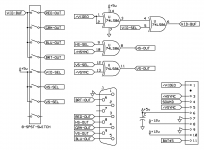
Well, it's not composite either so a "TV adapter" would have to be hacked to intercept separate Hsync/Vsync/video signals before they're mixed and knocked down from TTL levels. (Not a huge deal if you had the schematic and it was discrete components, but could be an issue if it's an ASIC.) Also, they're *TTL*, IE, black-and-white and I imagine an LC PDS card produces color/grayscale. That means more hacking either the card or the monitor circuitry. (And if the card uses an integrated analog DAC then you're probably stuck attacking the monitor side or setting up a crude one-bit ADC to compress an analog luminance signal down to digital.)Interlaced? Because there are a very small number of video cards for old-Macs that output to TV. I have an LC PDS one kicking around here someplace.
That schematic lines up with the need for inverters on H/Vsync noted in the mactech PDF. EGA is *almost* the same as the compact Mac when it comes to frequencies so I'd venture at least a plurality of EGA monitors could probably take the signals from this without further hacking. But, again, TRS-80 isn't even close to EGA.EGA Adapter
(If the TRS-80 monitor *were* capable of accommodating the scan rate the requisite adaptor would dispense with the "red/green/blue/brightness" rigormoral as seen in that schematic, the output labeled "vid-buf" would go to the monitor's "video" line.)
Last edited by a moderator:
I always thought compacts were supposed to have a bit of margin around the edges. He could have perhaps pulled the vertical in some and called it good.in the text for the PMGSP he admits that he never quite got the geometry right because he "used up" all the available range, IE: "The display is sharp and clear, but fails to use the full width of the screen...", in the adjustment available on the mono monitor's board, and the pictures do seem to back up that it's a little vertically stretched.
But IIRC, the main reason for leaving the black border when adjusting them was not to strain the analog board, which as you say
Given that, thisis also fairly notorious for being sort of marginally spec'ed for the job
is a very good point.the additional load from driving a bigger CRT might badly shorten its lifespan.
Quite so. Heck, get an old 12" VGA monitor - or a new LCD - and one of those Chinese EGA/CGA to VGA converters.there are still other sources for monochrome CRTs (mono monitors, 12" B&W TVs, etc)
I've seen schematics around for sync separators (extracting sync from composite (I mean, that's what TVs do internally after all)) but I don't offhand recall where, or what parts they used, or how complex they were. There's probably an IC for it these days.a "TV adapter" would have to be hacked to intercept separate Hsync/Vsync/video signals before they're mixed
EvilTim's brightness / gain pot hack ;^)Also, they're *TTL* / an LC PDS card produces color/grayscale. That means more hacking either the card or the monitor circuitry.
No, and I don't in any sense mean to imply it is. Just wanted to post that schem for future reference and/or other attacks (eg, Mac -> EGA -> VGA -> newer monitor).But, again, TRS-80 isn't even close to EGA.
Last edited by a moderator:


