• Hello MLAers! We've re-enabled auto-approval for accounts. If you are still waiting on account approval, please check this thread for more information.

Is there a way to turn the monitor off, but leave the logic board active on my SE/30?

If I wanted to leave my SE/30 on 24/7 for use as a server or BBS, is there a way to add a
switch into the monitor circuitry to turn the monitor off so that the CRT doesn't
get screen burn?

thanks
Chuck E.
 
Yes, I am running the After Dark screensaver, but I was just curious if there was a way to turn
The screen completely off.

Chuck E.
 
Last edited:
With all of the work that Bolle et al have done on the SE/30 recreation, grayscale, expansion cards, etc, there has to be something they have come across that would allow a safe circuit hack to be inserted at the hardware level, or maybe even a software bodge for this? Maybe a thought on the right location? (... maybe you could suggest it in a hacks thread?)
 
That should be fairly easy to do with the power supply being seperate from the analog board. Just isolate the 110v going to the monitor circuit with a relay (so you could toggle it on/off). The trick would be doing it unobtrusively.
 
You would need to disconnect the +12v sweep power into the analog board in order to switch the CRT completely off.

Reducing brightness to minimum will resolve screen burn, but it won't help save the CRT losing focus as it ages or wear on the analog board components. The video section is essentially a dumb monitor.... Feed power, horizontal drive, vsync, and B&W video signal in, picture out. No software control at all.
 
It's nothing too exotic compared to what you've worked on, I'm sure.

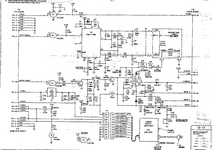
Depinning pin 10 of the connector out of the PSU and introducing a switch would probably be the easiest way to do it, otherwise you'd have some pretty gnarly cutting on the AB to do.

SE-Analogb.png
 
No need for hardware modifications.

Sleeper and Basic Black are Control Panels that should do what you want. Sleeper has the advantage that it would allow the spindown of a drive as well, though you may be going the solid state route there, I suppose, so that may not matter. Otherwise, Basic Black has a good reputation for being light on resources and doing what it says on the tin. As far as I know, they should both work on the SE/30.
 
No need for hardware modifications.

Sleeper and Basic Black are Control Panels that should do what you want. Sleeper has the advantage that it would allow the spindown of a drive as well, though you may be going the solid state route there, I suppose, so that may not matter. Otherwise, Basic Black has a good reputation for being light on resources and doing what it says on the tin. As far as I know, they should both work on the SE/30.

These are just screensavers and are the same as reducing brightness to minimum; it only helps avoid burn-in. As noted earlier this will not prevent CRT losing its ability to focus as it ages or wear on the analog board components.
 
It's nothing too exotic compared to what you've worked on, I'm sure.

Depinning pin 10 of the connector out of the PSU and introducing a switch would probably be the easiest way to do it, otherwise you'd have some pretty gnarly cutting on the AB to do.

View attachment 79918


Thanks for the schematic and the advice. I was hoping something like this would show up. It looks pretty simple to
splice the +12V wire at pin 10 on the power connector. I would probably just cut into the lead coming in on the power
supply side, I certainly don't want to be cutting traces on the analog board if I don't have to. The next question would
be to find an unobtrusive place to fit the switch. I wonder if I could find a reed switch that would handle the current
Then I could just put a magnet somewhere on the outside of the case to turn the screen off. Somewhere around here I
have a bunch of those tiny neodymium magnets.

Chuck E.
 
Thanks for the schematic and the advice. I was hoping something like this would show up. It looks pretty simple to
splice the +12V wire at pin 10 on the power connector. I would probably just cut into the lead coming in on the power
supply side, I certainly don't want to be cutting traces on the analog board if I don't have to. The next question would
be to find an unobtrusive place to fit the switch. I wonder if I could find a reed switch that would handle the current
Then I could just put a magnet somewhere on the outside of the case to turn the screen off. Somewhere around here I
have a bunch of those tiny neodymium magnets.

Chuck E.

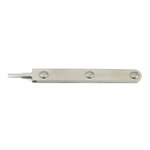
More elegant still would be to just eject the pin from the connector - you can use the official tool #11030044 or bend up a paperclip.

Find another lead (or buy one off digikey) and insert it in place, then you could fully reverse the modification as long as you don't remove the pin from the ejected wire.

PSU has a max of 1.25A on the sweep rail, so you'd need to find a switch rated for that.1730050002327.jpeg
 
If you were like me, I’d probably remove the interrupt/programmer’s switch internally and put a switch there that would still be compatible and usable with the external button assembly. I use the reset, but I’ve never used that interrupt switch in 35+ years of using these machines. If you’re a programmer that does a lot of debugging maybe that switch is of use to you, but I’ve never had any reason to use it. I pressed it once on a Plus just to see what it did.
 
Thats how i'd do it. It'd be easy to toggle a relay with a single push button. The easiest way, obviously, would to just install a toggle switch into the expansion cover (on the bracket) and run two wires to it. That wouldn't be any fun though.
 
Back
Top