• Hello MLAers! We've re-enabled auto-approval for accounts. If you are still waiting on account approval, please check this thread for more information.

Is there a programming forum here for help using the Toolbox Manager and Quickdraw Manager?

There is no code other than some window initialisation, no recursion or anything else.
Then you shouldn't need any fancy memory setup.
Use MacsBug to check the heap layout?
Did you quit Think C before running your app?
What does the Get Info window in the Finder show for your app?
What does the SIZE resource look like?
Did you try using malloc instead of NewPtr?

Oh, you mean NewPtr should be called before InitGraf?
Definitely not. You're using printf in Think C which makes its own windows.

By the way, is there a compiler that supports the C99 standard on a classic Mac? Declaring variables at the beginning is very cumbersome.
Did you check the C compiler options in Code Warrior Pro 8 (or Code Warrior Pro 6 since you want to generate 68K code).
Code Warrior Pro 6 mentions c99 in some source files but not the documentation.
Code Warrior Pro 7 mentions c99 in the documentation.
Those won't work on a 4MB Mac though.

Consider programming on a Power Mac and testing on the older Mac. But in that case, you might as well try Retro68 on a modern Mac or Linux.

 
Then you shouldn't need any fancy memory setup.
Use MacsBug to check the heap layout?
Did you quit Think C before running your app?
What does the Get Info window in the Finder show for your app?
What does the SIZE resource look like?
Did you try using malloc instead of NewPtr?
Hi, I checked the SIZE, it's 1024, here is my code, I put NewPtr at the top of main, it doesn't complain about any errors, but once I use this space it triggers a system 25 error, which I know means out of memory :

MaxApplZone();
buff = (unsigned char*)NewPtr(128 * 1024);
if(buff == NULL) SysBeep(5);

InitGraf(&thePort);
InitFonts().
FlushEvents(eventEvent, 0);
InitWindows().
InitMenus().
InitWindows(); InitMenus(); TEInit().
InitDialogs(0).
InitDialogs(0);
InitCursor();

Yes, malloc can work.
 
Last edited:
Sorry, I'd like to program on a classic Mac, the kind with only 4MB.
Hi Chip-64 bit! On THINK C I can create this simple program, running in miniVMac with 4MB.

C:
/**
 * FreeMem.
 */

#define kNumDigits 5

char gNum[kNumDigits];

void ToolboxInit(void)
{
    InitGraf(&thePort);
    InitFonts();
    InitWindows();
    InitMenus();
    TEInit();
    InitDialogs(NULL);
    MaxApplZone();
}

void main(void)
{
    WindowPtr win;
    Rect bounds;
    Ptr p=NULL;
    long kb=0;
    ToolboxInit();
    SetRect(&bounds,20,40,100,54);
    win=NewWindow(NULL, &bounds, "\pFreeMem", TRUE,
                noGrowDocProc, (Ptr)-1L, FALSE, 0L);
    ShowWindow(win);
    SetPort(win);
    TextMode(srcCopy);
    TextSize(9);
    do {
        if(p!=NULL) {
            DisposePtr(p);
        }
        kb+=256;
        p=NewPtr(kb<<10L);
        NumToString(kb,gNum);
        MoveTo(2,12);
        DrawString(gNum);
    }while(p!=NULL);
    while(!Button()) {
    }
}

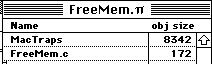
This is the project window:

FreeMemProjectScreenshot.jpg
All I did was add the basic MacTraps. The code is tiny, just 172b, it doesn't need any resources apart from the CODE resource that gets added when you build the application, but I did set the application size to 2MB. When I run it I see this:
1738327724048.png
FreeMem in this case allocates 256kB at a time using NewPtr, thus 1792kB is the maximum it will allocate and be <2MB. I could set it to a larger value just as easily, but I set it to 256kB, because you said you couldn't allocate 128kB.

I hope this helps, you should be able to try it yourself. I'm wondering, are you just supplying the allocation size as an int? THINK C defaults to 16-bit ints, so 128kB would end up being 0kB. If you notice in my code, kb is a long and I shift it by 10L which means the result will remain a long (stupidly, 'C' coerces the result type to the size of the shift value).

Hope this helps.

-cheers from Julz
 
Hi Chip-64 bit! On THINK C I can create this simple program, running in miniVMac with 4MB.

C:
/**
 * FreeMem.
 */

#define kNumDigits 5

char gNum[kNumDigits];

void ToolboxInit(void)
{
    InitGraf(&thePort);
    InitFonts();
    InitWindows();
    InitMenus();
    TEInit();
    InitDialogs(NULL);
    MaxApplZone();
}

void main(void)
{
    WindowPtr win;
    Rect bounds;
    Ptr p=NULL;
    long kb=0;
    ToolboxInit();
    SetRect(&bounds,20,40,100,54);
    win=NewWindow(NULL, &bounds, "\pFreeMem", TRUE,
                noGrowDocProc, (Ptr)-1L, FALSE, 0L);
    ShowWindow(win);
    SetPort(win);
    TextMode(srcCopy);
    TextSize(9);
    do {
        if(p!=NULL) {
            DisposePtr(p);
        }
        kb+=256;
        p=NewPtr(kb<<10L);
        NumToString(kb,gNum);
        MoveTo(2,12);
        DrawString(gNum);
    }while(p!=NULL);
    while(!Button()) {
    }
}

This is the project window:

View attachment 82911
All I did was add the basic MacTraps. The code is tiny, just 172b, it doesn't need any resources apart from the CODE resource that gets added when you build the application, but I did set the application size to 2MB. When I run it I see this:
View attachment 82912
FreeMem in this case allocates 256kB at a time using NewPtr, thus 1792kB is the maximum it will allocate and be <2MB. I could set it to a larger value just as easily, but I set it to 256kB, because you said you couldn't allocate 128kB.

I hope this helps, you should be able to try it yourself. I'm wondering, are you just supplying the allocation size as an int? THINK C defaults to 16-bit ints, so 128kB would end up being 0kB. If you notice in my code, kb is a long and I shift it by 10L which means the result will remain a long (stupidly, 'C' coerces the result type to the size of the shift value).

Hope this helps.

-cheers from Julz
Oh thank you so much, I'll try that, malloc works fine, this one confused me.
 
Oh thank you so much, I'll try that, malloc works fine, this one confused me.
You mean: p=NewPtr(kb<<10L); confused you? It just means NewPtr(kb*1024L), but I turned the multiply into a shift, because it's a lot faster on a plain 68000 (in fact faster at least all the way up to a 68030).
 
You mean: p=NewPtr(kb<<10L); confused you? It just means NewPtr(kb*1024L), but I turned the multiply into a shift, because it's a lot faster on a plain 68000 (in fact faster at least all the way up to a 68030).
Thank you, it works, what I meant was that malloc works fine without the need for an L after the number. on a side note, it's been a long time since I've seen code that needed an L after a number, I'm spoilt by modern compilers. LOL
 
You mean: p=NewPtr(kb<<10L); confused you? It just means NewPtr(kb*1024L), but I turned the multiply into a shift, because it's a lot faster on a plain 68000 (in fact faster at least all the way up to a 68030).
Hi, I know I'm asking a bit too much, how should I do an append operation on a file, like wb+ in open? Thank you.
 
No, it's perfectly fine, that's what forum is for. I'll respond in a few hours when I have some free time!
Hi, I have searched for information and the behaviour of appending data to a file seems to involve a function called SetEOF, do you have any other information to provide, thanks.
 
Hi, I know I'm asking a bit too much, how should I do an append operation on a file, like wb+ in open? Thank you.
OK, not sure exactly what you mean.

Do you mean the THINK C standard library function open? That's:

C:
#include <unix.h>
#include <fcntl.h>

// mode= O_RDONLY, O_WRONLY, O_RDWR, O_APPEND, O_CREAT, O_TRUNC, O_EXCL
int open(const char *filename, int mode);

So, I think you'd want O_APPEND and it returns a file number. However, if you mean fopen, then that's:

C:
#include <stdio.h>

// mode = "r", "w", "a", "rb", "wb", "ab", "r+", "w+", "a+", "rb+", "wb+", ab+"
FILE *fopen(const char *filename, const char *mode);

So, 'a' means append, all the + versions mean the same thing (updating), 'b' means binary. I thought there would be no difference with 'b' mode, because newline is (char)13 on a classic Mac ( (char)10 on Mac OS X), rather than <cr><lf> on DOS/Windows. But maybe 'r' and 'w' modes convert (char)10 to (char)13 on input and the reverse on output.

Or are you talking about Toolbox functions?
 
OK, not sure exactly what you mean.

Do you mean the THINK C standard library function open? That's:

C:
#include <unix.h>
#include <fcntl.h>

// mode= O_RDONLY, O_WRONLY, O_RDWR, O_APPEND, O_CREAT, O_TRUNC, O_EXCL
int open(const char *filename, int mode);

So, I think you'd want O_APPEND and it returns a file number. However, if you mean fopen, then that's:

C:
#include <stdio.h>

// mode = "r", "w", "a", "rb", "wb", "ab", "r+", "w+", "a+", "rb+", "wb+", ab+"
FILE *fopen(const char *filename, const char *mode);

So, 'a' means append, all the + versions mean the same thing (updating), 'b' means binary. I thought there would be no difference with 'b' mode, because newline is (char)13 on a classic Mac ( (char)10 on Mac OS X), rather than <cr><lf> on DOS/Windows. But maybe 'r' and 'w' modes convert (char)10 to (char)13 on input and the reverse on output.

Or are you talking about Toolbox functions?
Sorry to confuse you, I'm aware of the standard C libraries, but I don't really want to use them in a Mac, instead I want to use the toolbox routines.
 
Sorry to confuse you, I'm aware of the standard C libraries, but I don't really want to use them in a Mac, instead I want to use the toolbox routines.
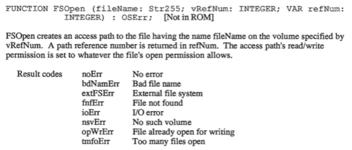
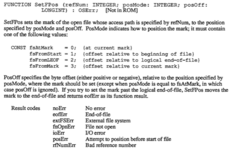
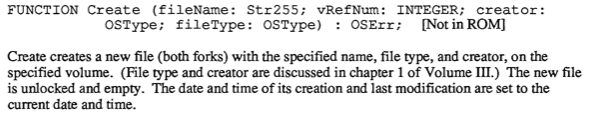
Fair enough, I prefer that too, it's just that you were talking about malloc recently, so I thought you might be using the standard C library. Anyway, if the file exists...

1738349800258.png

1738349863436.png

1738349949554.png
1738349973821.png

You'll need to find the vRefNum if you're not using StandardPutFile or StandardGetFile dialog boxes to choose a file. I do know how to do that, but I have to dash. Do you have a link to Inside Macintosh Volumes 1..3?
 
Fair enough, I prefer that too, it's just that you were talking about malloc recently, so I thought you might be using the standard C library. Anyway, if the file exists...

View attachment 82930

View attachment 82931

View attachment 82932
View attachment 82933

You'll need to find the vRefNum if you're not using StandardPutFile or StandardGetFile dialog boxes to choose a file. I do know how to do that, but I have to dash. Do you have a link to Inside Macintosh Volumes 1..3?
Thank you, I took a look at your screenshots and I probably know what I should do, do you mean you can't find volumes 1 to 3?

I was wondering if it is possible to continually add data to a newly created file just through SetFPos.
 
Last edited:
Thank you, I took a look at your screenshots and I probably know what I should do, do you mean you can't find volumes 1 to 3?
I have all the volumes on a pdf, I was just checking if you did too.
I was wondering if it is possible to continually add data to a newly created file just through SetFPos.
I don't think you can SetFPos to an arbitrary value to add data, you'd have to use FSWrite. The Classic Mac filing system was quite odd in that it made it difficult to access files the way it's done in a command line OS like Apple DOS, ProDos, MS DOS, Unix etc.

The real problem is the question of where volumes are relative to the application you're running. On Unix, it's solved by making everything a subdirectory of root '/'. So, device drivers are mounted as 'files' via the file system that way. On MS DOS it was solved via drive letters (an astoundingly stupid idea borrowed from CP/M which borrowed it from DEC minicomputers in the 1960s). The Mac solved it by treating volumes in a fairly abstract way, but as with most abstractions it leads to a different kind of complexity.

I guess you need to use GetVol, or GetVRefNum, or GetVInfo to get the right data. I have done it before, but once I've done something like that I tend to copy / modify my code rather than remember the details.
 
I have all the volumes on a pdf, I was just checking if you did too.

I don't think you can SetFPos to an arbitrary value to add data, you'd have to use FSWrite. The Classic Mac filing system was quite odd in that it made it difficult to access files the way it's done in a command line OS like Apple DOS, ProDos, MS DOS, Unix etc.

The real problem is the question of where volumes are relative to the application you're running. On Unix, it's solved by making everything a subdirectory of root '/'. So, device drivers are mounted as 'files' via the file system that way. On MS DOS it was solved via drive letters (an astoundingly stupid idea borrowed from CP/M which borrowed it from DEC minicomputers in the 1960s). The Mac solved it by treating volumes in a fairly abstract way, but as with most abstractions it leads to a different kind of complexity.

I guess you need to use GetVol, or GetVRefNum, or GetVInfo to get the right data. I have done it before, but once I've done something like that I tend to copy / modify my code rather than remember the details.
Am I to understand that using SetFPos to point to the end of the file and then using FSWrite to write new data?
 
Am I to understand that using SetFPos to point to the end of the file and then using FSWrite to write new data?
Yep. SetFPos(fileRefNum, fsFromLEOF, 0L); then e.g. you have a 1kB block filled with 0s (if you want the data zeroed) and then multiple FWWrite(fileRefNum, blockPtr, 1024L); (or whatever the correct parameters for the function are) I would have thought.
 
Yep. SetFPos(fileRefNum, fsFromLEOF, 0L); then e.g. you have a 1kB block filled with 0s (if you want the data zeroed) and then multiple FWWrite(fileRefNum, blockPtr, 1024L); (or whatever the correct parameters for the function are) I would have thought.
I see code in this order: SetFPos FSWrite SetEOF GetVRefNum FlushVol, should I follow this order every time I write data? Thanks for your answer.
 
I have been around the 68kmla for nearly as long as it has existed, first as a lurker but for many years as a member. The attention given to coding recently is NEW and very welcome. Part of the OP’s question was, in effect, where do I put questions about coding? Mods, we need that topic. Coding questions ought all to be in the one place and not all over the shop.
 
I have been around the 68kmla for nearly as long as it has existed, first as a lurker but for many years as a member. The attention given to coding recently is NEW and very welcome. Part of the OP’s question was, in effect, where do I put questions about coding? Mods, we need that topic. Coding questions ought all to be in the one place and not all over the shop.
I think you should talk to Snial.

Think C has a couple of small demos that involve a GUI, and then you can cobble together some other code to get the job done.
 
I have been around the 68kmla for nearly as long as it has existed, first as a lurker but for many years as a member. The attention given to coding recently is NEW and very welcome. Part of the OP’s question was, in effect, where do I put questions about coding? Mods, we need that topic. Coding questions ought all to be in the one place and not all over the shop.
Good idea! I'm a THINK C person, because it's a simple environment; generates decent 68K code and can run on any Mac with 4MB or more. Sorry I should qualify that. For 68K code I go for THINK C for simplicity. For PPC code I use Metrowerks CodeWarrior Gold 10 (or 11) Academic (which is the Pro version, but at a reduced price, which I was given when at Manchester Uni in the late 90s).
 
Last edited:
Back
Top