• Hello MLAers! We've re-enabled auto-approval for accounts. If you are still waiting on account approval, please check this thread for more information.

Is my HDD dead?

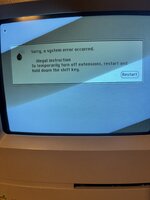
My classic was working fine until I couldn’t use my hard drive anymore and it says something about the version but this used to work. Also this place is way better than Reddit
 

Attachments

The fact it’s getting that far suggests that the HD is working, but part of the OS has become corrupted or unavailable.

However, it’s also possible it’s another drive.. Have you got a floppy disk in the drive or any other mounted drives it may be trying to boot from?

If not try booting from a disk tools or recovery disk and see if a repair fixes it.
 
The fact it’s getting that far suggests that the HD is working, but part of the OS has become corrupted or unavailable.

However, it’s also possible it’s another drive.. Have you got a floppy disk in the drive or any other mounted drives it may be trying to boot from?

If not try booting from a disk tools or recovery disk and see if a repair fixes it.
Thank you that got me further but I still get an error there seems to be two different ones depending on if extensions are enabled IMG_6739.jpegView attachment IMG_6740.jpeg
 
Hmm.. I presume you don’t have any way to copy an image from Macintosh garden onto a Macintosh formatted floppy that’d work with that machine?
 
Do you have the programmer switch on the side of the classic? If so when you get the crash error you could try pressing the interrupt button and typing G or G Finder then hit return and see if that gets you any further?
 
Sorry it took me so long but my keyboard broke. But anyways it didn't work thanks for trying to help though you or whoever sees this can keep pitching ideas but I wont be home for the next few days so I cant try to fix this.
 
Oh! Actually I just had a thought.. if this is the original classic then it can boot from ROM by holding down command-option-x-o at startup before the happy Mac appears. Try that when you have a chance!
 
Yeah, by doing the CMD+OPT+X+O you can boot into the OS without any disks at all. If that fails, you’ve got some other issue. If it succeeds, you should be able to access the HD and install a new OS or repair the existing one.

Of course, you’ll need a working keyboard for that.
 
Back
Top